Iphone stuck on apple logo and nothing is helping

Hello! My iphone is stuck on Apple logo for 5 days now. I am still not losing my hope and I NEED A HELP!

I have tried "Fore start" several times with volume up and down and power buttons. It did not help. Then I tried to do it with USB to my Macbook . in the beginning the progress bard went up to the middle then nothing appeared. But now for 2 days it is going up to the end but then nothing happens and logo comes back again. Progress bard comes till the end when i push the button "to update". But it does not help to get my phone back. I actually don't care about apps or other things, but my photos are so valuable!!! I have photos and videos there from my trips and concerts, university. I have them nowhere else. I have photos with my family who I don't see much often. They are soooo valuable! You would never imagine how valuable they are! I need your help! Please, help me solve the problem! It has not been even a year since i bought that phone. It was so expensive for me to buy it, I worked so hard to get it, but now I am desperate:((( I need your help!

iPhone XS, iOS 13

Posted on May 27, 2020 5:02 AM

Reply
1 reply

May 27, 2020 5:17 AM in response to ayasha07

Force restart iPhone - Apple Support ⬅︎ TRY THIS AGAIN, and if it does not work try Recovery Mode because if you can't get it to start properly then you have to have it serviced by Apple which you might not want to do and might not be an option right now...


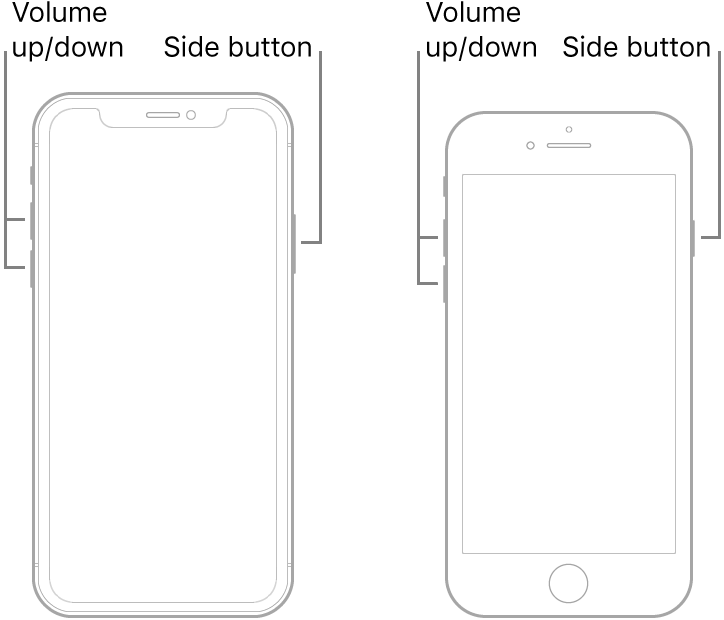
Force restart an iPhone with Face ID, iPhone SE (2nd generation), iPhone 8, or iPhone 8 Plus

  1. Press and quickly release the volume up button.
  2. Press and quickly release the volume down button.
  3. Press and hold the side button.
  4. When the Apple logo appears, release the button.

Note: If iPhone still doesn’t turn on, or if it gets stuck during start up, see the Apple Support article If your iPhone, iPad, or iPod touch won’t turn on or is frozen.


Recovery Mode... the full info is in the above link...⬆︎ the short info is below...⬇︎


Connect your device to a computer. On a Mac with macOS Catalina 10.15, open Finder. On a Mac with macOS Mojave 10.14 or earlier, or on a PC, open iTunes.


Press and hold both the Home and the Top (or Side) buttons at the same time. Keep holding them until you see the recovery mode screen.


If the above does not help the best thing to do now is contact Apple, you can click "Contact Support" top right corner of this page and follow the leads till you get to the phone or chat options.


They are very busy right now so you might have to try a few times, also not all options are immediately available...


OR try here...Contact Apple for support and service - Apple Support

This thread has been closed by the system or the community team. You may vote for any posts you find helpful, or search the Community for additional answers.

Iphone stuck on apple logo and nothing is helping

Welcome to Apple Support Community
A forum where Apple customers help each other with their products. Get started with your Apple Account.