iOS 13.5.1 battery drain

The battery drain from background activity in iOS 13.5.1 is horrible. Happens on several apps, currently Bloom berg and Teamsnap. Same problem on my iPad and my wife's iPhone Xs. Come on Apple, this needs to be fix now!

iPhone XS

Posted on Jun 5, 2020 8:28 PM

Reply
Question marked as Top-ranking reply

Posted on Jun 8, 2020 8:04 AM

in that case it is apps that have not been modified to run on the new OS and have runaway background usage, Viber fir example.

or a busted phone.

Nothing in 13.5.1 itself is causing this.

So to test this ( yes effort required)

  • backup
  • restore to factory settings as though you were selling it - see https://support.apple.com/en-us/HT201351
  • Set it up with your apple account
  • Check battery usage in that vanilla environment.
  • Restore from backup.


636 replies

Jun 22, 2020 11:36 PM in response to mistymountainhop

the same with me, i have to load twice a day now ... wrote in anger and they delete my message ... well well apple, if you would care about the battery issue as you do about the blogg, everything would be fine.


why do i have to checke the internet before i install an update for my iOS devices? they took away mouse support for my ipad for two month ... 13.4 without support (before it did), and with 13.5 it came back ...

Jun 23, 2020 4:23 AM in response to Indubious1

Thank you for your evidence. More than one other suggested Siri and it worked for you.

Yet again, Siri uses none of my battery so cannot point to it here.

Siri and all his/her friends, Alexa etc are an abomination anyway. I certainly don't let Siri wait for me to shout "Hey" as that assumes day and night background listening. Gotta be battery active.

Jun 23, 2020 7:43 AM in response to m_a_x_i_t

m_a_x_i_t wrote:

Hi. Have you guys thought how much time we spent trying this and that? In addition to current drain issue heating up my iPhone 6 back to boil eggs it switches off nicely outdoors at some 25 % battery if whether is 15 C (60 F) or below. Annoying when you are about to capture nice shot.

If your phone is getting that hot, you most likely have a hardware problem. Stop using the phone and make arrangements to have Apple evaluate it before more damage is done.

Jun 23, 2020 12:15 PM in response to IdrisSeabright

My battery issues since upgrading to IOS 13.5.1 just keeps getting worse. Almost 2 weeks later after the dreaded update I have done literally every troubleshooting step possible including:


  1. restore iOS via DFU mode (multiple times)!!
  2. restore from backup after reloading firmware as well as setting up as a new phone (twice?
  3. battery calibration
  4. downgrade to 13.5
  5. back to 13.5.1
  6. rinse, recycle and repeat
  7. currently on day 3 of a super clean fresh DFU mode iOS restore and setup as a new phone


the good news is well, battery is at least charging to around 93% overnight with battery optimization turned off, super frustrating. If battery optimization turned on I only get 80%....


I now have yet a new battery issue, I get a random battery drop around 55% remaining battery, drops from 55% to 35% in a matter of minutes. I have already had Apple run Diagnostics (instore and during a chat) and they don’t pick up any issues and won’t repair/replace, I give up :(


any ideas what to do here? Don’t say restore the firmware...


before iOS 13.5.1 I have never had any issues like this on my iPhone X or iPhone 11 Pro.
Jun 23, 2020 12:23 PM in response to TexThomas

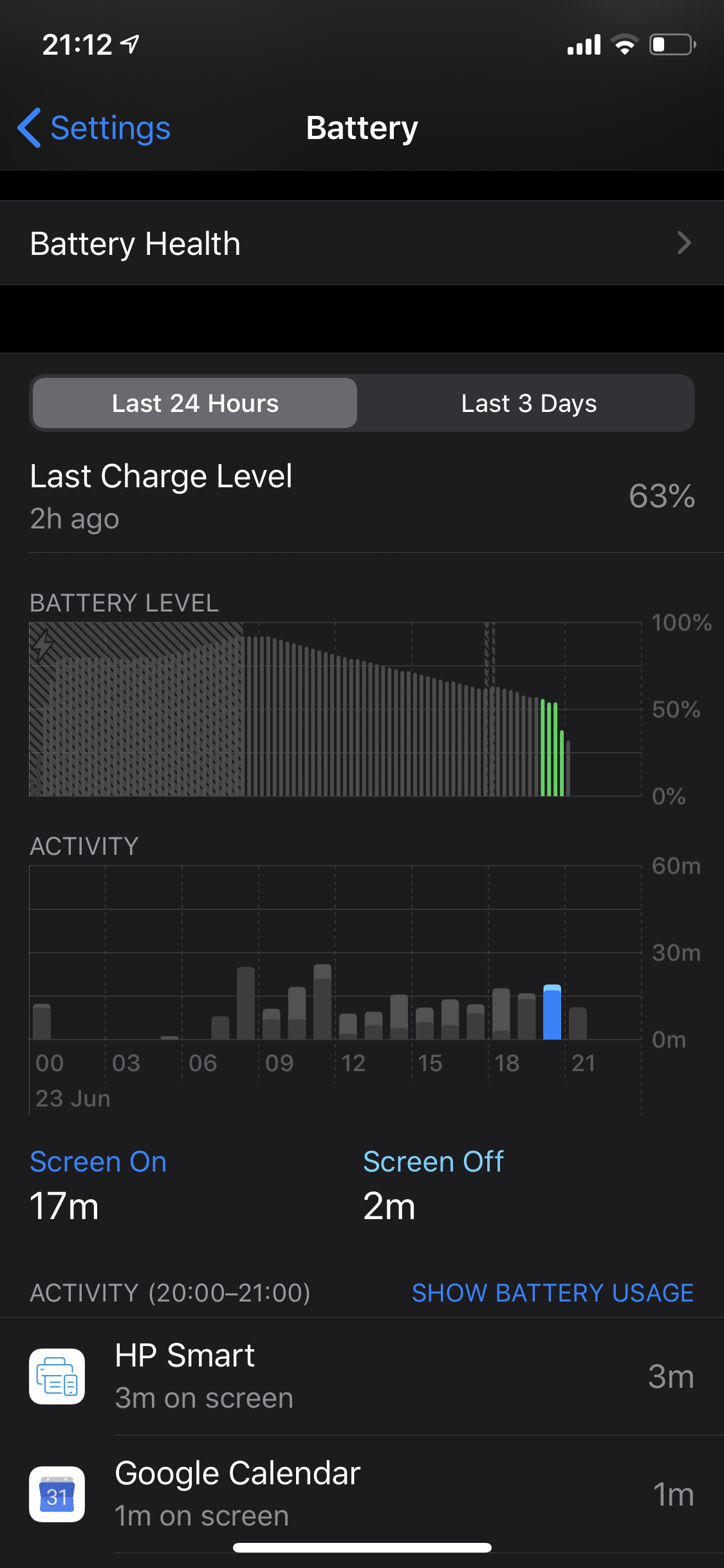
I dont know what is happening with my Xs Max, I was on 27% connected on Wifi and in just 10 minutes on standby doing nothing the battery dropped to 23%, what the **** is happening, I made a big mistake of updating from 13.4.1 to 13.5.1, my first hand on this new Xs Max and Apple you have turned me down, fix this problem quickly or else I have to go in Beta.

Jun 24, 2020 5:14 AM in response to TexThomas

Same, it’s awful and like my iPhone7 fell 3 generations behind overnight. What the heck did they break? Aside from the tremendous battery drain and regular app crashes I’m noticing that most apps get kicked out of memory the moment I return to spring board. Any time I leave an app, even if I do nothing and immediately return to the app, it has to relaunch cause it’s been kicked out of memory. I hope this gets corrected pronto

Jun 25, 2020 1:15 PM in response to LD150

An hardware problem?


I think you said something wrong now...

How much people are reporting problems here? Each of them who had tried a factory restore and this and that.... what not solves the problem do have an hardware problem?


Crazy hardware problems that arise after a software update. So that means 100.000+ people, include my iPhone Xs Max, my iPad pro 2017, my friends Xr who had never ever any battery problem do now have an hardware problem after this update????

That implies that iOS 13.5 destroys hardware from iPhones and iPads. Hopefully that won't make it to the press ...


Jun 25, 2020 3:45 PM in response to TexThomas

My iPhone 7 and iPad Air 2 both automatically updated last Thursday and within 24 hrs, my phone completely died and would no longer charge. I tried every way possible to revive it with the help of someone from Apple over the phone but nothing worked. I also noticed the same thing happening to my iPad and they guy ran diagnostics and my battery health is 100% apparently however it is current stuck in a continuous loop of barely charging, restarting and then proceeding to crash after 10secs of being turned on. This is so frustrating but it’s not happening to other devices belonging to my family members!

Jun 26, 2020 2:47 AM in response to TexThomas

i had same issue, some applications works at background while I turned off app background refreshing and the battery severely drained within 4 Hrs from 100% to 13% and I was sleeping during this time then I deleted these applications and reset the device but the problem still and appear with another application while this application is old on my iPhone and battery health is 86%

????!!!!!!!!!!!!!!!!!!!!!!!!!!!!!!!!!!!!!!!!!!!

Jun 26, 2020 8:54 AM in response to TexThomas

I haven't had this kind of battery drain in my 5 years of apple career. When my 6S is fully charged to 100%, after 30 mins of phone call, I am left with around (30-35)% of battery and a very hot back panel.


This is a major drop on apple's optimisation on their OS. Hope this problem gets resolved really soon as I am temporarily using a different phone now. My 6S is proving to be totally impractical for daily usage.


Really SAD

Jun 28, 2020 6:05 AM in response to TexThomas

Indeed!!! 100 % in the morning, one call plus a bit surffing in the net and 50 % gone. Then afternoon standby and now 25 % left. On top of normal checks, I am not interested into try this and that. I rather use my spare time for something else. Unacceptable change and revision 13.5.1 from Apple. Looking forward to urgent repair or I will change the M A K E R after more than half a dozen iphones. That much time spent is a pleasure compared this ridiculous battery draining.

This thread has been closed by the system or the community team. You may vote for any posts you find helpful, or search the Community for additional answers.

iOS 13.5.1 battery drain

Welcome to Apple Support Community
A forum where Apple customers help each other with their products. Get started with your Apple Account.


