
Apple Watch pauses after 11 seconds for all workout modes
Apple Watch pauses at 11 seconds for all workout modes.
[Re-Titled by Moderator]
Apple Watch Series 3, watchOS 6
Apple Watch pauses at 11 seconds for all workout modes.
[Re-Titled by Moderator]
Apple Watch Series 3, watchOS 6
Hi DebbieZeebie,
We see your Apple Watch pauses workouts after 11 seconds. This can often be related to the fit of the watch or it not detecting the wrist. We have some great information on this.
Specifically this section.
"For best results, the back of your Apple Watch needs skin contact for features like Wrist Detect, the Taptic Engine, and the electrical and optical heart sensors. Wearing your Apple Watch with the right fit—not too tight, not too loose, and with room for your skin to breathe—keeps you comfortable and let the sensors do their jobs. You may want to tighten your Apple Watch band for workouts, then loosen it when you’re done. In addition, the sensors will work only if you wear your Apple Watch on the top of your wrist.
Too loose
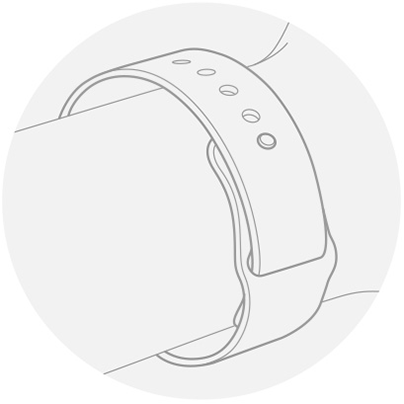
If your Apple Watch doesn’t stay in place, or the sensors aren’t reading your heart rate, tighten the band a bit.
Just right
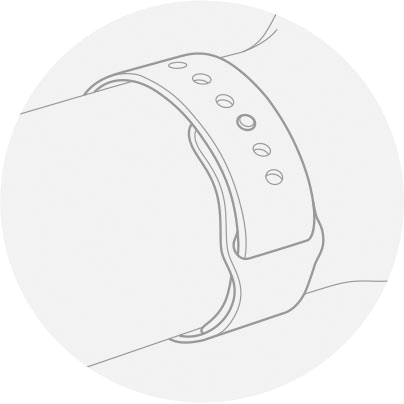
Your Apple Watch should be snug but comfortable."
If your workouts continue to pause please contact Apple at Get Support.
Have a great weekend!
Hi DebbieZeebie,
We see your Apple Watch pauses workouts after 11 seconds. This can often be related to the fit of the watch or it not detecting the wrist. We have some great information on this.
Specifically this section.
"For best results, the back of your Apple Watch needs skin contact for features like Wrist Detect, the Taptic Engine, and the electrical and optical heart sensors. Wearing your Apple Watch with the right fit—not too tight, not too loose, and with room for your skin to breathe—keeps you comfortable and let the sensors do their jobs. You may want to tighten your Apple Watch band for workouts, then loosen it when you’re done. In addition, the sensors will work only if you wear your Apple Watch on the top of your wrist.
Too loose
If your Apple Watch doesn’t stay in place, or the sensors aren’t reading your heart rate, tighten the band a bit.
Just right
Your Apple Watch should be snug but comfortable."
If your workouts continue to pause please contact Apple at Get Support.
Have a great weekend!
Hello all,
what I have found is Nylon watch strap... this definitely helped me much better ... this have reduced lots down to you will need to tighten one or two time during your heavy sweaty gym workout. Nylon do expand slight with your sweaty.
i recommend nylon strap with Velcro on. This make different for me !
Update: just tried with my Apple watch 5’s old custom made wrist strap on my Apple Watch 6 - Which is working better.
Connect to wrist is not the problem as once I hit resume the watch works throughout the workout. I have also done a shutdown and made sure all iOS updates are current. So still have the problem of starting a workout and it pauses at 11 seconds and then I have to hit resume.
I too having the same problem! Upgraded my Apple Watch 5 to 6 today and paired it ... never had this problem with Apple Watch 5 but on this Apple Watch 6... why paused at 11 seconds at any workout modes!!! Got me frustrated about it
Update:
After a few minutes of workout it it keeps stopping at 11 seconds or after a few seconds. it’s ridiculous that keep stopping at 11 seconds and or few seconds which interfered my gym workout, I have removed my gym strap to see if this helps to no avail. I had no problem with Apple Watch 5 ... but why on this Apple Watch 6?! Is it because of placement of oxygen sensor underneath inference with workout app?
this cost around 100 calories missed out to be recorded from workout today.
My watch does the same thing. I just upgraded from the 5 to the 6, more like a downgrade! I keep the watch as tight as possible on my wrist, but it pauses my workout about every 11 seconds. Literally, the only reason I have the Apple Watch is to record my workouts and it is no longer capable of that. Apple, fix this bug please!!! Suuuuper annoying
I was having this problem with stopping workouts at 11 seconds with my Apple Watch 3. I bought the 5 when it came out and it was fine until last month it started doing it again. I have tried everything and it still stops! Band type doesn’t matter. My workouts and steps are the only reason I have an Apple Watch. Why does Apple not fix this?
Running Autopause is already off for me before this. I leave on for my end workout reminder.
up to now, it’s been great with my nylon strap for workout ... only need to tighten the strap once or twice in my 1hours workout. Much better.
My husband and I have an Apple Watch 3 each, mine doesn't do the 11 second pausing but my husband's one does. I've checked all the settings, they're identical, so why does his do it and mine doesn't??
I did all the things Apple told me to do. Still does it.
This exact same thing is happening to me and I’ve not managed to find anyone at all to help me fix this. Have you managed to sort this out yourself yet
My strap is nylon Velcro, and my workout stops at 11 seconds every time.
Didn’t work
Doesn’t work with my watch
Apple Watch pauses after 11 seconds for all workout modes


