What was in the September 24, 2020 update that killed my iMac?

What was in the September 24, 2020 update that killed my iMac? I just turned it on this morning and it said it needed to restart to install updates, so I let it. That was 4 hours ago, and I still can’t get it to boot completely! I’m still running Mojave.

iMac, OS X 10.10

Posted on Sep 26, 2020 11:25 AM

Reply
43 replies

Sep 27, 2020 10:09 AM in response to sarahara

sarahara wrote:

I think if we all start a new thread with, say, "Apple Software Update Sept 24 2020 Has Crippled My System", then Apple will maybe respond. So far, discussions are only going under one or two posts. They probably only notice headlines for individual posts, so they probably need to see lots of them.

Flooding these user-to-user help communities will achieve nothing but hinder helping other users. Apple is not here. Apple does not monitor these communities for problems. Use the official feedback or contact channels if you want to notify Apple.

Product Feedback - Apple

Contact - How to Contact Us - Apple

Sep 27, 2020 11:33 AM in response to starplot

Humans make mistakes. Software has bugs. You need to plan for this.


You need to have a backup. I use timemachine and carbon copy cloner. Timemachine for incremental backups and CCC to make a clone of my system. A clone allows me to boot instantly from my backup system. I'm running from my backup system now. Trying to sort out my primary system now because of disappearing data on primary system.


I recommend etrecheck to assist in sorting out performance issues.


I'd run etrecheck. Etrecheck will analyze your machine and software and generate a report. Post results here so others can view.  Experienced users have found the reported information useful when diagnosing problems. The proprietary stuff in the report gets filtered.


Install and run

-- Download etrecheck.  Goto the  EtreCheck  download page.  The download link is at the bottom of the screen

-- Install etrecheck. Goto your download folder. Double click on EtreCheckPro.zip

-- Drag the app to the application folder if you wish.

-- Turn on full disk access for EtreCheck.  This was how macos used to work.  Do it for etrecheck not avast as in the instructions.

Enabling Full Disk Access in macOS Mojave (10.14) and higher | Official Avast Support

-- Double click on etrecheck to run.   The first five runs are free.

An alternative explanation how to install, run and report output for the EtreCheck Application

Using EtreCheck to Troubleshoot Potential… - Apple Community

Explanation of EtreCheck  output by etresoft, the author.

Using EtreCheck - Apple Community


How to report etrecheck data.

1) When the report is done, click on the Export icon.

2) click on "Copy report" to copy to the clipboard
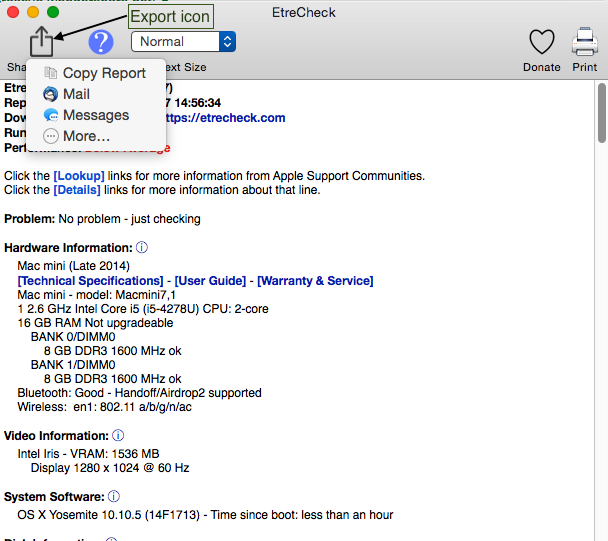


What to do with your report


4) Get back in your web browser and access your discussion. etc.


5) click on Additional text icon


which results in...
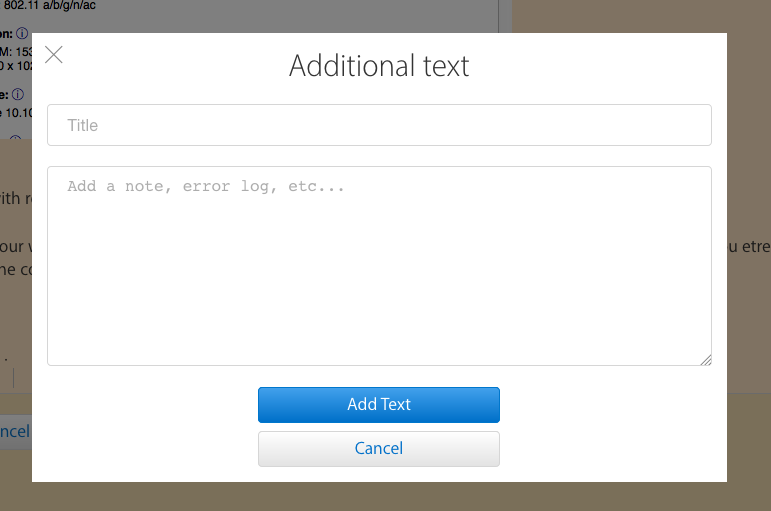

6) Paste your report


7) click on "Add Text" button


8) post your post.


Robert
PS. You may find Old Toad's write up helpful.
How to use the Add Text Feature When Post… - Apple Community



Sep 29, 2020 2:25 AM in response to CleverChocaholic

Just to reply on my earlier report of the same problem people are experiencing here.

I was able to find a solution. The accountsd is taking too much CPU usage. My fans quiet down when going to my calender preferences and setting my updates to manual instead of automatically. Maybe inconvenient, but better than a sluggish macbook. I hope I can help somebody with this tip!

Sep 29, 2020 2:08 PM in response to William Tomcanin

Mine did the same! Late 2013 iMac (21.5-inch, Late 2013), running Mojave 10.14.6 and ran Security Update 2020-005 on 09/25/20 AM. Wouldn't exit and had to power down then super slow to boot and work with anything! I Restored to Time Machine Backup completed just before the security update and all is better again. What is Apple doing? Releasing something like this is totally irresponsible! FIX IT APPLE!!!!!!

Sep 29, 2020 4:33 PM in response to starplot

Multiple people are suffering effects from these two patch’s. A user named “Steve27” in another thread related to this issue mentioned this article:

https://mrmacintosh.com/mojave-2020-005-security-update-causing-major-problems-updated/

it was very helpful in explaining the scope of the issue but more importantly what to do about it.

basically

reinstall your MacOS, he explains how in the article.

then you will be faced with when to reinstall the two new updates. The order of the installation of those two updates is critical. Only one way works.

I reinstalled my OS, which was 10.14.6 and it fixed all of my problems, but I haven’t yet reinstalled the security update or the Safari update.

(User) Steve27 said he did the security update first and all was well. Then he lastly upgraded Safari and all was well. (Brave was he). You can search for his comments yourself to verify what he said and did. I can’t remember the name of the thread as I type this.

Nov 1, 2020 12:26 PM in response to starplot

I have the last of the old Mac Pro towers from late 2012 or 2013 I believe and it's non-functional now that I've installed this last security update, the display is not working, smc, pram, recovery mode have all been attempted, not sure if any of them worked, pretty frustrating as this is my main workstation, now trying to figure out how to boot into target disk mode to my new MBP with USB_C, i am sure that will be straightforward to connect via firewire 800...


This thread has been closed by the system or the community team. You may vote for any posts you find helpful, or search the Community for additional answers.

What was in the September 24, 2020 update that killed my iMac?

Welcome to Apple Support Community
A forum where Apple customers help each other with their products. Get started with your Apple Account.