iPhone 7 Google maps delay on bluetooth

I use my iPhone 7 with Google Maps in both cars, connecting via bluetooth and set up as a bluetooth phone call. It has worked fine like this for years.

Recently both cars started missing the first second or so of the voice directions. e.g instead of saying "In 300 yards turn left" she says "...yards turn left". It's very frustrating.

I recently changed ISP and now have wifi calling turned on on the phone but I don't think it's that. I've tried turning it off and it makes no difference.

It still works fine if I have music playing via bluetooth in the cars so it seems to be a delay starting bluetooth or waiting until the link is established before starting the message.

Any ideas?

iPhone 7, iOS 14

Posted on Oct 21, 2020 1:30 AM

Reply
Question marked as Top-ranking reply

Posted on Jan 8, 2021 2:02 PM

Hi,


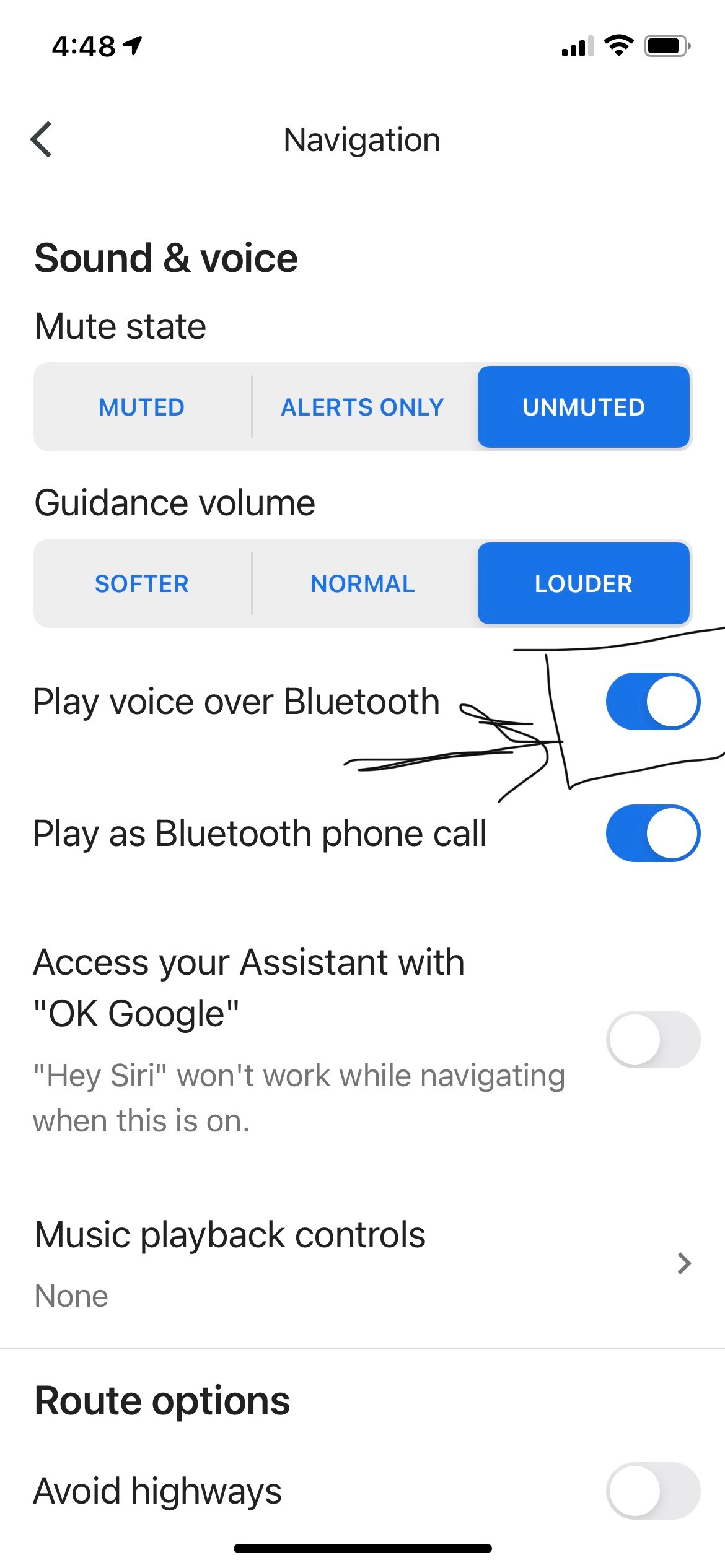
I have an update - I spoke to support staff and the guy I was speaking with had some idea on how to fix it. The fix worked for one trip and now works intermittently. Here is the fix:


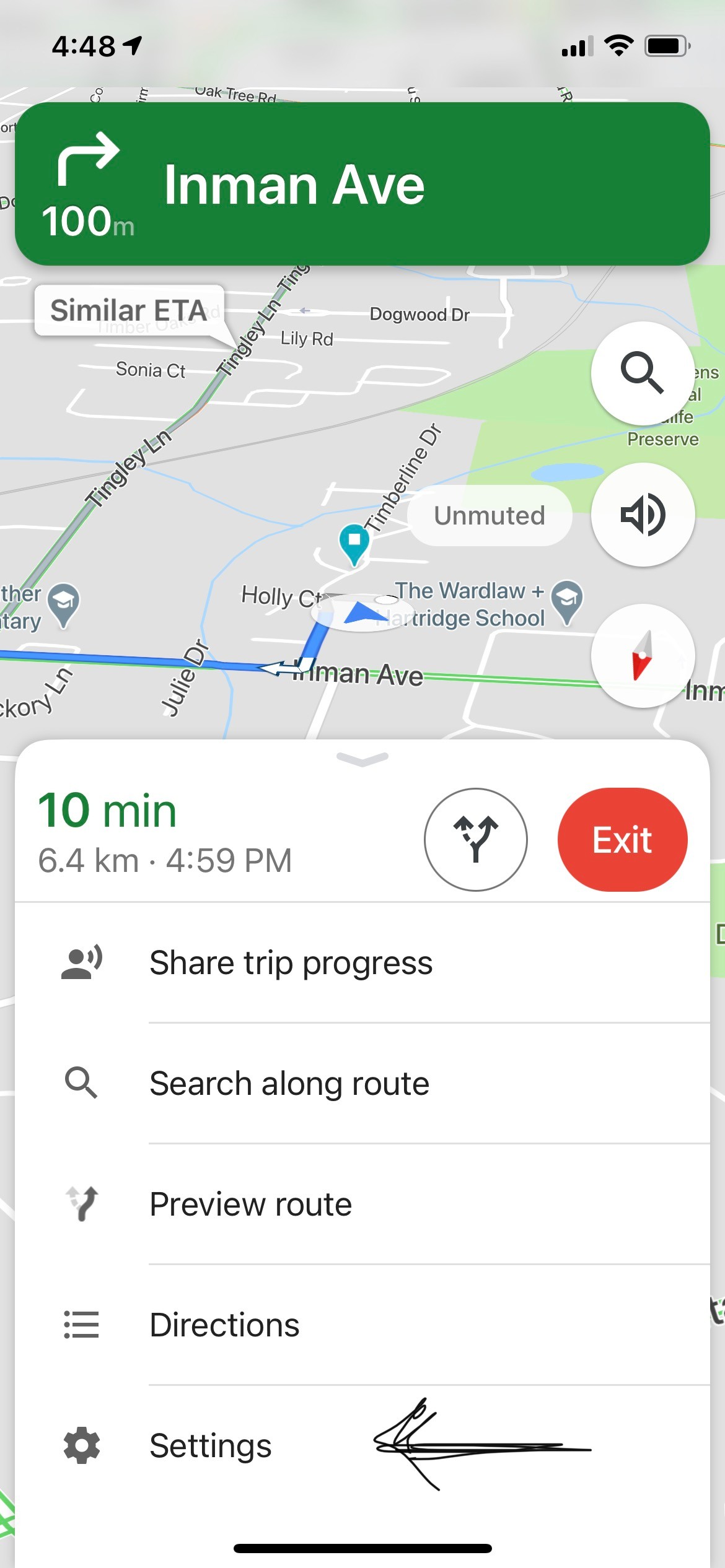
1) Go to Google Maps setting

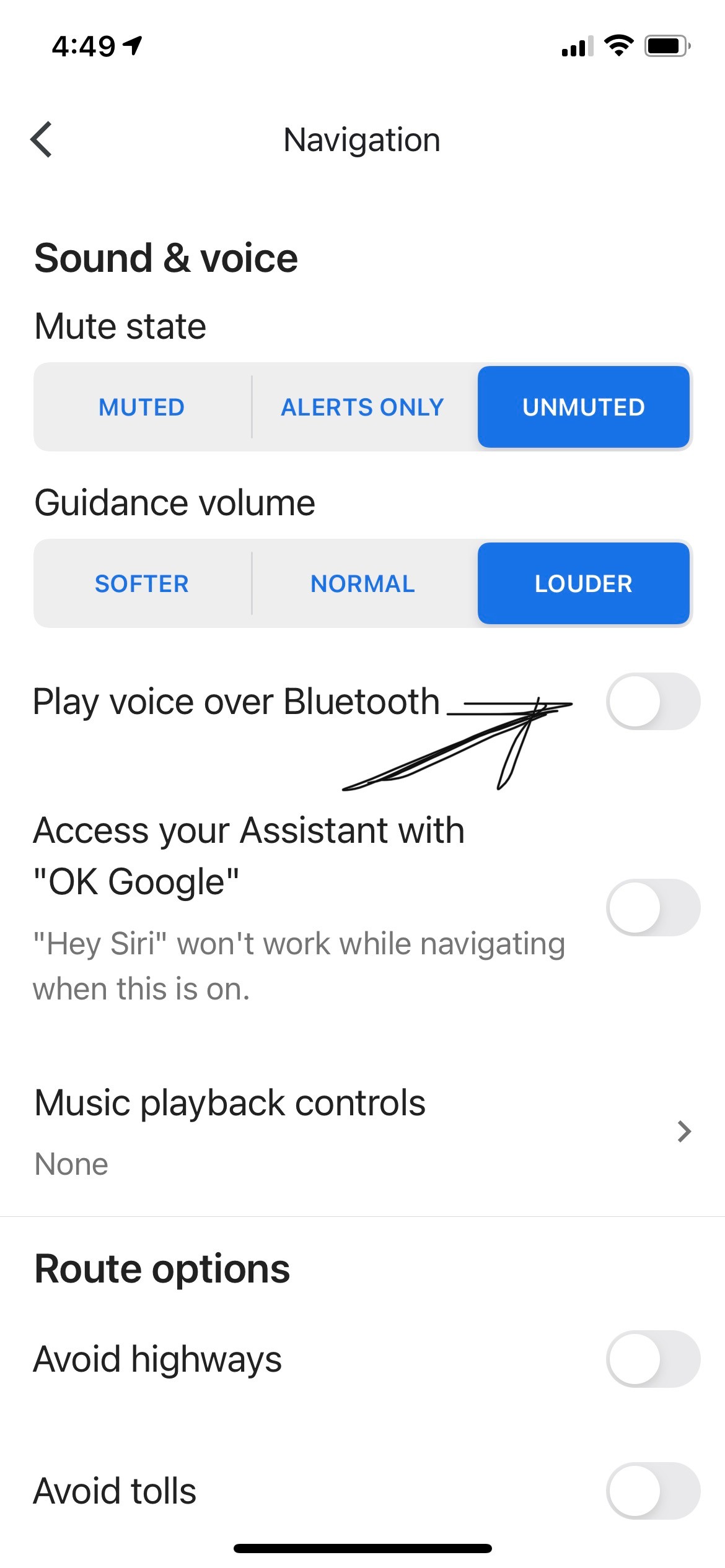
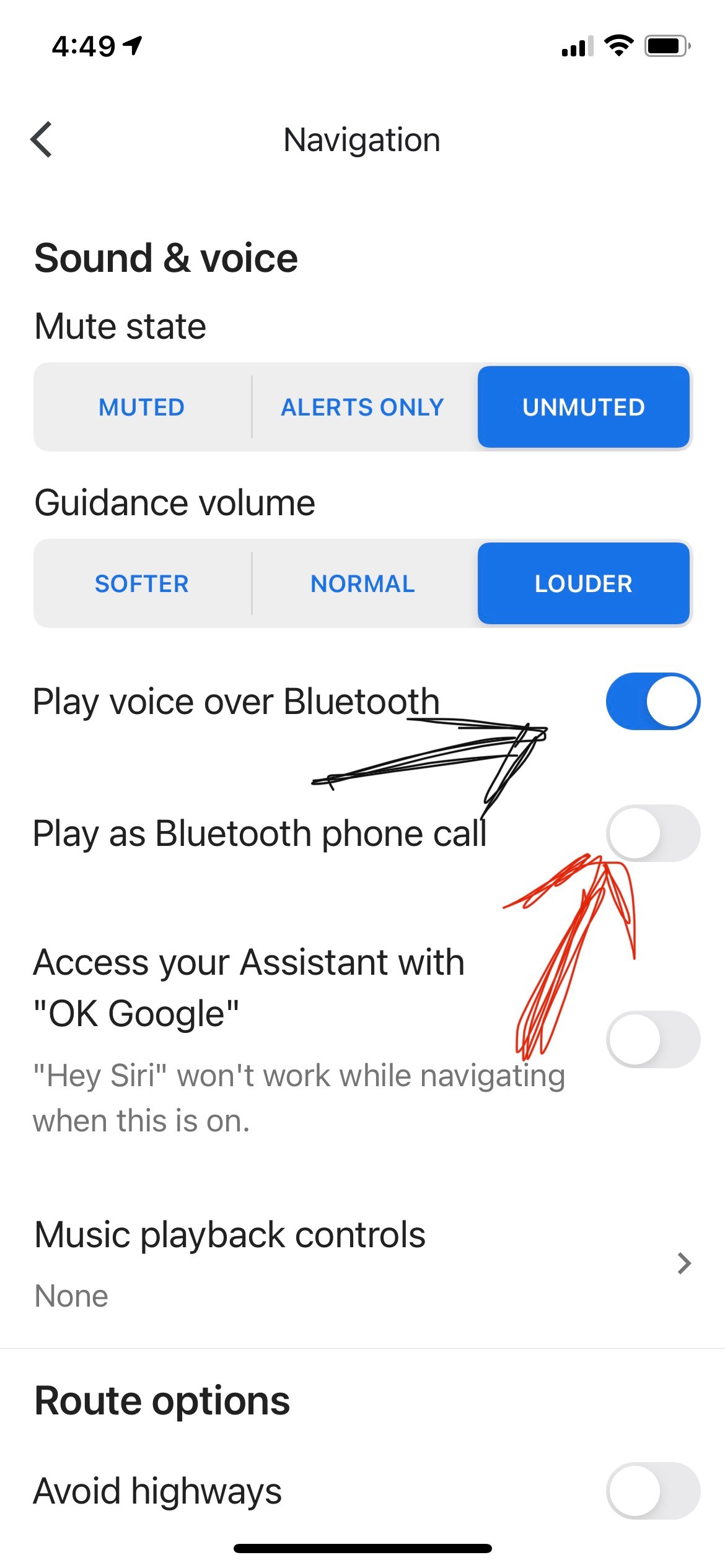
2) Switch-off play voice over bluetooth and wait for 20 seconds. This will automatically turn off "Play as Bluetooth phone call".

3) Switch-on play voice over bluetooth again.

4) Do not turn on "Play as Bluetooth phone call".


Save these changes and come out of settings.


Try on your vehicle. For me it worked. I was on call with Apple support staff and it worked. Then next day morning it did not work again. I fiddled with it and it worked for a while again. So I am not sure what is happening but here is what support staff told me:


Apparently in the new iOS the battery management snaps bluetooth connection to preserve battery if there is no voice transmission. When the setting is "Play as bluetooth phone call" the phone shuts-off BT connection when GMaps isn't giving out voice instructions. When it starts to do so, the connection takes a few seconds to re-establish and that is causing the problem. By the time connection is again established, GMaps voice navigation is already a few words ahead.


I agree it is frustrating. Since it worked for me temporarily I assume between GMaps and Apple they'll come up with some solution. I tried lodging a complain with GMaps as well. I spoke to Google support staff who supports my office but they said GMaps does not have a call-in support. So I am not sure if GMaps is even aware of this problem.


I suggest all of you to please raise complains with Apple. This needs to be fixed and soon.


295 replies

Jun 20, 2021 1:00 PM in response to amayson

May have found a solution. Or maybe one solution. Currently driving from Minnesota to IL, and the delay is making us crazy!! The phone is updated to 14.6 already so that’s not it. I went into the Bluetooth menu in settings and saw that my wife’s FitBit was on Bluetooth as well. My theory is that the Fitbit takes over Bluetooth, and then when maps needs to use it there’s a delay as maps takes over again. I **** off her Fitbit to Bluetooth and that worked.

Dec 7, 2020 12:49 AM in response to smartgoose

Hi Smartgoose,

Please see my posting from 3rd December above. It would be great if you can test with Apple Maps (I'm sure you'll get the same problem as Google maps) and then find an hour to raise it with Apple Support to reinforce to them that there are lots of people with the problem. They will make you run all sorts of tests on your phone which will show nothing wrong but eventually escalate you to technical support. They will escalate it to 'engineering' who are the ones who actually sort out problems and need to know it's a widespread problem to make sure they fix iOS 14.

You may be able to bypass some of the lower levels by asking to be put through to 'Technical Support' directly. Good luck.

Apr 10, 2021 6:45 AM in response to GF760

I have and iPhone 8 with the same problem as described in this thread. After umpteen chats and phone calls to Apple "support" I was told by Apple "support" to go to a "Genius Bar" so I went to one yesterday. Their suggestion was to reset the iPhone 8 to it's factory settings and set it up as new i.e., to NOT from a backup. Then just install Apple Maps and try it. Has anyone tried this and if so did it work?

My workaround, which will not work for many people, is my hearing aids. They are "paired" to my phone (I control the program, volume, etc. right from the iPhone 8) and the bluetooth connection is steady. When in the car and I start Google or Apple Maps, with my hearing aids on, NO words are dropped. My hearing aids work for this because a bluetooth connection between the phone and the aids is running. This, to me anyway, confirms what many other people have said, there is a "lag" in the bluetooth connection when Apple or Google Maps goes to speak that causes the initial and ongoing problem with directional instructions. I


I don't think Apple takes this issue seriously at all and I don't see any plans they have to address this issue.

Apr 15, 2021 10:42 AM in response to Beatrice57

Don't know much about a 2019 Infiniti. My 2014 BMW does not allow map driving directions from Google or Apple maps to bluetooth directly to the car's audio, but it does allow phone calls to do this. So driving directions masquerade as incoming phone calls and that way are bluetoothed to the car's speakers. But when Apple screwed up by inserting a delay before incoming phone calls are bluetoothed (they did this ostensibly to save iPhone battery drain)the delay affected map directions. In 2019 models BMW provided for direct bluetooth connection from iPhones for all purposes, so the delay is eliminated. I don't know about Infiniti.

May 3, 2021 1:28 PM in response to amayson

There is a thread on Macrumors going back to September 2020 that deals with this same problem and correctly traces the problem to the iOS 14 update and something called HFP prompts. But then, in a tantalizing way, the most recent posting states the following; "Apple maps didn't work too. But luckily I found the solution: After forgetting and reconnecting the bluetooth device, everything is working great (again)." I doubt this is really "the solution", but I thought I'd mention it for those on this thread who might be better able than I to make sense of it.

May 5, 2021 10:06 AM in response to amayson

I just tested with iOS 14.5.1 using both Apple and Google mapping apps.


Initially the problem appears to be fixed. However there is still a problem when 2 turn-by-turn instructions are spaced close together. The second instruction has the beginning words truncated.


My car display has messaging that indicates “incoming call connected” and “call disconnected” when handling radio interrupts from HFP (hands free protocol) phone calls or mapping instructions. It appears the infotainment system does not have time to process both the disconnect and re-connect sequences when two driving instructions are spaced close together.


screenshots of setting from both apps attached


May 5, 2021 1:49 PM in response to randie4620

Hi Randie4620,

Apart from 14.5.1 I changed absolutely nothing except check all the settings I changed in trying to get it working for the last 6 months. Here are the current settings for Apple Maps: -


Sitting at my desk: -


Sitting in the car with a destination set up and navigation started... swipe up from the bottom, and get this: -


Choose Audio and get this (you'll see it's the same screen as sitting at my desk... other than it's now the night screen.. with additional options. 'i10' is the name of the bluetooth connection to the car: -


You will see that it now shows the car (obviously I have previously paired the car and the phone but this has not changed in the six months that this problem has been going on) and gives me the option to select HFP (hands free protocol).


I hope this helps.


None of these settings worked without the problem delay before 14.5.1 come along by the way!

May 17, 2021 3:51 PM in response to Beatrice57

Theoretically this shouldn’t make any difference, but I have had luck and some improvement with Google maps by turning Bluetooth off on my iPhone, then turning it right back on. I’m not deleting the Bluetooth connection or anything like that, just literally turning the Bluetooth switch off and then back on on the iPhone. That seems to get rid of the delay at least for a while. At least some of the time. Not sure yet whether this is a permanent fix; I’m still playing around with it.

Aug 11, 2021 5:59 AM in response to Beatrice57

Beatrice, In my experience it has to do with the fact that in cars without Airplay such as my 2014 BMW driving directions are disguised as phone calls. The incoming phone call “wakes up” a Bluetooth connection which, ever since iOS 14, takes a few seconds thereby cutting off that part of the directions voiced before the wake up. But 14.6 seems to have added a stickiness to Bluetooth’s waking up. That is, once Bluetooth has connected it stays connected so that the next direction is heard from the beginning. In most cases now Bluetooth connects even before the first direction is voiced so even the first is heard without delay. But in one out of 20 times the delay reappears in the first direction but never again. The fact that you don’t experience this is interesting. Perhaps it has something to do with your car’s Bluetooth, which doesn’t want to maintain a sticky connection. Doesn’t explain why Waze alone should work. Keep at it; a solution is probably around the corner.

This thread has been closed by the system or the community team. You may vote for any posts you find helpful, or search the Community for additional answers.

iPhone 7 Google maps delay on bluetooth

Welcome to Apple Support Community
A forum where Apple customers help each other with their products. Get started with your Apple Account.