hp Malware Issue

I keep getting error window that tells me“ProductImprovementStudy.hptask” will damage your computer. I have a blue box with a check in it the error window reads "Report malware to Apple to protect other users. There is a... [Show in Finder] Button and an OK Button. How do I get rid of, delete or remove this perpetually popping up error widow? Please ASAP anyone Thank You.

Posted on Oct 23, 2020 8:43 PM

Reply
Question marked as Top-ranking reply

Posted on Oct 29, 2020 6:15 AM

These steps are working for most users:


Do the following, per fellow forum member, Lawrence Finch:


A. Get the most recent HP drivers, either from:


     ftp://ftp.hp.com/pub/softlib/software12/HP_Quick_Start/osx/Installations/Essentials/hp-printer-essentials-S-5_14_8_4.pkg

          or

     HP Printer Drivers v5.1 for OS X

          or

     System Preferences > Software Update (if you don't see it, press Command+R)


B. Run the installer.


C. When the installer completes, go to System Preferences > Printers & Scanners, highlight the HP printer and remove it. Then add it back. This is necessary because otherwise it will continue to use the now unsigned drivers and it will appear that the problem has not been fixed. Apparently installing the update does not remove the old drivers.


A note on AirPrint: Your Mac may say it can’t find the AirPrint printer. If that should happen, reboot your router.

34 replies
Question marked as Top-ranking reply

Oct 29, 2020 6:15 AM in response to amandamoo1980

These steps are working for most users:


Do the following, per fellow forum member, Lawrence Finch:


A. Get the most recent HP drivers, either from:


     ftp://ftp.hp.com/pub/softlib/software12/HP_Quick_Start/osx/Installations/Essentials/hp-printer-essentials-S-5_14_8_4.pkg

          or

     HP Printer Drivers v5.1 for OS X

          or

     System Preferences > Software Update (if you don't see it, press Command+R)


B. Run the installer.


C. When the installer completes, go to System Preferences > Printers & Scanners, highlight the HP printer and remove it. Then add it back. This is necessary because otherwise it will continue to use the now unsigned drivers and it will appear that the problem has not been fixed. Apparently installing the update does not remove the old drivers.


A note on AirPrint: Your Mac may say it can’t find the AirPrint printer. If that should happen, reboot your router.

Oct 23, 2020 9:00 PM in response to Ardentcreative216

Please refer to this Discussion, or follow the instructions below.



To ascertain the cause so that you can eliminate it, start by inspecting the contents of the following folder:


~/Library/LaunchAgents


To open that folder, copy the entire line above and paste it in the Finder's Go menu > Go to Folder... field. Make it look like this:


... and click the Go button.


A Finder window will open. Make sure all its file names are readable by selecting View > as List or other selection that shows that folder's complete contents. Then, take a screenshot of that Finder window.


Often, there is nothing in that Launch Agents folder so don't be surprised to find it empty.


In the same manner as the above, navigate to this next folder:


/Library/LaunchDaemons


The Finder's Go menu > Go to Folder... field should look like this:
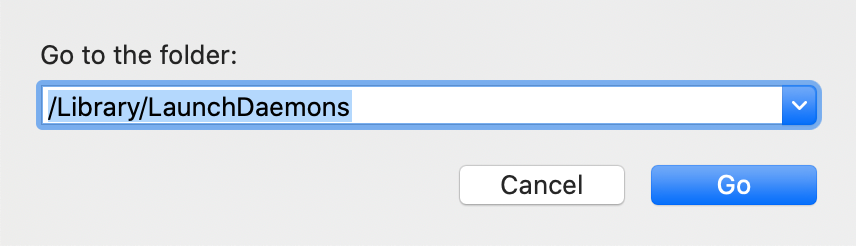


... and click the Go button once again.


Once again ensure all its files and their names are readable and capture a screenshot.


Then, repeat that exercise with the following folder:


/Library/LaunchAgents


Notice its pathname is different than the other two. The Finder's Go menu > Go to Folder... field should look like this:
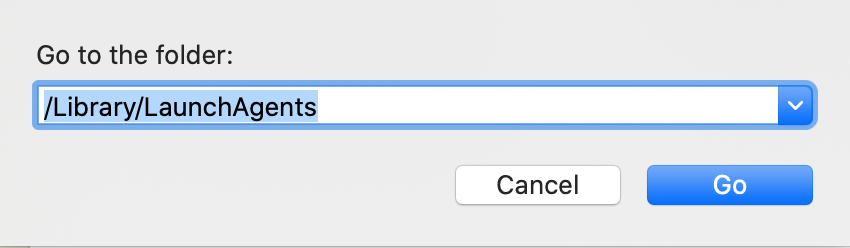


In the end, you will have captured the contents of the following three separate folders:


~/Library/LaunchAgents

/Library/LaunchDaemons

/Library/LaunchAgents


All three will be saved to your Mac's Desktop with names "Screen Shot... " followed by the date and time they were captured. Please be sure to include or otherwise indicate the name of the folder that corresponds to each screenshot, so that you and I can keep track of which ones they are.


Post the entire contents of all three windows, one at a time, using the "picture" icon that appears below your reply text:

Oct 24, 2020 7:43 AM in response to Ardentcreative216

It isn't malware. There's been a LOT of sudden such OS messages today, mostly regarding HP and Amazon software. Yours is of the HP variety. The file is part of the print drivers for your HP printer:


/Library/Printers/hp/Utilities/HPPU Plugins/ProductImprovementStudy.hptask/Contents/Helpers/HP Customer Participation.app


What's wrong is the certificates have expired on a lot of normally valid software and the OS is now treating them as dangerous. The only fix will be when HP releases new and updated drivers.

Oct 24, 2020 10:37 AM in response to Ato3rcr

Ato3rcr wrote:

I posted the 3 screen shots described on your post. Can you see the problem?


I see your problems but you are not the originator of this Discussion. I asked the originator of this Discussion who has not and may not return with a reply.


Your Mac has problems. In your case that Mac has been affected by "MacKeeper" as well as "Webroot". Those need to be uninstalled according to their respective instructions, and never installed ever again. Rule 1 of Macs is don't install junk.


In addition to that you can and should delete both files with hp in their names. They appear in your first screenshot. They are not required to use your printer. Deleting them is likely to put an end to the nag.

Oct 25, 2020 1:08 PM in response to Ardentcreative216

So far so good.

On Catalina 1. I removed the HP Printer. 2.Uninstalled HP Smart App 3. Deleted any and all HP files/folders. Took no hostages.

4. Restarted 5. Reinstalled the wireless HP printer. Works like usual.

Note. Did not install the HP Smart App. That is where I'm totally guessing the issue is. I've read just now that this is a legitimate warning from Apple, and HP is busy resolving. As well, on my HP 3830 I didn't get the warning, but on the printer page it said 'Certificate Expired', which then led me to HP to an online page that downloaded a new 'certificate' to the HP 3830. I'm thinking these two issues are related. Best to all.


Nov 9, 2020 4:07 AM in response to Ardentcreative216

HP Printers - A [software component] will damage your computer message displays when printing or while installing (macOS)


This document is for HP printers, macOS Catalina, and macOS Mojave.

Your printer might experience a temporary disruption

after the credentials on some older versions of Mac drivers were

unintentionally revoked. HP has worked with Apple to restore these

drivers, but some printers might still be affected.


https://support.hp.com/us-en/document/c06960563

Oct 24, 2020 10:09 PM in response to Ardentcreative216

Ardentcreative216 Said:

"hp Malware Issue: I keep getting error window that tells me“ProductImprovementStudy.hptask” will damage your computer. I have a blue box with a check in it the error window reads "Report malware to Apple to protect other users. There is a... [Show in Finder] Button and an OK Button. How do I get rid of, delete or remove this perpetually popping up error widow? Please ASAP anyone Thank You."

-------


To the OP and All:


Restore or Contact HP:


A. Restore from a Backup: 

Have you recently created a backup of your Mac? if so, restore from the backup.


If no Backup...


B. Contact HP:

Perform a chat session with HP - See if they can run you through the fix:

  1. Go Here: HP Virtual Agent
  2. Enter: your information
  3. Proceed from there as necessary

Oct 25, 2020 8:10 AM in response to TheLittles

You clearly haven't read a word of the responses in this topic, or you wouldn't have bothered to post this useless suggestion.


HP told Apple to revoke the credentials of a number of their drivers. They are now trying to put together a fix for this blunder.


Restoring the system won't do a single thing to help since they will be the same revoked drivers. Calling HP won't do anything other than have them tell you they're working to fix their goof.

This thread has been closed by the system or the community team. You may vote for any posts you find helpful, or search the Community for additional answers.

hp Malware Issue

Welcome to Apple Support Community
A forum where Apple customers help each other with their products. Get started with your Apple Account.


