Screen Time not blocking/affecting Chrome after iOs 14 update

After the new update the Screen Time doesn't block or limit Chrome. In fact Chrome doesn't even show up in the "Always Allowed" section as an option.

Any solution to this?

iPhone 11, iOS 14

Posted on Nov 1, 2020 4:05 AM

Reply
Question marked as Top-ranking reply

Posted on Jan 18, 2021 9:14 AM

I have found a solution! It's not perfect, but I've been testing it and it just about works:


  1. On the device in question, go to this address: chrome://flags/
  2. Then search for "screentime" (all one word).
  3. You should see: Enables ScreenTime Integration
  4. Switch this to ENABLED.


It's a bit glitchy, but this is the feature that they're working on. And it locks Chrome in the way you'd expect it to.

95 replies
Question marked as Top-ranking reply

Jan 18, 2021 9:14 AM in response to spacemenace

I have found a solution! It's not perfect, but I've been testing it and it just about works:


  1. On the device in question, go to this address: chrome://flags/
  2. Then search for "screentime" (all one word).
  3. You should see: Enables ScreenTime Integration
  4. Switch this to ENABLED.


It's a bit glitchy, but this is the feature that they're working on. And it locks Chrome in the way you'd expect it to.

Jan 26, 2021 2:33 PM in response to bartoon

To add Chrome to iOS screen time. Go to Settings > screen time > App limits and choose ‘Add Limits’. The list of available Apps will not include Chrome. HOWEVER, if you expose the search bar my pulling down that screen, you can type in Chrome and Choose ‘Chrome – System’. The next steps are standard applying the limit time etc. 

Jan 31, 2021 2:40 PM in response to bartoon

I have found a way round this which you can do on your phone, should work directly on child’s phone, but as I have created a family on my iCloud i can control it from mine instead.


Follow the steps below- I’ve added photos as it was easier to explain.


SETTINGS


SCREEN TIME
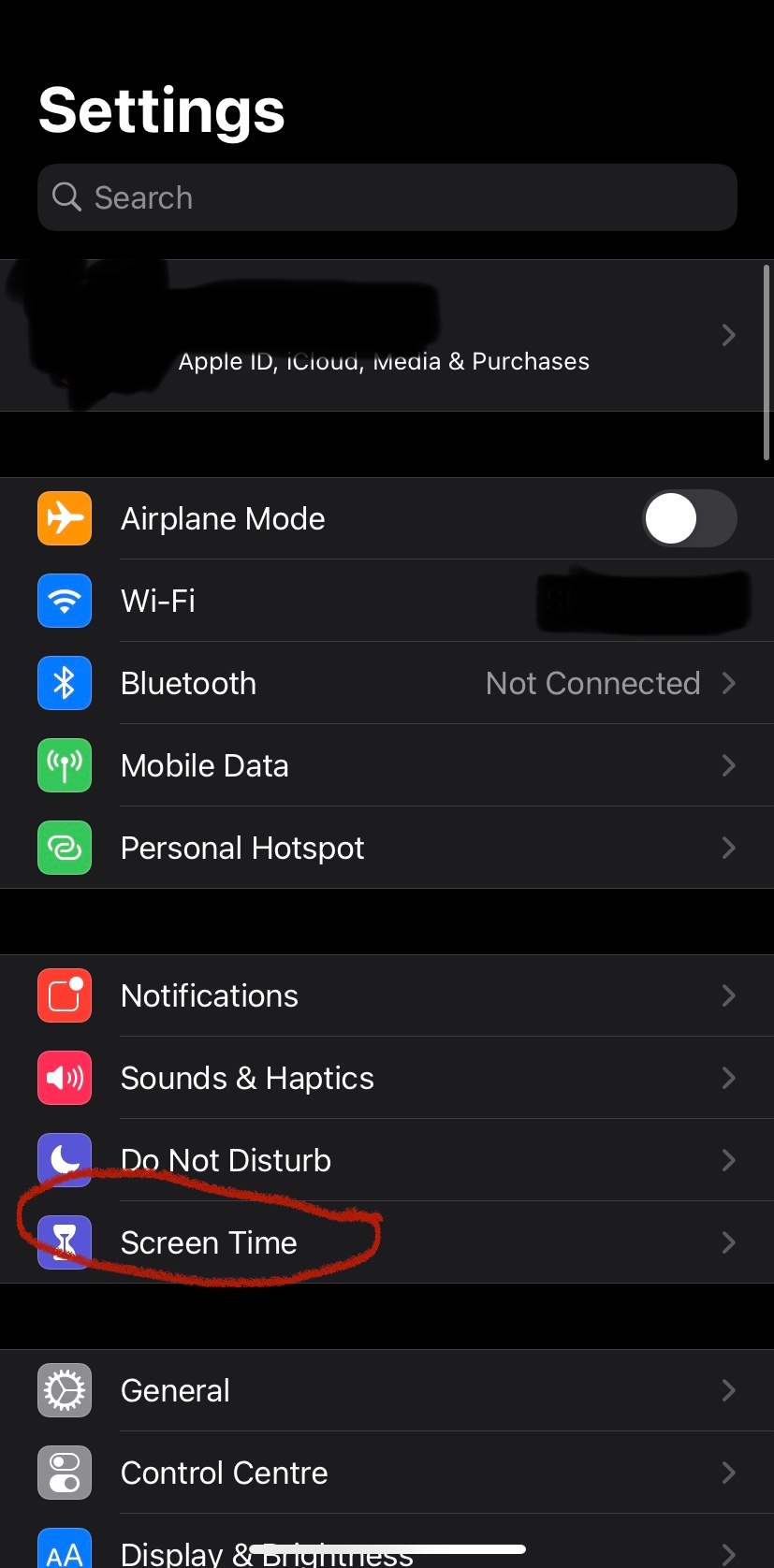


click on your child’s name


See all activity


in “MOST USED” click on chrome


you should then be able to select ADD LIMIT


I set an hour, he can have more time if I enter the screen time passcode. I suppose you could do this and then keep giving them more time as and when. I found this to be the only way to stop my son spending hours on chrome after his downtime started as screentime locked the other apps on his phone but not this one. He was still going on Instagram but through chrome.



Feb 4, 2021 1:01 PM in response to bartoon

I found another solution.


https://www.chromestory.com/2020/09/chrome-ios-screen-time/


Pepe le Pew says

December 13, 2020 at 5:52 pm

I figured out how to add Chrome to iOS screen time. Go to Settings > screen time > App limits and choose ‘Add Limits’. The list of available Apps will not include Chrome. HOWEVER, if you expose the search bar my pulling down that screen, you can type in Chrome and Choose ‘Chrome – System’. The next steps are standard applying the limit time etc. Incidentally, you can do the same for SAFARI.

It seems that iOS 14 has not figured (yet) how to display the category’System’ in the list of available Apps to limit.

Apr 27, 2021 11:39 AM in response to Jackscepticeye

I'm not sure what @jackscepticeye is talking about there. Why would I have screen time go until noon without a limit for my <=13 year old? Believe it or not, most of these kids need limits, regardless of their feelings. If they can show they can manage their screen time themselves, then that is a different story.


From a posting back in Janurary, 2021 (not mine) this seems to still work re: Chrome. I have found a solution! It's not perfect, but I've been testing it and it just about works:


  1. On the device in question, go to this address: chrome://flags/
  2. Then search for "screentime" (all one word).
  3. You should see: Enables ScreenTime Integration
  4. Switch this to ENABLED.


It's a bit glitchy, but this is the feature that they're working on. And it locks Chrome in the way you'd expect it to.

Jan 26, 2021 4:53 PM in response to awsbikes

You can block/limit Chrome in its entirety. The problem is kids need the Chrome browser for various distance learning apps/tools as required by the schools. You cannot block/limit Chrome ("never allow") websites (see "Web Content" Tab). You can tell Screen Time to limit them, but Chrome is impervious to those instructions. Safari works because it's an Apple app.

Nov 4, 2020 5:28 PM in response to bartoon

Howdy, bartoon!


We understand that you're having trouble getting Screen Time to work with Google Chrome.


To start with, if you're currently on the latest version of iOS 14 available we would like for you to confirm for us if you're a member of a Family Sharing Group.


If so, have the organizer go to Settings > Screen Time > Affected Member > Downtime / App Limits [Enable / Use] and make sure that you have set up the Downtime / App Limits.


Otherwise, make sure that the Google Chrome app is up-to-date. Learn how to Update apps or use automatic downloads.


Let us know if this helps,


Cheers!

Jan 20, 2021 10:12 AM in response to JohnnyW2001

Downtime is a feature of Screen Time that simply sets time windows for use. Previously, with "Parental Controls" (pre-Catalina MacOS), you could block a particular website from being reached. The same functionality exists in Screen time, and it will work when using Safari. It does NOT work when using Google Chrome. Try it with Discord.com, Instagram.com, or Pornhub.com. Tell Screen Time to block them, and then get unfettered access with Google Chrome.


Unfortunately, my kids are required to use google Chrome fo distance learning. So, it remains installed on our machines.

Nov 26, 2020 5:24 AM in response to cp from OH

Agreed that this is a bug. Same experience as other posters. Using the latest iOS version, 14.2 (18B92). Chrome is also updated to latest (87.0.4280.77). app limits is enabled in settings. Downtime does not affect chrome or safari and the default behavior is to always allow if apps are not in the list.


This should be elevated in priority because it circumvents downtime for many other apps by allowing access to the mobile site, thus rendering the feature useless in restricting most apps.


For proof, including screenshots of home screen as well as Always Allowed section of screen time settings where Chrome should be found.


This thread has been closed by the system or the community team. You may vote for any posts you find helpful, or search the Community for additional answers.

Screen Time not blocking/affecting Chrome after iOs 14 update

Welcome to Apple Support Community
A forum where Apple customers help each other with their products. Get started with your Apple Account.

