Installing Java or Java runtime

Hi,


For working in LibreOffice with databases I need JRE. But I try to install (it gives no errors), but it seems it is not correcly installed as I get following error from LibreOffice Base:


LibreOffice vereist een Java Runtime Environment (JRE) om deze taak uit te voeren. De geselecteerde JRE is defect. Selecteer een andere versie of installeer een nieuwe JRE en selecteert u deze onder LibreOffice - Voorkeuren - LibreOffice - Geavanceerd.


English: the selected JRE is defective!


So I already uninstalled, and installed again, installed complete Java, but always got same result.


How can I check Java an runtime Java is correctly installed?


rgds, Wilfried

iMac 27″, macOS 10.15

Posted on Nov 3, 2020 6:13 AM

Reply
Question marked as Top-ranking reply

Posted on Nov 3, 2020 11:36 AM

Now that your Java in terms of macOS seems to be straightened out. I think the issue is confined to the Libre Office. Personally, now that things are in a good position (in my opinion) in terms of macOS + Java I would remove LibreOffice and reinstall it and see if its reinstall can straightened everything out.


To do this you'll want to delete two things, the LibreOffice.app in Applications folder, and the contents of the LibreOffice support folder itself. You can choose Finder > Go menu > Go to Folder, and paste in the following path:

 ~/Library/Application Support/LibreOffice


Then do the normal reinstall.


FYI, as a test I installed LibreOffice, opened the Database portion, and had no problem creating a new table and successfully adding some test data to that new table. Again, running my normal 1.8 JDK.


Also one more thing: I only ever use the Java JDK as that includes all the portions of the Java JRE and again, LibreOffice's website says the JDK is the version to use. I also did another test: I tried switching the Java in the Advanced settings where it listed also a newer "run-time version" I have to (occasionally for one particular) use, and got the same error you're getting trying to create a 2nd table:


Interestingly, my 1.7 JDK didn't show up as an option. Probably too old.


Anyway, I switched back to the Java 1.8 JDK, and it was fine and I created another table no problem.


So I do think wiping the LibreOffice config files from Application Support and a fresh reinstall now that you are on 1.8 JDK has a strong chance of working for you. Each version of Java is very self-contained and co-exist nicely with other versions.


If not, you'll want to create a new macOS test user and give LibreOffice a fresh install there to see if it works.

19 replies
Question marked as Top-ranking reply

Nov 3, 2020 11:36 AM in response to wilfried48

Now that your Java in terms of macOS seems to be straightened out. I think the issue is confined to the Libre Office. Personally, now that things are in a good position (in my opinion) in terms of macOS + Java I would remove LibreOffice and reinstall it and see if its reinstall can straightened everything out.


To do this you'll want to delete two things, the LibreOffice.app in Applications folder, and the contents of the LibreOffice support folder itself. You can choose Finder > Go menu > Go to Folder, and paste in the following path:

 ~/Library/Application Support/LibreOffice


Then do the normal reinstall.


FYI, as a test I installed LibreOffice, opened the Database portion, and had no problem creating a new table and successfully adding some test data to that new table. Again, running my normal 1.8 JDK.


Also one more thing: I only ever use the Java JDK as that includes all the portions of the Java JRE and again, LibreOffice's website says the JDK is the version to use. I also did another test: I tried switching the Java in the Advanced settings where it listed also a newer "run-time version" I have to (occasionally for one particular) use, and got the same error you're getting trying to create a 2nd table:


Interestingly, my 1.7 JDK didn't show up as an option. Probably too old.


Anyway, I switched back to the Java 1.8 JDK, and it was fine and I created another table no problem.


So I do think wiping the LibreOffice config files from Application Support and a fresh reinstall now that you are on 1.8 JDK has a strong chance of working for you. Each version of Java is very self-contained and co-exist nicely with other versions.


If not, you'll want to create a new macOS test user and give LibreOffice a fresh install there to see if it works.

Nov 5, 2020 4:56 PM in response to wilfried48

The application data is user-specific even though the app itself is system wide as you noted.


So you didn't mention, but I assume you did try running it there it there in the new user account? And I assume you did double-check to make sure LibreOffice's advanced settings showed the 1.8 JDK?


So to clarify, what my screen shows are both JDK versions (not JRE). LibreOffice will only work on 1.8 Java (at least based on my testing). If I switch to 1.11 Java I get the same error you do. Finally, switching Java requires you close and re-launch LibreOffice. I can usually switch once, but if I switch again it will crash.


That being said, here is my suggestion:


If you can't get this working based on the above information you go ahead and install the 1.11 JDK as well so you can actually have something to switch to....and go ahead switch to that, then close LibreOffice. For me it doesn't work with 1.11, you can try it but I assume you will get the same error. Then re-open LibreOffice, verify it shows 1.11 still as active, then switch back to Java 1.8. Then, Apply and Close that. Close LibreOffice, don't test the database functions yet. Then, re-open LibreOffice and test it out making sure it still shows 1.8. And be sure you are doing this using the test user account.


To explain, my long-shot theory (if nothing else) is that have two Java's installed so that you can have one to switch to temporarily then switch back to 1.8, may actually help make sure LibreOffice is really using what is selected (as opposed to their being only one option to select.


If this doesn't work, on the Advanced page you can click Expert and do a search for Java. This is what mine shows:
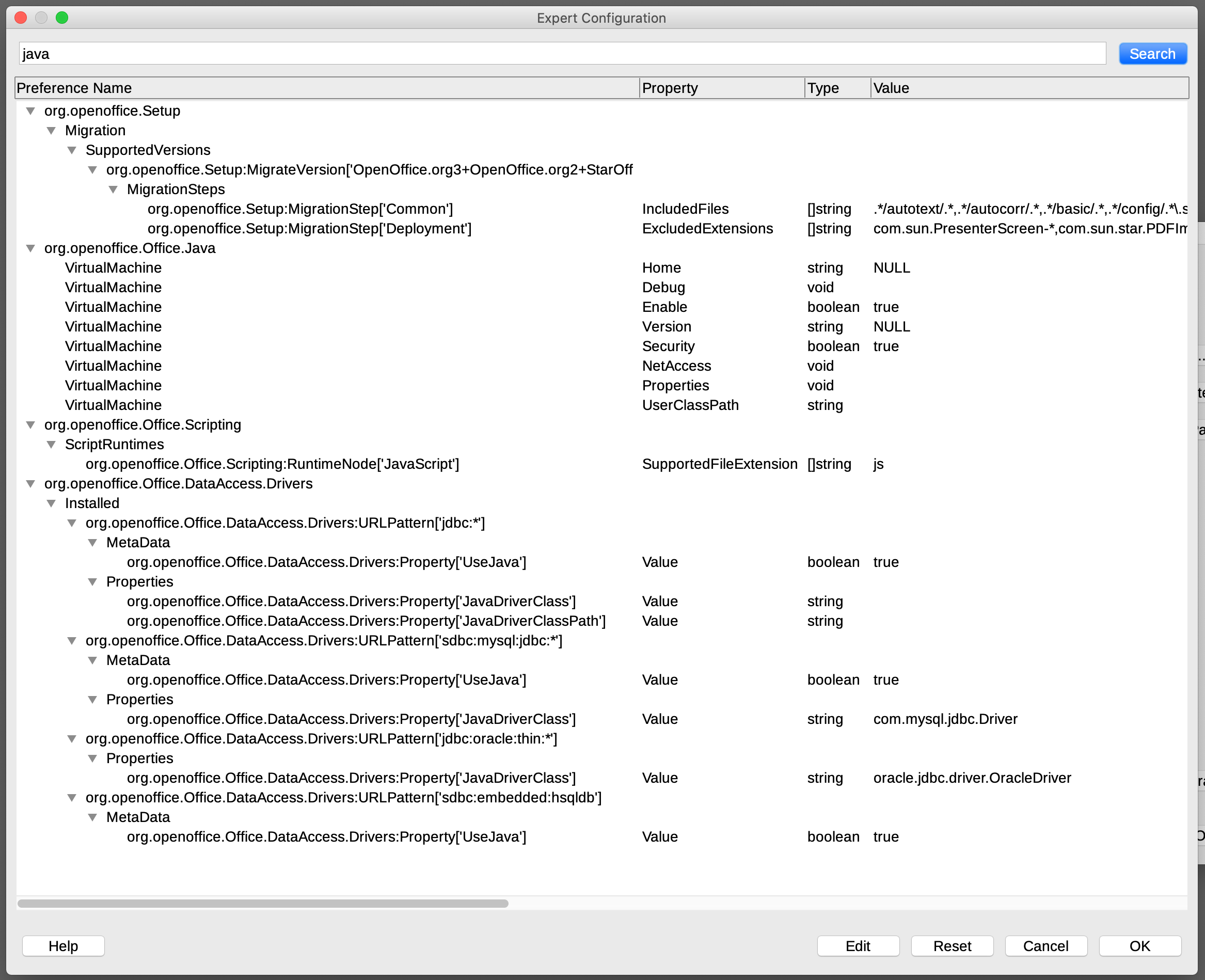


Not sure if this will help, but if none of this gets you on track you can post your own two screenshots of the same as I did above and we can see if anything jumps out.


Also note, in my case I have a bit older build of 1.8 (build 191) and not the latest 1.8 (build 271). I can't see this being the issue, but... if you want to try the exact same build that I'm using (191) you can get it through the archive page here: https://www.oracle.com/java/technologies/javase/javase8-archive-downloads.html


I'm also wondering if it's working for @Loner T (or anyone else) or not.

Nov 4, 2020 12:19 PM in response to Old Toad

I would actually choose neither and download and install the 1.8 JDK honestly from the link in my last post. JDK 15 would only be if you were a developer and 13 would be good if you had some very particular app that required only that version.


For non-developers, really the only two choices would be between 1.11(LTS) or 1.8


In my quick test of the database function of LibreOffice, I used 1.8 and it was fine. I prefer it since if you ever decide to run some random Java app in the future, 99% chance it will work with 1.8 but not something newer. It's still actively updated too.

Nov 3, 2020 4:17 PM in response to Old Toad

Old Toad,


So just to clarify, the "Major" versions are 15 (1.15), 11 (1.11), 8 (1.8), and 7 (1.7). This is their official page link that has all those:

https://www.oracle.com/java/technologies/javase-downloads.html

1.15 being currently the "latest" bleeding edge version, 1.11 being the LTS version, and 1.8 being the majority of what most people need as it is what most existing Java apps require or is at least compatible with.


As noted above, for all the JDK versions you need to make a quick Oracle web page account. With the JDK you never need the JRE as it's a super-set of the JRE.


And important tip to keep in mind, if you need to switch back to another version of Java you have installed for whatever reason you can put this in terminal:

export JAVA_HOME=$(/usr/libexec/java_home -v 1.x)

(where x is the dot version number, like 1.7, 1.8, 1.11, 1.15)


Before you install Java the Java JDK I would do a quick "java -version" to see what you currently have, if anything.


And if you deal with Windows users, the same recommendation for always using the JDK for Windows equally applies as it does for macOS.

Nov 3, 2020 9:49 AM in response to Mrokcratron

ok getting somewhere:
Last login: Tue Nov 3 18:41:47 on console
wilfried@iMac-van-Wilfried ~ % java -version
java version "1.8.0_271"
Java(TM) SE Runtime Environment (build 1.8.0_271-b09)
Java HotSpot(TM) 64-Bit Server VM (build 25.271-b09, mixed mode)
wilfried@iMac-van-Wilfried ~ % 

Still in LibreOffice same error.

I deleted the version 15 in Finder.

LibreOffice show me only the right Java version (I don't know how to do a print-screen in Mac), but when I click on 'tables' then LibreOffice tell's me there is no Java installed.


Nov 3, 2020 8:22 AM in response to Mrokcratron

Hi,

Thank you for reply. It seems Java is not correctly installed, see below:

Last login: Tue Nov 3 15:07:43 on console
wilfried@iMac-van-Wilfried ~ % java -version
java version "15.0.1" 2020-10-20
Java(TM) SE Runtime Environment (build 15.0.1+9-18)
Java HotSpot(TM) 64-Bit Server VM (build 15.0.1+9-18, mixed mode, sharing)
wilfried@iMac-van-Wilfried ~ % echo $JAVA_HOME

wilfried@iMac-van-Wilfried ~ % 

So I probably dit some things wrong. Please advice further before I do next things?

Nov 3, 2020 8:52 AM in response to wilfried48

I did installation. Same error in LibreOffice. Also after restarting computer. However in Libroffice I can now select another Java (1.8.0_271), so that seems OK. but I get same errror.

Also results in terminal window are exactly the same. So I think I need an extra step...

wilfried@iMac-van-Wilfried ~ % java -version  
java version "15.0.1" 2020-10-20
Java(TM) SE Runtime Environment (build 15.0.1+9-18)
Java HotSpot(TM) 64-Bit Server VM (build 15.0.1+9-18, mixed mode, sharing)
wilfried@iMac-van-Wilfried ~ % echo $JAVA_HOME

wilfried@iMac-van-Wilfried ~ % 

Nov 4, 2020 1:49 PM in response to Mrokcratron

I downloaded and installed JDK 8 Update 271. I then ran the terminal command and got this:


When I ran LibreOffice and tried two create a database I got these two error messages:


I know how a new Mac user feels as I feel like a fish out of water. 🤭


I then downloaded Java 8 Update 271, ran Terminal and got this:


And got the two same error messages in LibreOffice. Any suggestions?


This thread has been closed by the system or the community team. You may vote for any posts you find helpful, or search the Community for additional answers.

Installing Java or Java runtime

Welcome to Apple Support Community
A forum where Apple customers help each other with their products. Get started with your Apple Account.
