Installing Java or Java runtime

Hi,


For working in LibreOffice with databases I need JRE. But I try to install (it gives no errors), but it seems it is not correcly installed as I get following error from LibreOffice Base:


LibreOffice vereist een Java Runtime Environment (JRE) om deze taak uit te voeren. De geselecteerde JRE is defect. Selecteer een andere versie of installeer een nieuwe JRE en selecteert u deze onder LibreOffice - Voorkeuren - LibreOffice - Geavanceerd.


English: the selected JRE is defective!


So I already uninstalled, and installed again, installed complete Java, but always got same result.


How can I check Java an runtime Java is correctly installed?


rgds, Wilfried

iMac 27″, macOS 10.15

Posted on Nov 3, 2020 6:13 AM

Reply
Question marked as Top-ranking reply

Posted on Nov 3, 2020 11:36 AM

Now that your Java in terms of macOS seems to be straightened out. I think the issue is confined to the Libre Office. Personally, now that things are in a good position (in my opinion) in terms of macOS + Java I would remove LibreOffice and reinstall it and see if its reinstall can straightened everything out.


To do this you'll want to delete two things, the LibreOffice.app in Applications folder, and the contents of the LibreOffice support folder itself. You can choose Finder > Go menu > Go to Folder, and paste in the following path:

 ~/Library/Application Support/LibreOffice


Then do the normal reinstall.


FYI, as a test I installed LibreOffice, opened the Database portion, and had no problem creating a new table and successfully adding some test data to that new table. Again, running my normal 1.8 JDK.


Also one more thing: I only ever use the Java JDK as that includes all the portions of the Java JRE and again, LibreOffice's website says the JDK is the version to use. I also did another test: I tried switching the Java in the Advanced settings where it listed also a newer "run-time version" I have to (occasionally for one particular) use, and got the same error you're getting trying to create a 2nd table:

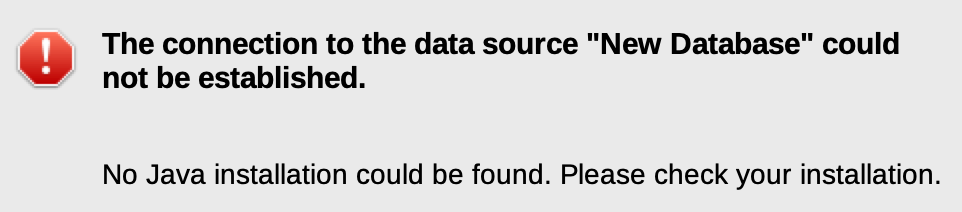


Interestingly, my 1.7 JDK didn't show up as an option. Probably too old.


Anyway, I switched back to the Java 1.8 JDK, and it was fine and I created another table no problem.


So I do think wiping the LibreOffice config files from Application Support and a fresh reinstall now that you are on 1.8 JDK has a strong chance of working for you. Each version of Java is very self-contained and co-exist nicely with other versions.


If not, you'll want to create a new macOS test user and give LibreOffice a fresh install there to see if it works.

19 replies

Nov 3, 2020 7:56 AM in response to wilfried48

Bring up a Terminal window (using Spotlight or going to Applications, Utilities folder, Terminal) and type in:

java -version


Does it come up with a response? For example, I use Java 1.8 build 191 and get the following:


I strongly recommend that you actually take the step of installing the Java JDK. The JRE version is **** and often won't update your system variables properly (like the Java Home folder).


For example, as an additional test you can type in:

echo $JAVA_HOME


Does it list a particularly folder? Such as:


Anyway, all this aside, simply install the Java JDK.


In fact, I just checked... LibreOffice says the JDK is required for macOS 10.10 and later (https://www.libreoffice.org/get-help/system-requirements/) so that definitely settles it!


Get the JDK here:

https://www.oracle.com/java/technologies/javase/javase-jdk8-downloads.html


You have to make a free Oracle account to download the JDK. I linked you to the 1.8 version which is what I recommend. It's also what Oracle recommends too for most people, the latest build is 271. I should probably update mine. :)

Nov 3, 2020 9:31 AM in response to wilfried48

So you have multiple Java's installed and your macOS default (as shown via terminal) is Java 15 which is definitely not recommended. It's possible that even though your LibreOffice is selected to use Java 8, it's still not doing things properly and I suggest changing your macOS's Java itself to be 1.8 also by changing the Java Home environmental variable.


You should be able to do this:

export JAVA_HOME=$(/usr/libexec/java_home -v 1.8)


And then do

java -version

to see if it now shows the 1.8 build 271 as the default.


If that doesn't work you can go here to delete the Java 15 via Finder, Go, Go to Folder, and put in:


/Library/Java/JavaVirtualMachines/


I'm assuming that's where it is for you, but to not assume you can type in the following to see where your current java home is set to:

/usr/libexec/java_home -v 1.15


And that's where it should show all your Java JDKs installed and you get get rid of the Java 15. For example, here's a screenshot that shows what Javas I have and where you can delete the 15 (presumably):

This thread has been closed by the system or the community team. You may vote for any posts you find helpful, or search the Community for additional answers.

Installing Java or Java runtime

Welcome to Apple Support Community
A forum where Apple customers help each other with their products. Get started with your Apple Account.