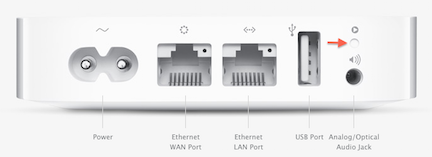
If the Ethernet cable is already plugged into the WAN (circle of dots) port......
Power up the AirPort Express and let it run for a minute or two
Hold in the reset button on the back of the AirPort Express for 7-8 seconds and release
Allow a full minute for the Express to restart to a slow, blinking amber light status
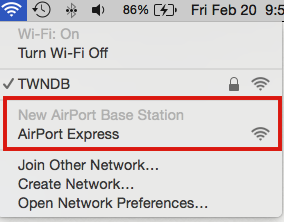
Click on the WiFi menu at the top of the iMac's screen and look for a listing of New AirPort Base Station
Under that listing, click directly on AirPort Express
When you click on AirPort Express, that will start up the AirPort Utility setup "wizard"
The wizard will take a few seconds to analyze the network and then display a screen that looks like the example below, except that you will see your version of the Express pictured
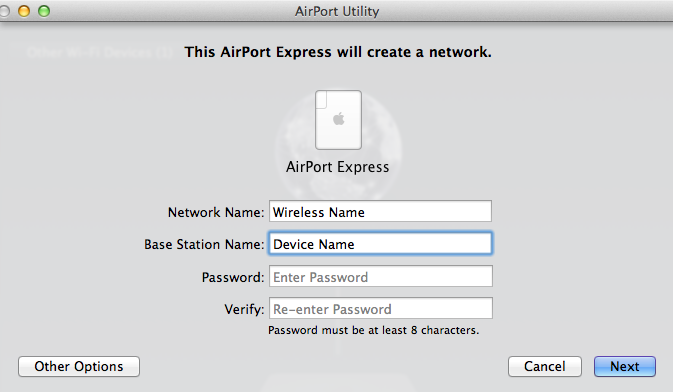
Network Name......Edit the box to enter the exact same wireless network name that the Hitron router is using
Base Station Name.......Enter a simple short device name for the AirPort Express
Password.......Enter the exact same wireless network password that the Hitron router is using
Verify......Enter the same password again to confirm
Click Next, and the setup wizard will automatically configure the Express with the correct settings
When you see the message of Setup Complete, click Done........and you are done.

