Playlist function removed with Catalina upgrade/new music app (formerly itunes)?

I was horrified to learn that playlists were removed as a feature from the new music app and there is no way to group similar music together anymore on your iPod. I used this function EVERY DAY and it's how I listen to music on my iPod 95% of the time. Now what?! Play a loop of Wage War's "Stitch" for 8 hours, that's what.


I spoke with customer support, who escalated to a senior engineer and they confirmed that the playlist feature no longer exists. Daniel recommended I spread the word, as customer feedback does impact future app updates. I recently upgraded to Catalina to fix an ongoing audio issue (crashing on every video call) on my Macbook Pro, so I cannot revert the app or os. Please comment and submit feedback to Apple so we can get this basic feature back.


This is frustrating and annoying as ****. I likely will end up buying a used laptop (not Apple) just to use the old iTunes. Meanwhile the Macbook Pro will sit abandoned under the coffee table and collect dust bunnies.

MacBook Pro 15”, macOS 10.15

Posted on Nov 6, 2020 9:28 AM

Reply
Question marked as Top-ranking reply

Posted on Nov 6, 2020 9:32 AM

Whoever you spoke to appears to have provided the wrong information. See What happened to iTunes? - Apple Support. The Music app that has replaced iTunes still supports playlists, smart playlists, and playlist folders.


tt2

Similar questions

8 replies

Nov 6, 2020 12:22 PM in response to turingtest2

I would say that a fair amount of iTunes/music app users cannot use the automatic sync function. Especially avid music listeners. I have music on a 1 TB drive that would max out my iPod in 3 minutes if synced, so I have always managed my music manually.


They did not offer the feedback you provided, however the playlists were also not available in Finder. I talked with the Senior Advisor for two hours with a screen share. There is no solution, unfortunately.

Nov 6, 2020 2:04 PM in response to lemonworld7

See Recover media from an iPod - Apple Community. Recovering playlists from a device that were created using a different library can be awkward. I have a free solution for Windows but I'm not able to translate it for Mac right now. I don't know if https://dougscripts.com/ has anything that works the same way. There are third party solutions for extracting media, some of which also do playlists, but I've not kept up with them lately so I'm not sure which if any are compatible with Music as well as iTunes.


tt2

Nov 6, 2020 1:34 PM in response to turingtest2

Thanks for this info. I can't sync my iPod as it will erase everything, but this might be useful for someone else. My previous playlists were also created directly in the iPod while plugged into the Mac, so even if I didn't care about losing my music with a sync, this would not work as the playlists do not exist on the Mac.


It's very disappointing. I expect a brand like Apple to have a laser sharp focus on understanding how users curate their music. There is definitely an opportunity for other companies to swoop in here since iTunes is virtually unusable now.


Nov 6, 2020 10:11 AM in response to turingtest2

I can't speak for the iPod Touch, which your article references, but the playlist feature on the iPod Nano was eliminated with the upgrade. The playlists don't even appear when you have the iPod plugged into the Macbook. You can still create playlists in the Music App outside of the iPod view, but they cannot be transferred/dragged to the iPod and modified like before.


Nov 6, 2020 12:40 PM in response to lemonworld7

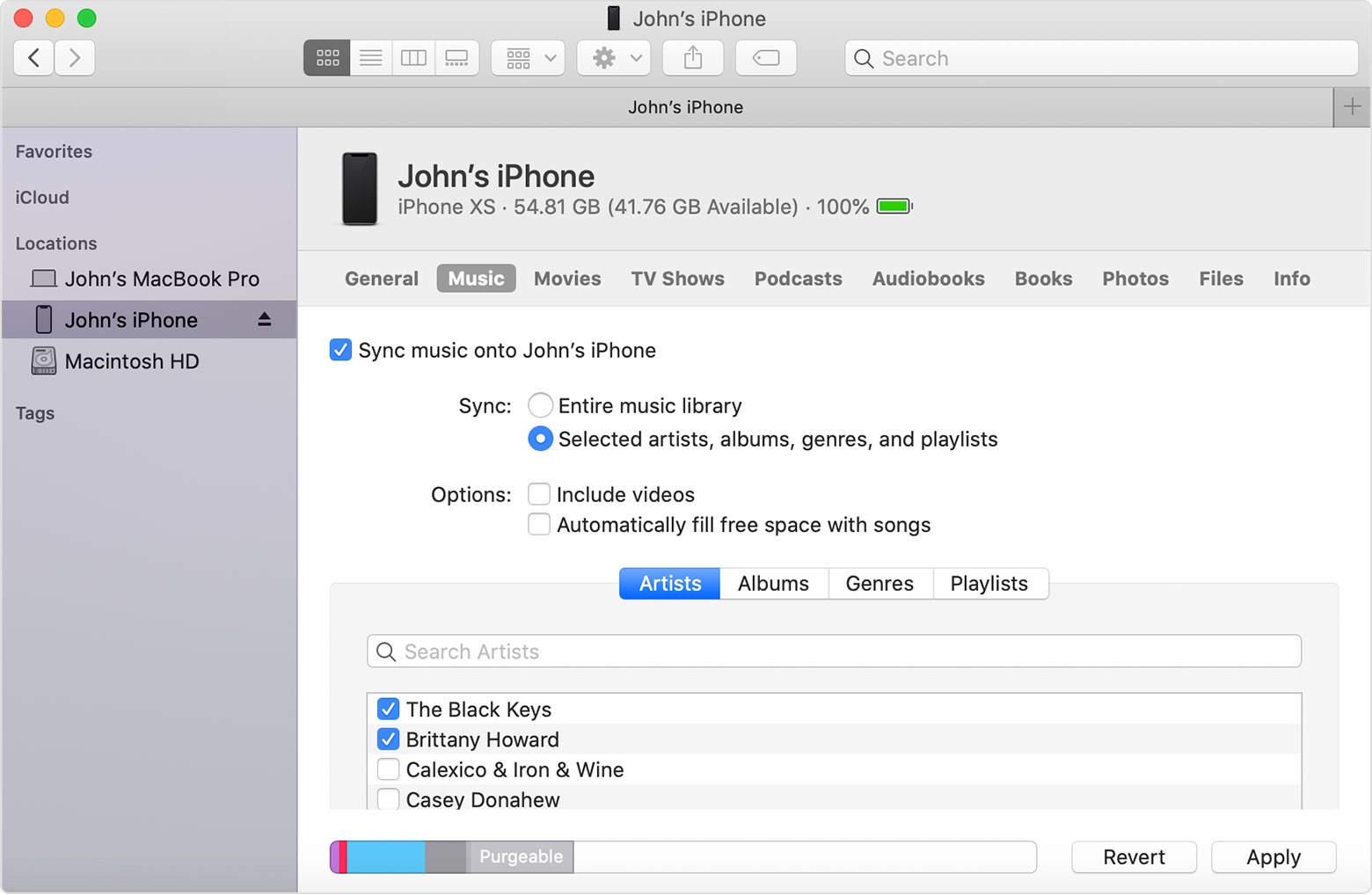
I too have long had more media in my library than would fit on my device. When syncing with selected playlists you build one or more playlists that you want to put on the device and sync those. and only those. When I've been managing multiple devices from a single library I've made a playlist folder for each device, and put the playlists that I want on that device in the folder.


This is the relevant image from the article I posted above. This view in Finder should be similar for an iPod nano. You need to select the radio button for Selected artists, albums, genres, and playlists. Personally I'm old school and only use the playlists option. I think this is one of those occasions where adding options also unnecessarily increased complexity and confusion. Using playlists you have all the fine control required to add any track, album, artist, or genre that you want on the device.


Working with selected playlists in this fashion is more powerful than manual management. Ratings and play counts can sync in either direction. You can review what will go on device before you connect it. You can experiment with your selections without overloading your device or having interrupt an active transfer of data. And you can backup your selections along with the rest of your library so they can be put back if a device ever has to be restored or replaced.


tt2

This thread has been closed by the system or the community team. You may vote for any posts you find helpful, or search the Community for additional answers.

Playlist function removed with Catalina upgrade/new music app (formerly itunes)?

Welcome to Apple Support Community
A forum where Apple customers help each other with their products. Get started with your Apple Account.