Ethernet adapter not working with big sur update?

Ethernet adapter not working with big sur update, tried the many solutions, but nothing works.

I am using macbook air 2017.

Adapter working fine before update, also working fine with another macbook air 2017 with Catalina.

MacBook Air 13″, macOS 11.0

Posted on Nov 11, 2020 12:50 PM

Reply
Question marked as Top-ranking reply

Posted on Dec 4, 2020 2:21 AM

I had the same problem after macos 11 big sur update. After the update, the USB ports were working but not the ethernet port.


I found a simple solution using new drivers provided by UGREEN (Chinese company). My type-C adapter is BASEUS brand, but the new drivers worked, since most adapters use Axis or Realtek chip, the brand does not matter!


RTL8153/B, AX88179 and AX88772A series of chip network card drivers have corresponding MacOs 11.0 drivers upgrade, they can be directly updated with new drivers, like normal upgrade solution.


To identify you network card, make sure your adapter is plugged in, then:

  • choose Apple menu > About This Mac, then click System Report (more details: https://support.apple.com/guide/system-information/get-system-information-syspr35536/mac)
  • Look under USB (usually under USB 3.0) search for model name like: AX88179, AX88772A (for Axis) or RTL8153 (for Realtek). Sometimes it may only be just a number (product ID): 0x8153 (then 0x8153 = Realtek8153) - if not familiar with this part, please refer to screenshots examples below:
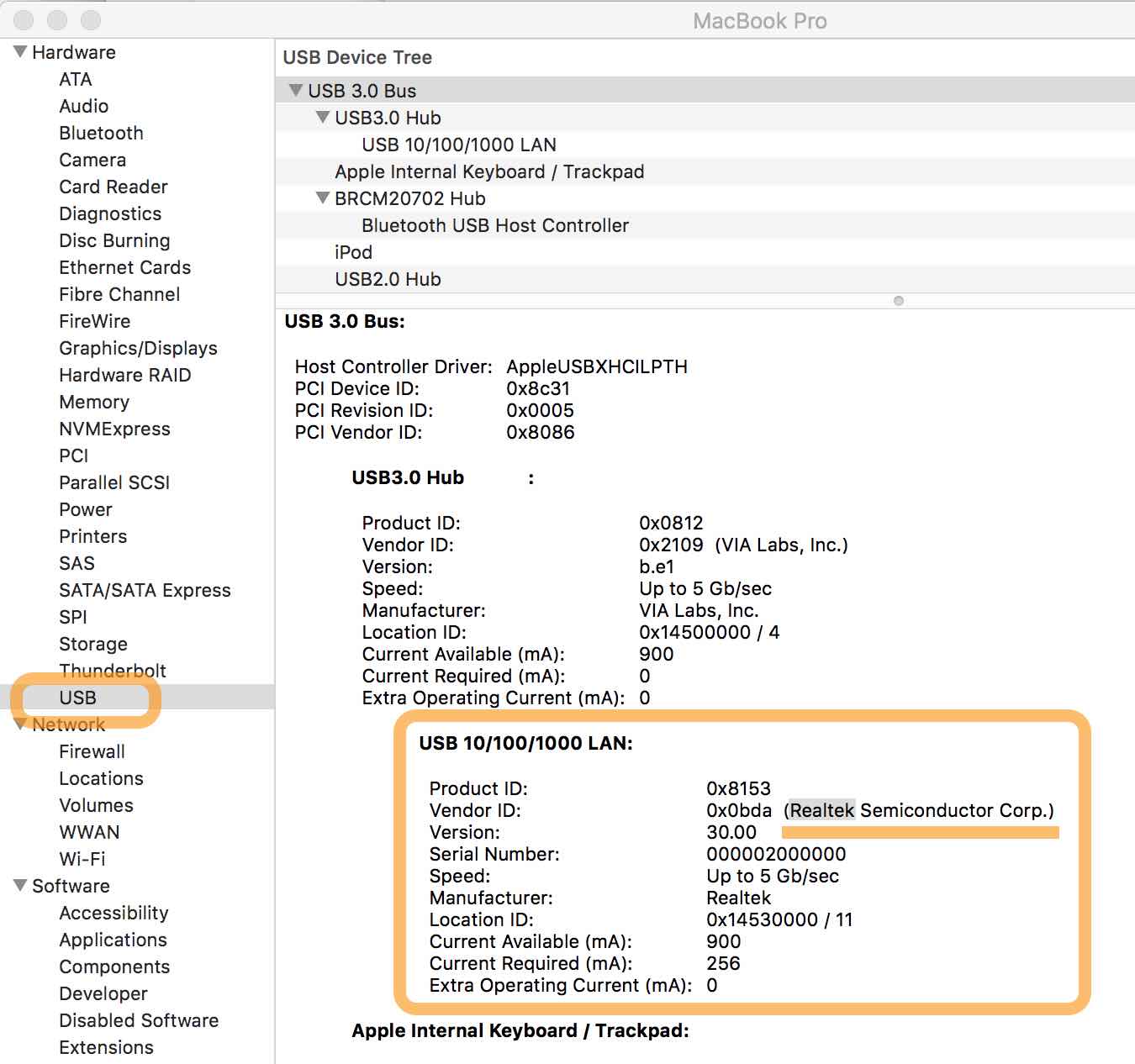
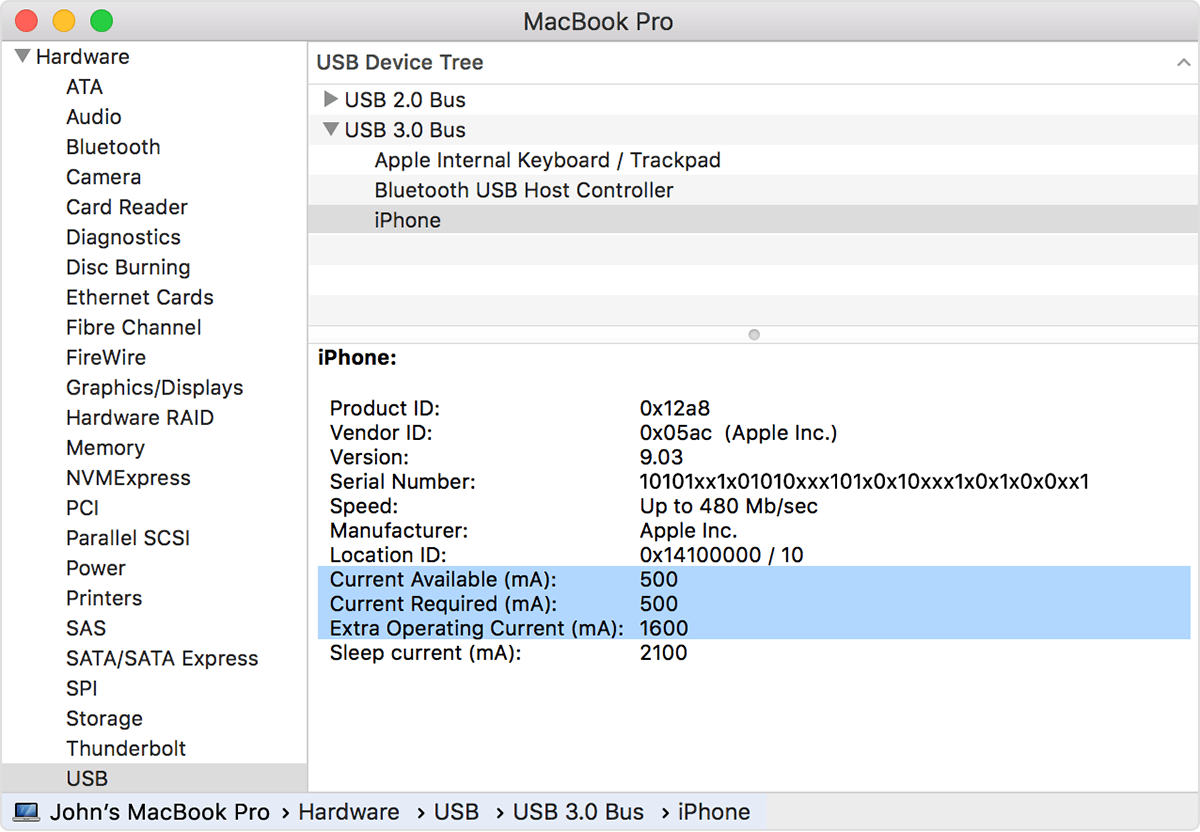


Next, download the latest drivers for Axis/Realtek provided by Ugreen (the company is making Thunderbolt-Ethernet type-C USB adapters for MacOS). Since the download page is in China and in Chinese, I uploaded the driver on Google Drive:


Drivers for Type-C Ethernet Chipset AX88179 for MacOS 10.9 to MacOS 11:

https://drive.google.com/file/d/14zgRn3ByXK8mjueuws_Cb8MlIqzJ4aX-/view?usp=sharing


Drivers for Ethernet Chipset AX88772A for MacOS 10.05 to MacOS 11:

https://drive.google.com/file/d/1W2sfestajENincZYpQQ0QnjM_cD7z9Cn/view?usp=sharing


Drivers for Type-C Ethernet Chipset RTL8153/RTL8153B for MacOS 10.12 to MacOS 11:

https://drive.google.com/file/d/1b3VTsPl7sN4KxGErZZ5-t1UaRt5PJ0e-/view?usp=sharing


Original Chinese page with drivers for download:

https://www.lulian.cn/news/494-cn.html


FYI: you may find other updated download links on the English website, Type C products (support > download)

https://www.ugreen.com/pages/download


To upgrade the drivers, follow the steps below.

  1. Unplug the external USB/Typce-C ethernet device.
  2. Uninstall the outdated driver if you installed drivers previously (I did not uninstall anything).
  3. When booting press and hold the "Command+R" key until the Apple icon appears on the screen, and the computer enters the recovery mode (if you have not entered this mode, please restart it again). More about Recovery Mode here: https://www.macworld.co.uk/how-to/mac-recovery-mode-3674052/
  4. Select "Utilities" (top menu) > "Terminal".
  5. In the terminal run the command "csrutil disable" (it will disable System Integrity Protection, it's probably possible to re-enable it later, I did not try, or when MacOS 11 has been properly updated).
  6. Restart the computer.
  7. Install the newly downloaded driver.
  8. In System Preferences -> Security and Privacy, you will be prompted to allow this driver installation, accept.
  9. Plug in your USB-Ethernet device again, and you should be able to access the Internet normally now.

I am not a IT expert but searched a solution for a long time and this is the best one I found for now.


Similar questions

108 replies

Nov 14, 2020 12:27 PM in response to raji116

My Plugable USB 3.0 Gigabit Ethernet Adapter was no longer recognized after upgrading to Big Sur. I went to the Plugable website and found the following...


Note for macOS users: ASIX-based Ethernet adapters like the USB3-E1000, USBC-E1000, and USB2-E1000 are no longer officially supported on macOS by Plugable, but drivers may be available for your specific version of macOS. For more details, please visit: https://plugable.com/2020/11/13/asix-ethernet-adapters-unsupported-in-macos-11-big-sur/

Nov 18, 2020 1:32 PM in response to EBWhy

I was using a "Mobi Lock" USB type A ethernet adapter from Amazon (plugged into a Mokin USB-C dongle) with my 16" MacBook Pro which immediately stopped working following the update to Big Sur.


I purchased an Anker USB-C adapter from Best Buy (also available on Amazon) which I can confirm has been working without issue since November 15. Simple plug and play; I did not change any settings or attempt any other troubleshooting.


Nov 19, 2020 8:17 PM in response to raji116

Evidently Belkin adapters are the closest thing to an Apple adapter, and do not require installation to use them.

I bought a new MacBookPro and as part of setting it up, updated the OS to Big Sur. Then the USB adapter I had did not work. Someone at the store where I bought the adapter told me about Belkin. They had the Belkin USB-C multimedia hub in stock (https://www.belkin.com/us/p/P-F4U092/) , and we tried it at the store. It worked fine for the USB. It was working fine for the ethernet until yesterday. I am using it now as I write this, but the internet suddenly drops off sometimes.

Nov 21, 2020 9:27 AM in response to EBWhy

I used an Anker USB 3.0 to Ethernet Adapter, PowerExpand USB 3.0 to Gigabit Ethernet Adapter, Aluminum Portable USB-A Adapter Compatible for MacBook Pro 2015, MacBook Air 2017, . I have a (Late 2013) Macbook Pro ( Big Sur ver 11.0.1 ) and it worked. All I did was connected Adapter and then restart the computer. Works perfectly.

Nov 26, 2020 7:59 AM in response to raji116

The Belkin USB-C to Gigabit adapter that apple sells has continued to work great for me in Big Sur. Apple explicitly lists all USB-C Macbooks, USB-C iPad Pros and the new M1 Macs as compatible. I have both white and black versions of this adaptor and they are identical save the color.


Belkin USB-C to Gigabit Ethernet Adapter (Black)

https://amzn.to/3m8Nw8g


Belkin USB-C to Gigabit Ethernet Adapter (White, Apple Exclusive)

https://www.apple.com/shop/product/HJKF2ZM/A/belkin-usb-c-to-gigabit-ethernet-adapter

Dec 18, 2020 1:44 PM in response to raji116

I have a brand new M1 MBP, and a 4yr old Intel MBP. I have the Belkin USB-C to gigabit ethernet adaptor that Apple sells, and a random one from another company. Both adaptors on both computers don't work. Resetting PRAM, updating macOS 11, etc etc, nothing works.


All my computers are stuck on wifi right now, and (relatedly) neither computer can use my HP printers... Apple, help!

This thread has been closed by the system or the community team. You may vote for any posts you find helpful, or search the Community for additional answers.

Ethernet adapter not working with big sur update?

Welcome to Apple Support Community
A forum where Apple customers help each other with their products. Get started with your Apple Account.
