Since the Archer has lots of Cat 5 possibilities, can I use the Extreme and the Time Capsule both as extensions, if I run a Cat 5 to each in different parts of my old house?
Yes, but make sure that the cabling is labeled CAT5e or CAT6.
How exactly would I configure them?
We often regret it when we assume something, but we'll take a chance that you will be using a Mac for this.
Connect the Ethernet cable from one of the Ethernet LAN <--> ports on the Archer router to the WAN "O" port on the Time Capsule
Power up the Time Capsule and let it run for a minute
Hold in the reset button on the back of the Time Capsule for 7-8 seconds and release. If you have the "tall" or "tower" model of the Time Capsule, the reset button is located just to the right of the power cord socket
Allow a full minute for the Time Capsule to restart to a slow blinking amber light status
Open AirPort Utility on your Mac (Finder > Applications > Utilities > AirPort Utility)
Click on the Other WiFi Devices button
Click on Time Capsule xxxxxx

When you click on Time Capsule, that will automatically start up the setup "wizard". The wizard will take a few seconds to analyze the network and then display a screen that looks like the example below, except that you will see a Time Capsule pictured
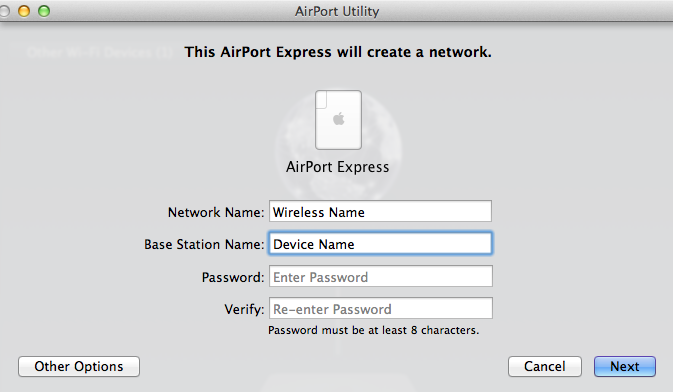
Network Name........Type in the exact same wireless network name that the Archer router is using
Base Station Name.......Type in a short simple device name that you want to call the AirPort Extreme
Password.......Type in the exact same wireless network password that the Archer router is using
Verify......Type in the same password again to confirm
Click Next
The setup "wizard" will configure that Time Capsule correctly and automatically
The Time Capsule will display a green light when the setup is complete
If you have been using the Time Capsule to back up your Mac using Time Machine, check to make sure that backups are running again. If you have not backed up the Mac for some time, you may see a "Preparing" message for a long time before the back up begins. Let things run until the process has completed or until you see an error message.
To configure the AirPort Extreme, substitute "AirPort Extreme" for "Time Capsule" in the instructions above and type in a different Base Station Name or device name that you want to use for the AirPort Extreme since the Time Capsule and AirPort Extreme will have different device names.

