App Store – unable to update my apps!

hello!


I am unable to update my apps in the app store. I'm running Mojave on macbook pro (and don't intend to upgrade).


I tried restarting, logging out, nothing helps. It's stuck on the circle animating, doesn't start the update.


I'm unable to update some crucial apps for work!


please help


Posted on Feb 22, 2021 9:33 AM

Reply
Question marked as Top-ranking reply

Posted on Feb 24, 2021 4:38 AM

Update to my [NichiyoDaikusan] post above:

Found a workaround from https://discussions.apple.com/thread/252471137?answerId=254689658022#254689658022


Copied from Eau Rouge' entry:

"There is a workaround.

Open Activity Monitor from your Applications> Utilities folder.

Click on CPU and in the Search field enter appstoreagent,

now highlight appstoreagent in the list, see below.

click on the info button, and press Quit> force Quit. [or click on the "View" drop down menu then "quit process" ⌥⌘Q] "
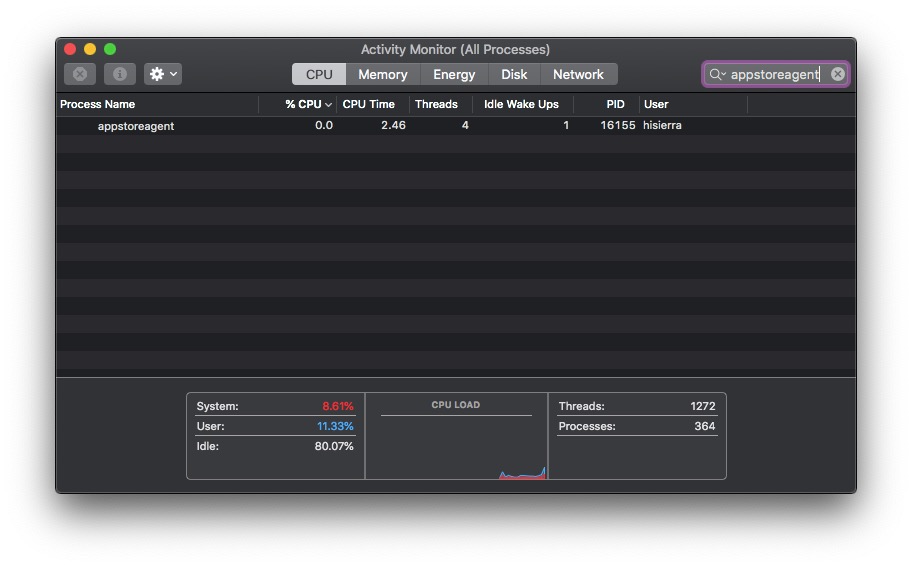
The following entry after Eau Rouges post by implied64 has the answer!!!


THE App Store MUST BE OPENED when force quitting the appstoreagent. And yes you have to kill it twice before it goes away.


Was able to complete all the updates without killing appstoreagent again after the first update.

Similar questions

12 replies
Question marked as Top-ranking reply

Feb 24, 2021 4:38 AM in response to NuchiyoDaikusan

Update to my [NichiyoDaikusan] post above:

Found a workaround from https://discussions.apple.com/thread/252471137?answerId=254689658022#254689658022


Copied from Eau Rouge' entry:

"There is a workaround.

Open Activity Monitor from your Applications> Utilities folder.

Click on CPU and in the Search field enter appstoreagent,

now highlight appstoreagent in the list, see below.

click on the info button, and press Quit> force Quit. [or click on the "View" drop down menu then "quit process" ⌥⌘Q] "

The following entry after Eau Rouges post by implied64 has the answer!!!


THE App Store MUST BE OPENED when force quitting the appstoreagent. And yes you have to kill it twice before it goes away.


Was able to complete all the updates without killing appstoreagent again after the first update.

Feb 24, 2021 5:17 AM in response to mantras

I am so disappointed in Apple. I've been a loyal customer since the 1970s, and quality control of Apple products has sunk to a new low. I have been a beta tester, an early adopter, and a steadfast aficionado even when *given* competing products. Still, the awful decline in reliability and stability, especially in the Mac arena are nothing short of disheartening.


I held off on Catalina, and even bought a MacBook Air to use as a "sandbox" for Big Sur. Neither of these "updates" inspires me to change from Mojave. And now the App Store, which is hard-wired into the OS it seems (wasn't Microsoft sued for doing the same thing with Internet Explorer?). I can't remove it, and now I can no longer update apps I've purchased through it. How is Apple QA allowed to pass these kind of failures on to the public, and why does Apple management not address the growing defect list in its products? Linux is looking better all the time...

This thread has been closed by the system or the community team. You may vote for any posts you find helpful, or search the Community for additional answers.

App Store – unable to update my apps!

Welcome to Apple Support Community
A forum where Apple customers help each other with their products. Get started with your Apple Account.
