That HP caused printer driver mixup was resolved and the HP Printer Drivers v5.1 for Mac was updated on Dec 11, 2020 to clear up that fiasco. That HP driver download offers support for the following models where the support columns on the right are Print (P), Scan (S), and Fax (F) in that order.
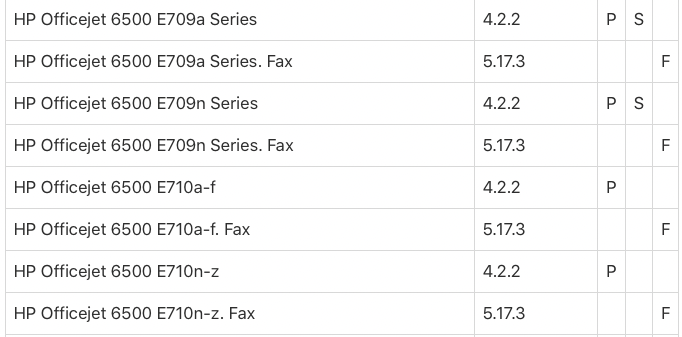
If you model does appear here, then download and install the linked HP driver package above. Afterward, and with your printer powered and connected, visit System Preferences > Printers & Scanners panel, right-click on your device entry, and choose Reset printing system… When you re-add the device, select the appropriate HP driver entry. This may also present scanner configuration capability on Printers & Scanners panel.
On the other hand, if your particular device is not shown in the above matrix, and HP no longer provides online driver downloads for this device (ended with macOS 10.12), then you do have a paperweight. If this is the case, I suggest your next printer choice is among Apple's AirPrint supported devices so you can remain vendor driver independent in the future. AirPrint support is built into the operating system for networked devices.

