Can't upload songs to library for iTunes matching

I can't upload any songs to my library for matching at Itunes match.

Uploading song has status - trying to match at Itunes Store.

And this status isn't changing at all.

Changing accounts, using other wifi networks - nothing helps.

The Problem began at Thursday. Before that day everything was OK.

Oh - and there is NO problem with downloading already matched songs.


[Re-Titled by Moderator]

Posted on Jul 18, 2021 12:24 PM

Reply
Question marked as Top-ranking reply

Posted on Jul 29, 2021 7:39 AM

So before the call with adviser I did some digging in macos. Music app logs: "log show --predicate 'processImagePath CONTAINS[c] "Music"' --last 2m" in command line. App connects and in few seconds connection get reset by remote server. Same picture in Wireshark - remote server sends RST or FIN packets short after session start.


I told all that to adviser, thats why he asked me to delete VPN profile, I think. He said it gets messed up on OS updates or something similar. Btw, I tested it again. Installed VPN.mobileconfig profile, connected VPN, added an album - no dice. Disconnected VPN - no dice. Removed profile - no dice (!). Restarted macbook - instant match all songs. So its def networking something.

366 replies

Jul 29, 2021 1:21 AM in response to orbitalnuke

I too was told to disconnect my VPN (I’m on a Windows machine) which I removed. It started to upload files after a restart but then got stuck on ‘uploading remaining songs and artwork’ - infinite loop again! I restarted the machine (sans VPN!) and lo and behold! Still stuck on ‘Matching your music…’ so doesn’t look like the VPN workaround works on Windows machines! Hope they sort this out or they’ll need to make a 1TB iPod!!!!

Jul 31, 2021 5:22 PM in response to Pittboy

Apple chat support was as helpful as they could be in their limited way. We opened a case and escalated to a senior advisor who called me. I received the call but the gentleman told me there is NO path for issues brought up by customers to reach the engineers who could actually fix a bug that is in the software that runs the Apple servers that support the iCloud Music Library. The ONLY path that his department, including senior advisors, can use is to engineers who work on the software that customers use on their own computers and devices. He also said he wasn't a manager and there was no way for a customer to contact a manager. So I suppose we need to wait until there is enough bad press on Twitter or online publications before Apple fixes this bug. Or perhaps when enough engineers who work on the server software have this problem on their own personal devices and realize it's a server-side bug they should go in to work and fix. How sad to have a support system that is purposefully set up to ignore customers. He said I might try the Apple feedback site; he said MAYBE that gets thru to the server-side engineers. So, I'm sorry folks … it's just wait and see now.

Aug 2, 2021 11:10 AM in response to Pittboy

Hi,


I am from Germany and I have this problem now for 2 weeks.


The iTunes app on Windows or Apple Music on Mac will not even try to upload after a restart. The ring of fire is turning and nothing will happen. If you wait for many hours iTunes Match will manage to upload 1-2 songs. In the last two weeks I've catched some good moments where iTunes Match worked perfect for only few minutes. But it is still very slow or does not match or upload.


Last week I've contacted the Apple support and they wanted to call me back but due to some reasons the recall didn't take place.


I have a relative in Cyprus who has the same problem and I've found also a german Twitter user complaining the situation.


I hope this will be fixed soon as I my membership will be renewed in a few weeks. If this will be not fixed I will quit this wonderful service.


BR

Aug 2, 2021 12:43 PM in response to Pittboy

This is happening for me for the past few weeks - I cannot believe Apple are ignoring this issue - I did try to contact Apple Support but I was mostly told to delete the tracks that were not syncing and add them again. Pretty useless advice though though trial and error I was able to sync most of the tracks but it took days of adding a few, deleting the ones that were stuck and adding them again.

Aug 2, 2021 1:47 PM in response to Pittboy

Just another iTunes Match user here to confirm what we already know that the service has been unbelievably slow for the past week or so, just wish I had known it wasn't just me!


I have been checking online for any signs that this problem is being flagged up by any other Apple news media outlets, but other than the iMore article from July 28th, I can't see anything.

Perhaps we should all be writing to some of the more popular Apple websites like 9to5Mac or MacWorld rather than spending hours with Apple Care reps who clearly have a limit to what they can do in a situation like this.


I am one of those people who has been a constant user of iTunes Match since it was released 10 years ago and I already had over 3,000 CD's to rip into my iTunes account back then when it started.

I can say that in all those years I have personally never experienced an upload glitch like this one and have added songs on multiple computers from different corners of the world without a problem.


My Apple Music 'Match' account is now sitting at 88,000 songs.

Around 65% of these songs are 'matched' and the rest are shown as 'uploaded' - however many of the uploaded songs were ripped from commercial CD's that were readily available in stores.

For example, even a couple of Beatles albums show as 'uploaded" - so I was never really convinced that the 'matched' songs uploaded quicker than the 'uploaded' songs or that the algorithm that matched the songs was 100% accurate as some users have previously commented here.


Thinking I was alone with this mess and in desperation to get some new songs to upload this past weekend I signed out of Apple Music, unchecked 'sync my songs' in preferences and deleted all 88,000 files of downloaded music from my hard drive knowing everything was already matched or uploaded.

Before a restart I cleared all the caches, signed out and back in to my iCloud account and anything else I could think of the purge anything that might be causing this problem.

Then I re-booted the iMac, signed back in and clicked on 'sync my music' and walked away.


It took 2 ½ days, but I re-downloaded all 88,000 songs (813 Gb) and both the 'matched' and 'uploaded' songs downloaded really fast - all except of course the music I added on 29th July which was still showing as ....."waiting"!


However, one thing that I discovered during this long fruitless exercise was that the new downloaded version of 'matched' songs was smaller in size than what the Apple servers previously recorded.

I saw this as I watched the list update every time the song downloaded by showing 'view songs'

What I mean is that a song previously showing as 256 kbs Apple Music streaming quality that was previously a file size of e.g. 8.9Mb is now more like 7Mb.

I watched this happen hundreds of times in all types of music old and new as the files downloaded off the servers back onto my iMac.


Does this mean that Apple has further compressed the music files?

Is this problem something to do with new Lossless files being added?

Is their entire Apple Music library being updated and is this the reason we can't get our new songs to upload?

No idea. But it's just another theory to throw into the melting pot.


So the result of my weekend exercise was that whether songs were 'matched' or 'uploaded' Apple Music will let me download at high speed the entire 88,000 songs in my library - and yet it has taken 5 days to 'match' just 16 songs from a new 29 song album.


In my opinion this issue is 100% related to something at the servers, possibly in connection to the new lossless option.


I write all this to warn you off wasting your time doing what I did and 'cleansing your Apple Music".

It was a waste of time and the problem of slow uploads still exists.

After reading all the other comments from users who have asked Apple Support to help, I won't bother with that either because it looks like they no more than us.

Thanks for the heads up.


This evening though I have noticed a new twist.


To be 100% certain that this long delay in uploading new music wasn't only on my iMac, I added an album to Apple Music on my MacBook Pro...and waited.


The new album showed up quite quickly on my iMac.

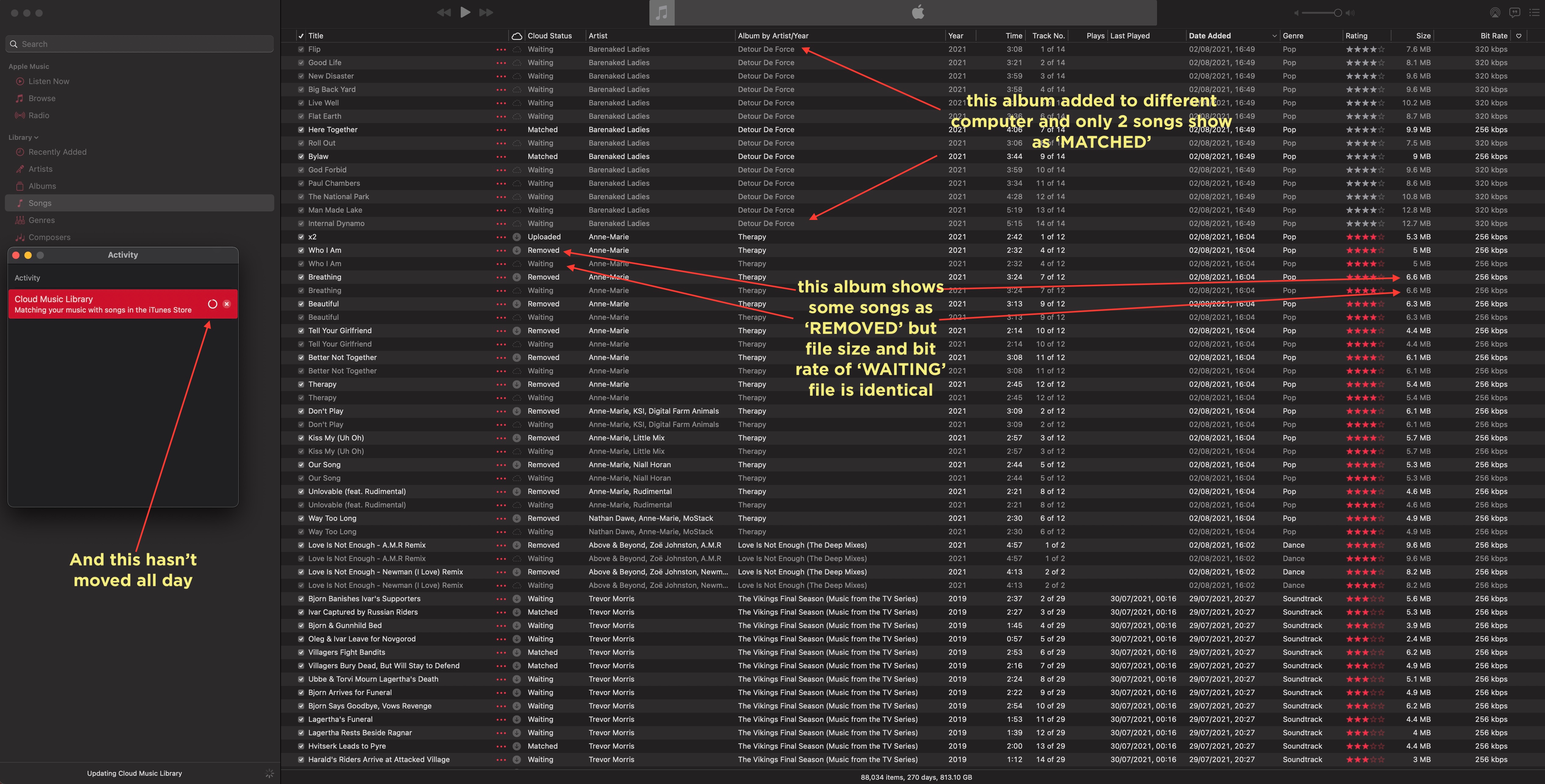
The songs were listed and the artwork was complete, but so far (5 hours later) only 2 songs of 14 have matched the rest are in purgatory otherwise known as 'waiting'


At the same time I also added a few new songs to my iMac.

However they show something new and are showing as 'removed' and underneath the very same file shows as - yes you guessed it "waiting".

Anyone else getting 'removed' showing up in their library?

See screenshot below to show what I mean.

None of these songs were already in my library - so they could not be 'removed' and the Cloud Music Library has been at 95% complete for hours.

When I close Apple Music and select 'update cloud music' this window takes a couple of minutes to get back to this 95% complete position - but never ever completes matching.



Aug 2, 2021 5:03 PM in response to lightfader

Like you lightfader, I’m seeing many songs showing as “uploaded” from popular artists/albums and even examples of a few uploaded songs where others from the same album are showing “matched”. I’ve now seen about another 300 songs matched in the past 24 hours - having restarted Music app twice due to the “genius” error.

Aug 2, 2021 6:26 PM in response to Michael K. W

Following this thread for the past two weeks, we've gone from "outage" to "it's working, just slowly and not what I am used to."


I am starting to wonder if Apple introduced some throttling either by mistake or by design. There could be an inbound network throttle, or a workload throttle in their server farm or even in the back end storage subsystem. We can only speculate without knowing how iTunes Match is architected.


If this is the case though, Support's stock response of "delete it and try it again" would only make the problem worse by flooding a queue that is already full.


And that goes double for all the experimentalists out there who are deleting and re-uploading their 88,000 track libraries. :))


Aug 2, 2021 9:08 PM in response to Pittboy

I have had the same problem for at least two weeks, a few songs match from a new import, the rest take days. It used to take minutes. I have tried this running iTunes 12.8.3.1 on a mid 2012 Macbook running High Sierra 10.13.6 (old one I use for importing cds), but when I first had the trouble I copied files across and imported to Music 1.1.6.32 on a mid 2015 MacBook running Big Sur 11.5 with exactly the same problem.

Definitely no network problem, I have done plenty of uploading large files to Box and Dropbox, Zoom meetings etc during this time. I'm in Australia.

Aug 2, 2021 11:33 PM in response to Pittboy

I’m having the exact same issue. I went so far as purchasing a new MacBook Air M1. The songs literally takes days to fully download, if I’m lucky. I can see the albums I’m trying to dl on my other devices, but most songs are grayed out and tells me they aren’t synched across all devices. I spoke with Apple Support 2 days ago and thought I resolved the issue. I switched my import setting from Lossless to MP3 high quality. Instantly imported CDs synched. The Rep explained to me that since Apple just in the process of updating Apple Music to Dolby Atmos and full Lossless that this was the issue. He said they’re hoping to have it run smoother this Fall. However, today I imported a few CDs using MP3 and the same issue is happening. I’ve loaded out and in. Quit and restarted. Reimported using a lower quality. Logged out of iTunes Match on all my devices and nothing. This has to been occurring on Apples end. They seriously need to address this ASAP because we pay for a service and it’s blatantly broken. I also subscribe to Apple Music, but I reply on iTunes Match for hard to find and rare tracks that are not available anywhere else.

Aug 3, 2021 8:35 AM in response to Pittboy

Same problem here since last week. It looks like iTunes isn't matching anything anymore, but it is at just an incredibly slow speed. It took about 24 hours for it to match 10 songs over the weekend where I'm used to 10 songs being matched within a few minutes at most.


Sucks because I caused all sorts of damage to my library thinking that something was wrong on my side. Signed out of iTunes, signed in again. Disabled iCloud Music and re-enabled while holding Option. Ended up getting all sorts of duplicate playlists and tracks which were originally matched now listed as duplicates—I haven't even started trying to clean up that mess yet since matching is going so slow.


And as others have said, downloading track is no problem at all. That goes nice and quick like usual. Also, any edits I make to playlists get synced immediately. It's only a problem with matching tracks that I add to my Library.

Aug 3, 2021 12:31 PM in response to Pittboy

Not much to add regarding the issue except that I'm experiencing it too. I hadn't uploaded music to iTunes Match in the past weeks and last Friday (30/07/2021) I tried adding one album and in 4 hours it uploaded 1 song. Since then I've tried uploading the album again several times and the maximum songs that I it uploads to this day are 2 of the 12 songs.


Hoping this thread gets enough visibility to warrant a response for Apple.

This thread has been closed by the system or the community team. You may vote for any posts you find helpful, or search the Community for additional answers.

Can't upload songs to library for iTunes matching

Welcome to Apple Support Community
A forum where Apple customers help each other with their products. Get started with your Apple Account.