iPhone 13 Camera is blurry

Hello,


I’ve just received my iPhone 13 Pro and instantly noticed that especially the front camera quality in low light is horrendous. Coming from an iPhone X, the difference is literally night and day. The front camera seems to have some kind of beauty or over-smoothing effect on and the pictures really do look unacceptable. My colleague has the same problem with his 13 Pro Max and across the internet there have been multiple discussions about this.


[Re-Titled by Moderator]


iPhone 13 Pro, iOS 15

Posted on Sep 25, 2021 2:32 AM

Reply
Question marked as Top-ranking reply

Posted on Nov 4, 2021 8:10 AM

isazavakos wrote:

oh my gosh thank you for validating this. thank you.


You are very welcome isazavakos! 🙏


⭐️📩If other users noticed this

we can try to send our feedback here: 📸➡️ https://www.apple.com/feedback/camera/ ⬅️📸


I asked for:

1️⃣_Being able to shoot without this Oil paint effect/ software noise reduction added by the software (pic on the left)

2️⃣_Being able to shoot without HDR (like in previous iPhone models)


(pics from isazavakos - pls note differences in hair, eyelashes, make up. Picture on the right is a RAW using camera on Lightroom for iOS, as a workaround to avoid this effect)


Left: iPhone native camera app Right: iPhone Adobe Lightroom Camera iOS

809 replies

Oct 22, 2021 12:06 AM in response to urlocalbrwnskn

You can focus with the back camera but you may need to tell it what to focus on.


If you are trying to focus on something closer than about 3.5” away, the phone will automatically shift to the ultra-wide angle lens as it can focus much closer than the 1x lens can.


Further, if the light is not sufficient for the 3x optical lens to produce a good picture, the iPhone will shift to a digital zoom which, while it will produce the desired zoom, will do it with much worse quality as it is just scaling up pixels to do so.


So:


• If the camera doesn’t seem to be focusing, tap to set a focus point.


• Don’t try to use 3x zoom except in good light. The 3x telephoto lens on the 13 Pro Max has an aperture of ƒ/2.8; the 2x telephoto lens on the XS had an aperture of ƒ/2.4, which means the 3x lens needs more light to be usable than the 2x lens on the XS did.


• If you are trying to take a macro photograph, wait until the phone decides which lens to use, then snap the photo.


There is nothing defective or broken here, just a different set of tools than those you may have been used to.

Oct 22, 2021 1:03 PM in response to Haribosss

Why do you have an issue with someone not agreeing with the assertion many have here that the new phones don't take good pictures. Should everyone agree with you? This thread is NOT only for people complaining about their photos. And people who might come here for the first time should see that there are other viewpoints. I think my iPhone 13 Pro Max takes the best pictures of any iPhone I've owned. Do I ever get bad photos? Sure. All photographers do, regardless of whether they're using a smart phone or a multi-$thousand camera system.


The thing to do is look at the photograph. Figure out what camera you used. Try the photo using a different camera or F-Stop or focal length or any manner of options available to you to get better photos. You should expect that not every point and shoot photo you take will work the way you thought or wanted. But learning from your mistakes (which we ALL make) is the way to get better quality photos.


Oct 22, 2021 6:05 PM in response to Dogcow-Moof

You know you can crop at 100% and not have image degradation beyond some mild jpeg compression. So snip some areas of your shots and post them. Should help people feel better knowing that you can get good photos from the camera.


I will disagree with you slightly on “better camera means it shows flaws” because 1. The camera improvements are really modest at best 2. Improvements to sensors and lenses can help you get better pictures in marginal situations. I didn’t become a better photographer when I was able to capture night shots with my phone - technology made night shots possible.


I must say this phone is infuriating because it can do some really amazing things in low light, but absolutely flub it in better conditions. Artifacts from the processing run what would otherwise be a great shot.

Oct 22, 2021 6:16 PM in response to StabbyLoon

Actually, 100% crops do still show degradation because of DPI differences and of course HEIC to lossy JPEG conversion.


I know what looks razor sharp on my iMac 5K becomes filled with digital artifacts if I post it here; it's trivial to do an Internet search and find reviews of the 13 Pro Max on photography sites that have much better photos than I do.


The ironic thing is the better the camera, the more it shows flaws in your technique; many people found this when DSLR sensors went above 35 MP or so. I know many people complained the Nikon D850 produced blurry photos until those same people were forced to use tripods, and it revealed even at high shutter speeds a 45 MP sensor will reveal camera shake unless you use high shutter speeds and small apertures to maximize depth of field.


Apple does tend to over-process slightly, which is why it's great you can shoot in RAW and see how good these cameras really are.

Oct 22, 2021 7:10 PM in response to StabbyLoon

StabbyLoon wrote:

Mind reader? No, it’s called not making assumptions based on your biases.

And you can’t adjust the F-stop, there is no physical aperture.

Hope you feel better soon.

Really? Now you're just demonstrating how LITTLE you know about your camera.


  • Open the Camera app, select Portrait, then tap on the f button. A slider will show up next to the shutter button, for you adjust the f-stop, and see the changes as you move it. Once you're happy with the way your photo will look, tap on the f button again. Notice that the button now displays the currently selected f-stop.


If you don't know what you're talking about, you should quit while you're behind.

Oct 23, 2021 2:28 AM in response to Haribosss

i don’t see it with mine, sorry.


Not bad faith at all and I don’t appreciate the implication that it is just because we disagree.


I posted some leaves earlier; at full resolution they’re breathtakingly razor sharp for a cell phone camera with a lens 1/2” in diameter.


Could it be an issue with your phone? Of course, which is why I keep stating if you feel so, take it in to be checked to be sure:


Genius Bar Reservation and Apple Support Options - Apple


Oct 26, 2021 5:49 PM in response to lobsterghost1

Lol why be on support page and bash ppl

there has been many discussion on macrumors and other forums too. In some instances it does perform worse than prior models and seem much more over processing than before


sure many ppl may not be as “experienced “ as you but it’s also not first phone they have and with apple iPhone ease of use. They should be able to point and shoot like before and should not be noticeable difference than prior if not better


there is also that apple seem not use telephoto lens and rather digital zoom the main lens coz it thinks it is better


overall it does seem there are more issues from more ppl

its find to tell them to get it checked but to attack and bash and bring down others Why even come on here ? I’m sure there are better thing to do

Oct 26, 2021 10:16 PM in response to Dogcow-Moof

Yeah, Proraw with 10x file size is great. Colours start ****, so then need to grade. I feel like I am wasting time on undoing what Apple puts in. This is also about workflow too.


The quick snaps need to look less supercharged in colour. Without downloading to computers.


I want the compressed shots to not have so many Apple decisions in the post processing. So I don't have to undo their grade. So it is more like the nicer and less intelligent colours in their older phones.


Oct 26, 2021 10:33 PM in response to Sevillemarmalade

As an A7 III user, you're used to RAW files that are 27 - 48 MB in size each, so the 13 PM's 27 MB is right in the same ballpark; there's a reason 13 PM HEIC files are only about 5 MB in size.


When I bring a RAW DNG file into my Mac I don't see any of the "supercharged" colors you reference; in fact only color temperature is set, all my color sliders are at zero.


For example, this is what I see in Photoshop Elements 2021's Camera Raw 13.0 when I open a quick photo I shot with my 13 PM:
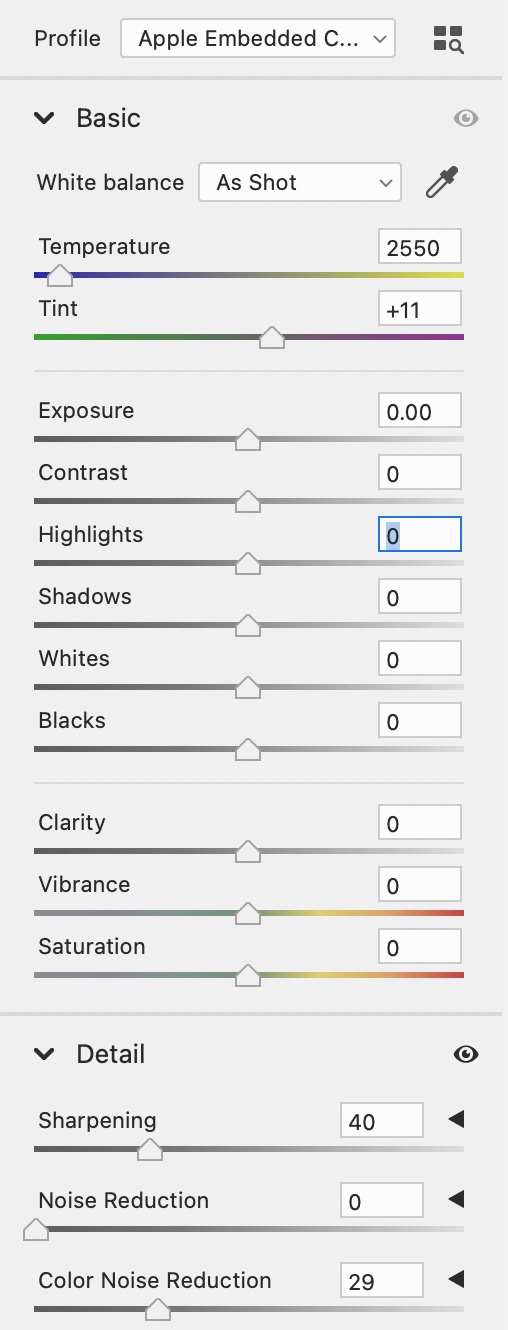


Apps are for people who want "one click" solutions, no matter what Adobe says, whether it's Apple's Camera app or Lightroom Mobile.


If you want the best results you will have to grade and adjust every single photo you take; the same is true for anything from my Nikon D850. I would never dream of posting a JPEG directly processed by the camera; that's kind of the whole point of RAW.


For example, I regularly take photos that I upload to Facebook from my D850; it usually takes me a minimum of two to three minutes to examine, grade and process each one; why would I expect any less of DNG files from my 13 PM?


On the other hand, what comes straight out of Camera is good enough in most cases for just casual shots.


Feel free to complain to Apple here as most people love the defaults and Apple is trying to please them; the fact that we got RAW mode at all means Apple wants to keep photo pros happy, too but not at the cost of disappointing average users.


Feedback - Camera - Apple


Oct 28, 2021 1:01 AM in response to MarcelDav

Perhaps you should have your phone checked:


Genius Bar Reservation and Apple Support Options - Apple


I don’t see anything like you describe, and I certainly don’t see any “oil painting” effect on RAW photos; in good light they are frighteningly close to what I get from my Nikon D850 though of course with ¼ the resolution.


I owned a 12 Pro Max and think the 13 Pro Max’s photos blow away anything the 12 Pro Max could do.


There’s not much point in my going to speak to

someone at Apple except to tell them how absolutely thrilled I am with the photos the 13 Pro Max takes.

Oct 28, 2021 3:27 AM in response to MarcelDav

There is no point trying to assess photos posted on Reddit or any other site. They are almost always reprocessed and resized by the site software, and the final rendering anyone else sees in their browser may not be a good representation of what was originally uploaded. Even the original upload is not certain to show the camera's true capability after it has been downloaded from the camera and pulled into a web browser or app for the site upload. Many posting here are unable to make the distinction in their heads between the capability of the camera and the resulting image file after several rounds of software processing not all of which were performed by the iPhone.


The ONLY route for suspected camera faults is to get the device examined by Apple's technicians, and assessed properly - as you seem to have done. The court of public opinion here is looking at unreliable evidence so it is meaningless.


Oct 28, 2021 6:09 AM in response to Dogcow-Moof

Apple assistance didn’t say “it’s fine”

they admitted the presences of “oil paint artifact” and they also admitted that wasn’t present in previous model. And also admitted that HDR now can’t be turned off.

so please avoid comments that can create confusion.


I understand that you and few users are not able to see this oil paint effect we are talking about.


you are constantly commenting saying that this strong noise reduction doesn’t exist just because you don’t see it. Let other people talk too please , otherwise the last comment will be always yours telling that this effect doesn’t exist.


this way you are disrespecting those who are looking for a solution.


You are not even reading carefully other users comments since I already told in the previous comment that I returned the device already.

This thread has been closed by the system or the community team. You may vote for any posts you find helpful, or search the Community for additional answers.

iPhone 13 Camera is blurry

Welcome to Apple Support Community
A forum where Apple customers help each other with their products. Get started with your Apple Account.

