What does "notifications silenced" mean in Messages?

I’ve been texting with a good friend of mine and all of a sudden at the very bottom of our texting thread it says “🌙 Molly has notifications silenced “. What does this mean? Is she specifically silencing my specific text messages so she doesn’t receive them or the banner doesn’t pop up? She has an iPhone as well and I’ve never seen this message before. My feelings are a bit hurt but I’m not really sure what it means, if someone could explain this to me I would so appreciate it.


[Re-Titled by Moderator]

iPhone 12 Pro Max, iOS 15

Posted on Oct 11, 2021 2:54 AM

Reply
Question marked as Top-ranking reply

Posted on Oct 12, 2021 7:48 AM

Hi vinnetta208, 


Thank you for using the Apple Support Communities. 


We understand that you’re seeing a notifications silenced message when messaging a friend in Messages app and we’re happy to help. 


It looks like your friend uses Focus on their iPhone. When a person sets up Focus on their iPhone, then you might see a message displayed in the Messages app that says [contact name] has notifications silenced. This means that the person you’re messaging has their notifications silenced. Please note that you can still notify your friend if it’s urgent. Learn more about Focus here: Use Focus on your iPhone, iPad, or iPod touch


Best regards. 

410 replies

Jul 31, 2022 8:48 AM in response to vinnetta208

I am having this issue. My boyfriend continues to tell me that my notifications are silenced when I’m getting all of his messages. So this seems to be a continuous issue but how do we fix it because I’m getting annoyed with the messages from people asking me why I’m keeping my phone silenced.


I went as far as to turn off the status that is supposed to alert everyone when it’s silenced and they’re still seeing it’s silenced. I only have my do not disturb while I sleep. I’ve tried turning each one on then off, restarting my phone with up, down and power hold, I’ve even tried removing the set time on there to see if that would stop it but nothing I’ve tried has worked.

Sep 9, 2022 9:53 AM in response to vinnetta208

This is definitely still an issue. I have done the following:

Turned off Share across devices under focus mode on my phone and macbook

Removed all focus modes on both devices except the default DND and Driving on the phone (both are turned off)

Deleted my sleep schedule so it won't trigger DND automatically

Restarted the phone and laptop multiple times

After all of this the "notifications silenced" message still WILL NOT go away.

This is ridiculous!


Sep 10, 2022 2:02 PM in response to balex66

I spent most of the day going back and forth with Apple Support on Twitter to no avail. This was their final response:


We understand your concern and appreciate the information you’ve provided. This issue is currently under investigation. We don’t yet completely understand the issue are unable to predict when the investigation will finish.


Sep 18, 2022 8:14 AM in response to balex66

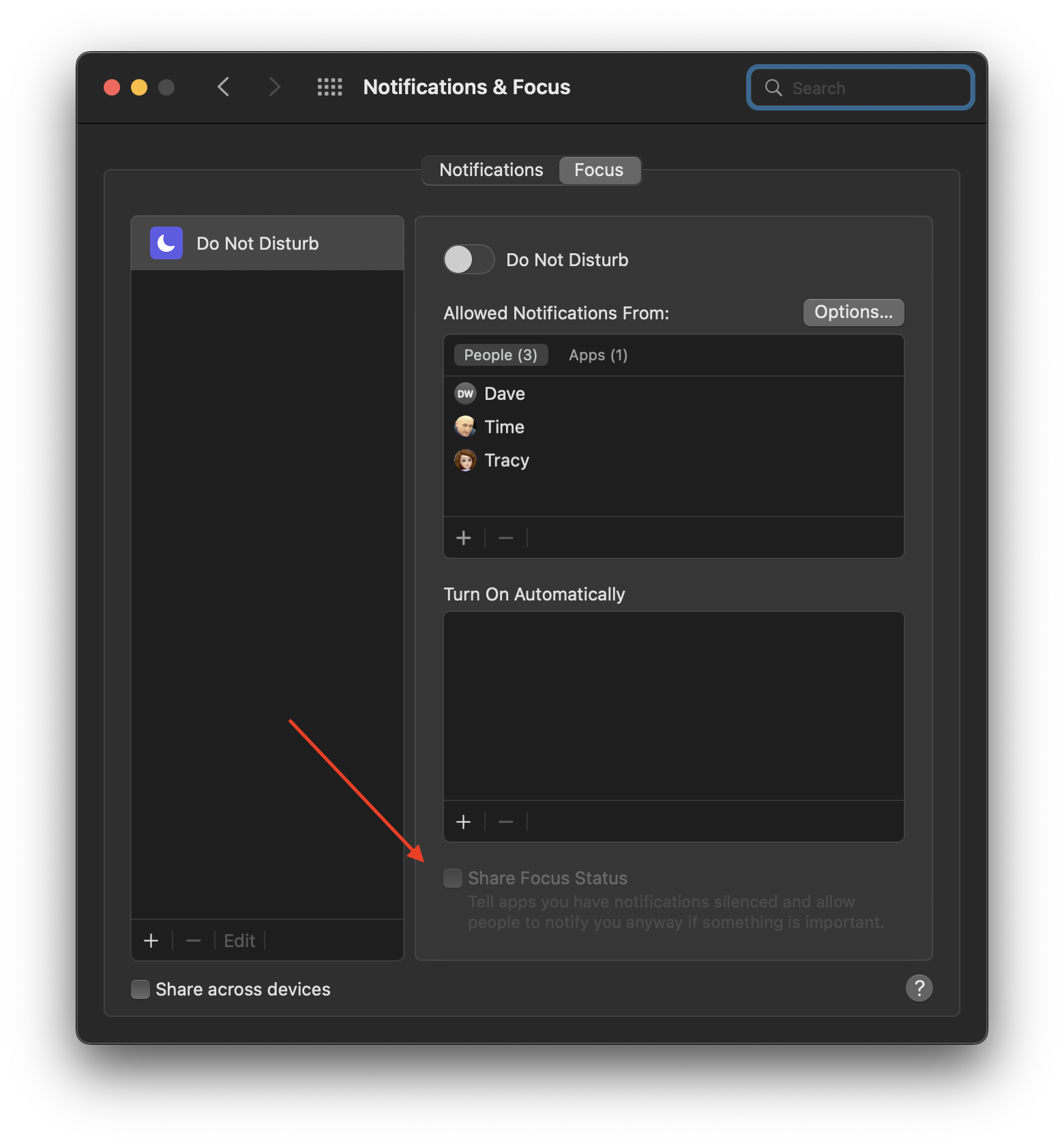
Some may think this is a minor issue, but when your phone is integrated into your work life and your clients are asking why you have notifications silenced, it becomes a more urgent problem to fix. Fingers crossed, I was finally able to fix this bug, but I'm still not entirely sure what did the trick. In addition to everything mentioned in this thread I also did the following: I continued switching settings on and off, on both devices around focus settings and messages, restarting the phone several times, upgraded to iOS16, I then did a soft reset (volume up, volume down and holding the side button until apple logo appeared), One thing I noticed under the default DND that cannot be deleted, under >Turn on Automatically, even though the DND was off and nothing was added under, "Turn On Automatically" the "Share focus Status" under the schedule box was greyed out but there was a checked box. (On the phone, this was before I upgraded now the settings are different), but on my Macbook Pro I had to add a schedule, then I could uncheck that box and then remove the schedule again. See image below.


I also enabled Messages in iCloud on my laptop (which is a new model) and synced. I have no idea which of these things finally did the trick.


After all of this, a week of troubleshooting on my own and with Apple Support, I'm very hesitant to use any kind of focus mode going forward which is unfortunate as the only one I used was for my sleep schedule and it was very nice not to hear text dings while trying to sleep. I guess I'll go back to using the side silent mode switch at night.

Nov 21, 2022 3:40 PM in response to vinnetta208

So basically about a few weeks ago or two months ago or so, my friend I’ve been friends with for years now it’s saying blink blink has silenced notifications and I got kind of worried thinking I might not like me even though that’s not true even though I don’t feel close with me anymore, but then a few minutes ago or sooner it’s in the same thing but both times they came in and went away what’s this mean? I said it to a family friend too a year older thn/than me, but it went away it has only happened once, I didn’t really think much of it except yeah they silence notifications why what happened right now and then it’s happened again I thought the same thing someway I wasn’t answering but still I’m just confused is it them thinking do I want to silence the notifications or do I want to keep them open I still like this person or is it just like an accidental thing like a butt dial, or something when I accidentally clicked on it or silence notifications, or like something in your pocket

Jan 9, 2023 4:30 AM in response to vinnetta208

In my case (Monterey) this was a bug. My friend did not have Focus enabled and I was seeing it on my Mac but not my iPhone. Quitting Messages and fully restarting my MacBook Air caused this warning to go away and the bug to fix itself. I'm only guessing but it may be a data cacheing bug where she has Focus enabled at night and once it appears on my Mac is stays there regardless of her Focus status the next day when it automatically is turned off on her end (but that is not reflected on my end)

This thread has been closed by the system or the community team. You may vote for any posts you find helpful, or search the Community for additional answers.

What does "notifications silenced" mean in Messages?

Welcome to Apple Support Community
A forum where Apple customers help each other with their products. Get started with your Apple Account.


