Safari 15 keeps logging me out of several sites every week or so

I've increased "remove history items" to 1 month - no luck

I've disabled all extensions - no luck


Still there are some sites which keep me logged in, but google.com, youtube.com, facebook.com, ebay.com - they are all throwing me out every week.


Other browsers doesn't do that.

Safari 14 didn't do that.


Am I alone with this porblem?

MacBook Pro Retina

Posted on Oct 12, 2021 11:32 AM

Reply
Question marked as Top-ranking reply

Posted on Nov 26, 2022 1:31 PM

I may just be lucky, but after nearing a year of this problem I followed the first two steps in this post on the developer forums explaining how the user there fixed it by:

Resetting all experiments: Develop -> Experimental Features -> Reset all to defaults
Re-enabling Safari -> Preferences -> Privacy -> enable "Prevent cross site tracking" + enable "Allow privacy-preserving measurements of ad effectiveness" (I suspect this is the issue but not sure)

I initially had several sites log out once, but I haven't experienced any further unexpected logouts in over a week, even when using the console/inspector. I hope I didn't just jinx myself 🤞


I'm running Safari 16.1 on Ventura 13.0 and a 2.9 GHz Quad-Core Intel Core i7.

Similar questions

107 replies
Question marked as Top-ranking reply

Nov 26, 2022 1:31 PM in response to radozd

I may just be lucky, but after nearing a year of this problem I followed the first two steps in this post on the developer forums explaining how the user there fixed it by:

Resetting all experiments: Develop -> Experimental Features -> Reset all to defaults
Re-enabling Safari -> Preferences -> Privacy -> enable "Prevent cross site tracking" + enable "Allow privacy-preserving measurements of ad effectiveness" (I suspect this is the issue but not sure)

I initially had several sites log out once, but I haven't experienced any further unexpected logouts in over a week, even when using the console/inspector. I hope I didn't just jinx myself 🤞


I'm running Safari 16.1 on Ventura 13.0 and a 2.9 GHz Quad-Core Intel Core i7.

Apr 15, 2022 1:09 PM in response to radozd

I was having the same issue in April 2022 and found your question after an online search. Thankfully, I found a solution that worked for me. I had many tabs open and at some point may have opened one or more as a new private tab. While having the auto log out issue, I noticed that if I ctrl-clicked (right-clicked) a link, one of the options was "Open Link in New Private Tab" and that a non-private option was not being given. I copied all my open tab links to a Pages document and closed every tab. I believe when I relaunched Safari that any private tabs were cleared out and it did resolve my issue. Hopefully this solution will help other frustrated users as they too search for a solution and stumble there way here.

Aug 3, 2022 6:57 AM in response to radozd

I started getting this problem today and found this thread. I found one possible solution (at least for me):


In the inspect window under Network, I had checked the little "Ignore the resource cache when loading resources" button. After unchecking this it looks to me like everything is back to normal. No logouts, still developer mode available.


Could be a bug where this setting affects all pages Safari loads, would have to do some more investigating to see what Safari is actually sending to confirm. Hope this trick can help other people out also.

Aug 7, 2022 4:38 PM in response to radozd

In the inspect window under Network, I had checked the little "Ignore the resource cache when loading resources" button. After unchecking this it looks to me like everything is back to normal. No logouts, still developer mode available.


i just looked and mine was not enabled, yet i still experience this bug.


i have been using safari technology preview for the last few months, and have not had the cookie problem with it at all. unfortunately, the latest version of STP (150) has an unrelated back-button bug that is driving me batty. still, i'd rather deal with that than lose my logins all the time.


Apr 12, 2022 8:50 AM in response to tobi089

I had to troubleshoot something in Safari a couple of weeks ago, so I trepidatiously enabled the Developer Tools again. Prior to doing that, however, I executed “defaults delete com.apple.Safari” to reset my Safari settings.


Amazingly, the last couple of weeks have been logout-free ever since. I’ve kept the Developer Tools enabled and have been using them frequently.


But I really don’t believe the problem is gone. Something weird causes it, and somehow I’m miraculously sidestepping it like a clairvoyant freak walking through a minefield.

Jun 7, 2022 11:06 AM in response to tal178

I’ve had Safari’s developer tools enabled since early April and somehow enjoyed a nice two-month spell that was free from this pestilent bug, but I suffered a relapse an hour ago after running some snippets of JavaScript in the console. My first clue: performing a Google search and noticing that the background color was white when my search results loaded. I’m a dark mode user, so I braced myself for the fallout: as expected, all my sessions with Facebook, Twitter, LinkedIn, GitHub, eBay, Amazon, and Gmail were gone.


Logging back into most of these sites results in a raft of security alerts that arrive via email and/or push notification. They all say variations of the same thing: “a login was detected from a new device we don’t recognize.” They usually contain links to the site so you can take immediate action to change your password. Somehow Google’s security page knows the name of my machine (SBP) and puts a little blue checkbox next to it, identifying it as “this device”. How Google ascertained that bit of private information is an alarming head-scratcher. Yes, I am logged into Gmail under “Internet Accounts” in macOS, but it’s curious how Google is able to correlate that connection with a “new device” it did not recognize minutes earlier.
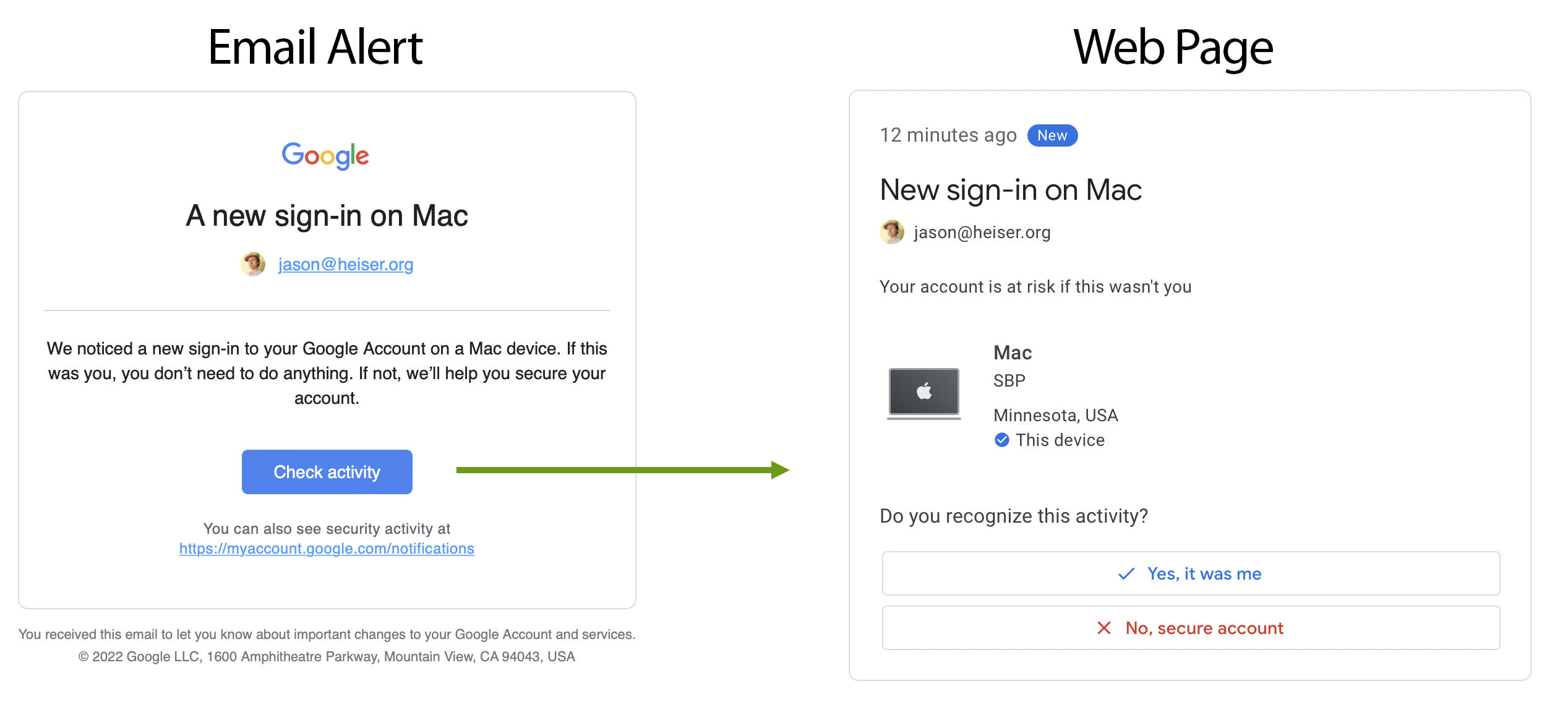


So all of these big technology companies must be using a device-based login technique that relies on some kind of fingerprint they derive from the information Safari gives it, probably a hash generated by JavaScript from a number of factors. And somehow interacting with Safari’s web developer tools can corrupt that fingerprint and make us a total stranger to major tech sites.


I’m a web developer, but I only work on small-time sites that use unsophisticated cookie-based login sessions that have been around for decades. These types of sessions are still working fine in Safari 15. I would love to hear from a developer who works on big-time tech sites that rely on device-based login techniques. Their insight would be interesting.


Oct 13, 2021 11:07 AM in response to radozd

Hello there radozd,


Thanks for posting here on the Apple Support Communities! This is a place where other Apple users can submit questions or respond to others to help lend a hand. Let's take a closer look as we do our best to provide some additional insight.


We understand some websites require you to sign back in more often than you're used to. Typically, this is controlled by the cookies or security settings as directed by the website itself. However, let's make sure Safari is set up to make sure they stay logged in as long as possible.


To get started, have you also tried completely resetting Safari by clearing all Safari history? We can do that by selecting Clear History from the Safari drop down menu next to the Apple icon.


Also, be sure to test with other Safari settings by going to Settings > Privacy. Some settings that help further protect your privacy and how websites can track you, can also lead to them signing you out sooner than expected: Change Privacy preferences in Safari on Mac


We hope this helps get you pointed in the right direction.


Take care.

Dec 16, 2021 4:38 AM in response to evgenyshev

evgenyshev wrote:

I spoke with a Senior Apple Care Specialist who helped me collect the logs and forward them to the Safari engineers. Yesterday I received an answer that Apple is aware of this problem, it is widespread, users bombarded support with similar complaints. According to the support specialist, the next update will fix the bug.

Good news, let's hope this will work out 🤞

Mar 2, 2022 4:08 PM in response to radozd

This problem started affecting me a week ago or so. It’s been driving me up the wall!


It only seems to affect tech giant sites: Facebook, Twitter, YouTube, LinkedIn. On many smaller websites, my login sessions continue to work after those big sites are struck by another wave of amnesia, which has happened to me at least four times today.


All the tech giants appear to use device-based login sessions that Safari 15 intermittently breaks. In Twitter’s session management tool, I can see a litany of “devices” but they are all the same MacBook Pro I am typing on now.


Opening the Web Inspector seems to cause it, but not immediately. An indeterminate amount of time must elapse before it occurs.


I’m on an M1 MacBook Pro running Monterey. I am not using the Private Relay beta, and I have disabled nearly all of Apple’s privacy-protecting measures.


It’s been a while since I went spelunking into macOS’s logs. Has anybody done this and seen any Safari-related error messages?

Mar 15, 2022 7:56 AM in response to radozd

NOOOOOOOOOOO.


Almost half of a year with this persistent bug, and there’s still no fix with this MAJOR update?!


My solution has been to disable Safari’s Web Developer tools and to only use Chrome for development. But sometimes I have to debug an issue with Safari, which means losing all my login sessions on major tech sites.


I can’t believe Apple’s own web developers haven’t torn down the door to Safari’s engineering department.

This thread has been closed by the system or the community team. You may vote for any posts you find helpful, or search the Community for additional answers.

Safari 15 keeps logging me out of several sites every week or so

Welcome to Apple Support Community
A forum where Apple customers help each other with their products. Get started with your Apple Account.

