pop-up menu and vertical search

Hi, I made a file on Excel but I can't replicate it on Numbers.


Let's imagine we have a table with a column (A) with various names and the next column (B) with values.

Each name corresponds to a value.


In another sheet I have so many cells that have to refer to names ONLY via a pop-up menu.

And in the next cell through a vertical search the corresponding value appears.


In Numbers the pop-up menu work very differently from Excel and I can't replicate the file.


You can help me?

Mac mini 2018 or later

Posted on Oct 26, 2021 3:20 AM

Reply
Question marked as Top-ranking reply

Posted on Oct 26, 2021 4:08 AM

Here's small example. Name - value in the 'Data' table, Popup (cell A1) and Lookup (cell B1) in the 'Lookup' table.


In the second column of the 'Lookup' table the formula is:


=VLOOKUP(A,Data::A:B,2,FALSE)


However: you have to type each name manually into the popup menu, and if you add more names to the Data table later, you also have to add them manually to the popup. You can't automatically populate the pop-up menu from the names in column A of Data.


Similar questions

5 replies
Question marked as Top-ranking reply

Oct 26, 2021 4:08 AM in response to Santiago_Calzolari

Here's small example. Name - value in the 'Data' table, Popup (cell A1) and Lookup (cell B1) in the 'Lookup' table.


In the second column of the 'Lookup' table the formula is:


=VLOOKUP(A,Data::A:B,2,FALSE)


However: you have to type each name manually into the popup menu, and if you add more names to the Data table later, you also have to add them manually to the popup. You can't automatically populate the pop-up menu from the names in column A of Data.


Oct 26, 2021 7:07 PM in response to Santiago_Calzolari

Excel's data validation is a pretty slick way to create a pop-up that can automatically modify itself when new names/items are added or removed. Creating a pop-up in Numbers is fairly easy but modifying it later is not as automatic as in Excel. Numbers pop-up menus are best for static lists.


You can create a pop-up from cells in a table, you do not have to type them into the pop-up.


Select the range of cells you want to have in the pop-up. Sort the column if you want the pop-up alphabetical. Format the cells as pop-up menu. It will include all values from the selected cells. Note that the list of items in the pop-up will be de-duplicated. The example above includes a duplicate of "John" and you can see the pop-up has it only once. It is case sensitive. "John" and "john" could both appear on the list.


The steps above will make all those cells pop-up menus, which may not be your intent so you may want to put them back like they were. Copy one of them, use Undo to revert all those cells back to regular cells, then Paste what you copied to wherever you want the pop-up.


Adding/removing items afterward can be done by editing the popup by hand or by going through the same steps to create a new pop-up.

Oct 26, 2021 10:51 PM in response to HD

"You can't automatically populate the pop-up menu from the names in column A of Data."


True, but you can populate the pop-up menus from the names in column A of the second table.

Here's a sample:

Start with the table as it currently exists—Mine has five cells, each with the same menu (shown in the Cell format Inspector panel to the right. Each cell has a different value chosen (not necessary for the editing to be done, but useful in pointing out a fact stated below).

Add enough rows to that table to contain the new names.

Enter the new names in the new cells of the column containing the pop-up menus.

(You may need to delete the Pop-up menus from these new rows to allow entering single names in each).

Note that in the inspector, these cells (after deleting the Pop-up menus) has the data format set to automatic.)

After entering the names, select all of the cells containing pop-up menus or (new) single names in that column.

Set the format of those cells to Pop-up menu.
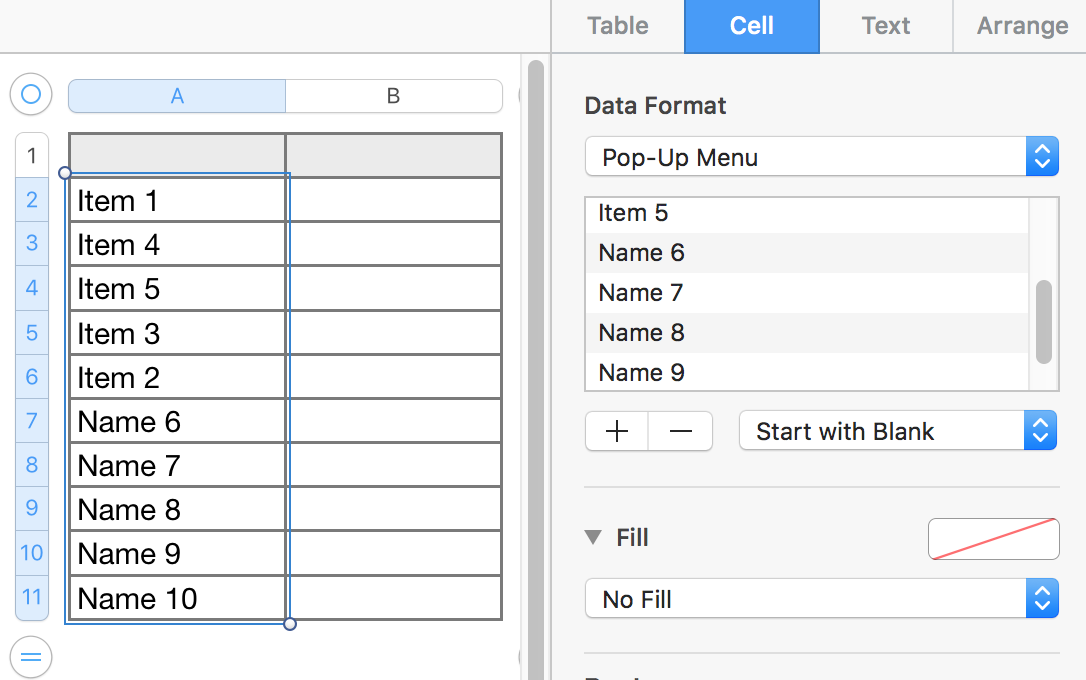

All 10 cells now contain the new 10 item pop-up menu. In each menu the original five names are in the same order as they were before the new names were added, and are followed by the five new names, in the order that they appeared on the list. Displayed values in the cells are unchanged from what was chosen or entered prior to setting the format to Pop-Up Menu.


Regards,

Barry

This thread has been closed by the system or the community team. You may vote for any posts you find helpful, or search the Community for additional answers.

pop-up menu and vertical search

Welcome to Apple Support Community
A forum where Apple customers help each other with their products. Get started with your Apple Account.

