"You can't automatically populate the pop-up menu from the names in column A of Data."
True, but you can populate the pop-up menus from the names in column A of the second table.
Here's a sample:
Start with the table as it currently exists—Mine has five cells, each with the same menu (shown in the Cell format Inspector panel to the right. Each cell has a different value chosen (not necessary for the editing to be done, but useful in pointing out a fact stated below).

Add enough rows to that table to contain the new names.
Enter the new names in the new cells of the column containing the pop-up menus.
(You may need to delete the Pop-up menus from these new rows to allow entering single names in each).
 Note that in the inspector, these cells (after deleting the Pop-up menus) has the data format set to automatic.)
After entering the names, select all of the cells containing pop-up menus or (new) single names in that column.
Set the format of those cells to Pop-up menu.
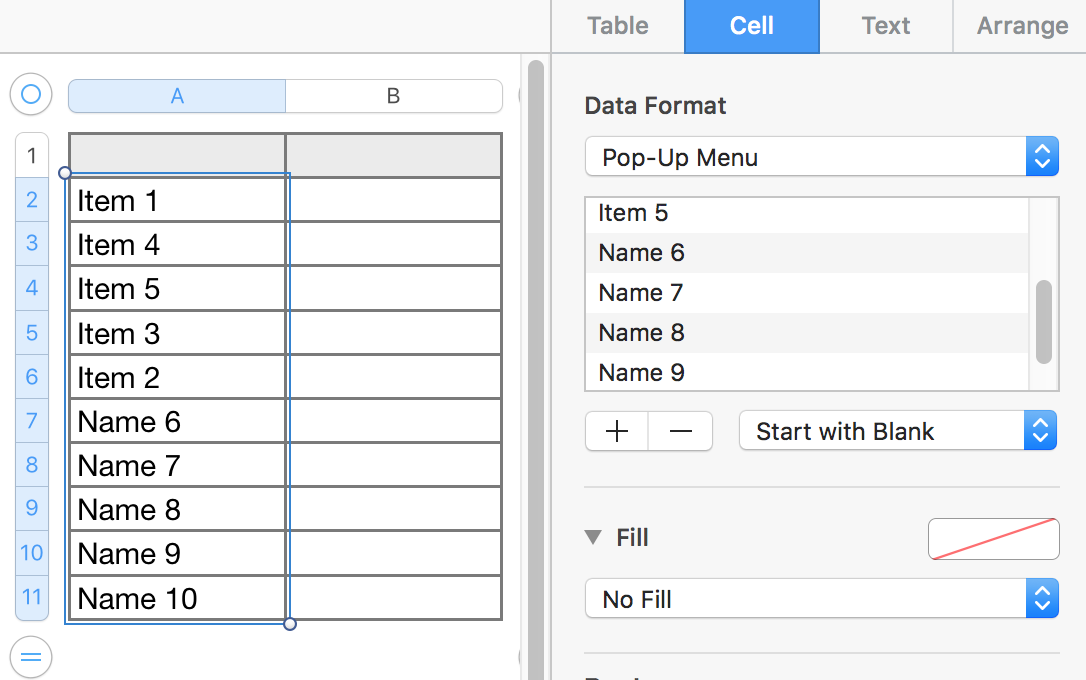
All 10 cells now contain the new 10 item pop-up menu. In each menu the original five names are in the same order as they were before the new names were added, and are followed by the five new names, in the order that they appeared on the list. Displayed values in the cells are unchanged from what was chosen or entered prior to setting the format to Pop-Up Menu.

Regards,
Barry


