Facebook freezes on iPad when I click comments

Every time I try to open comments on Facebook App, the App “freezes”/crashes & will not open comments. I have removed app & reinstalled with no luck. I have powered off iPad & no luck. Any other suggestions?


[Re-Titled by Moderator]

iPad Pro, 15

Posted on Nov 3, 2021 9:53 AM

Reply
Question marked as Top-ranking reply

Posted on Nov 7, 2021 7:47 AM

Ihnprandn wrote:

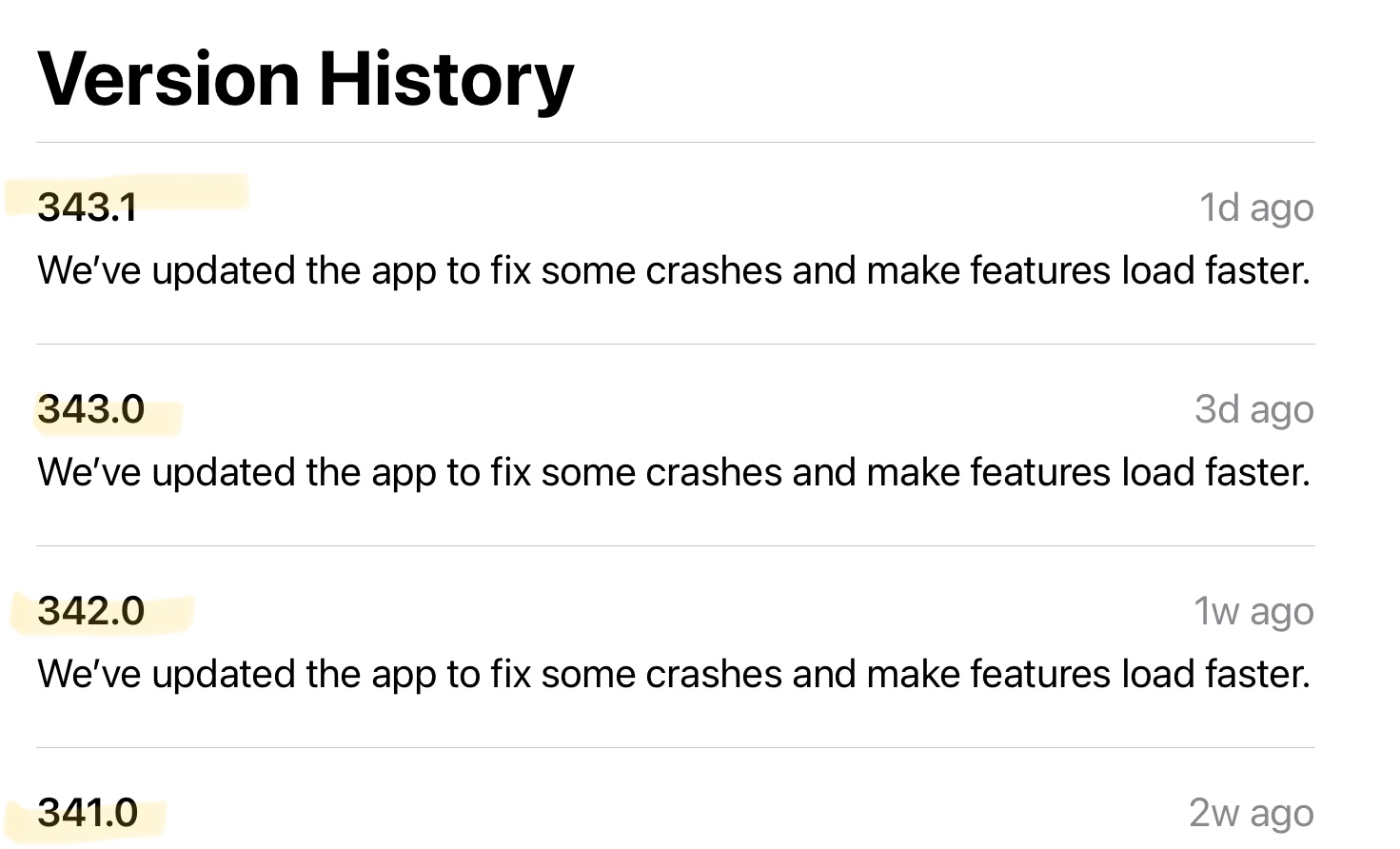
Definitely not right after ios 15.1 - I started experiencing it right before I downloaded that update. It started (for me) right after Facebook app 341.0 was installed. Installing ios 15.1 was part of my troubleshooting, the day the issue started. Subsequent FB updates up to 343.1 (today 11-6) have still not resolved the issue. :/.

Troubleshooting has involved rebooting; warm updates on each FB version, followed by testing, followed by rebooting, testing again, then uninstalling the app completely, rebooting, and reinstalling and rebooting - and the problem has remained, and even expanded.

341.0 - the problem was ONLY in comments on posts within GROUPS. Expanding comments for anything in the newsfeed worked

342.0 - the problem expanded to comments in the newsfeed, as well as groups

343.0 - no change in behavior

343.1 - no change in behavior

I have reported the issue to FB via their instructions for reporting issues, but did not feel confident that it was the right channel. :/

As others have said—disconnecting the keyboard miraculously solved the problem—which may be why the phone version of the app doesn’t have the issue. (I plan on testing this out with another keyboard, later today.)

For now—I’m getting by by keeping my iPad keyboard attached; when I need to view comments, I lift the iPad off the keyboard (case + keyboard combo), and touch “comments”—and when comments pop up, I set the iPad back down on the keyboard and start typing. Scrolling once you’re IN the comments doesn’t seem to be an issue…only getting into the comments.

(Not putting this out here to argue with you or anyone else—just to help others, like myself, who are trying to work through the problem, who might stumble across this issue! :))

https://discussions.apple.com/content/attachment/eaa60c46-4ce7-4be1-b5f0-d69cc44e32f5

Great documentation of problem that seems to be 15.x and these latest facebook updates. Kind of a pain to take ipad off when I want to see comments sometimes I just pull out my handy iphone. Very strange bug glad I finally found this thread was wondering if it were just me but not alone.

628 replies
Question marked as Top-ranking reply

Nov 7, 2021 7:47 AM in response to Ihnprandn

Ihnprandn wrote:

Definitely not right after ios 15.1 - I started experiencing it right before I downloaded that update. It started (for me) right after Facebook app 341.0 was installed. Installing ios 15.1 was part of my troubleshooting, the day the issue started. Subsequent FB updates up to 343.1 (today 11-6) have still not resolved the issue. :/.

Troubleshooting has involved rebooting; warm updates on each FB version, followed by testing, followed by rebooting, testing again, then uninstalling the app completely, rebooting, and reinstalling and rebooting - and the problem has remained, and even expanded.

341.0 - the problem was ONLY in comments on posts within GROUPS. Expanding comments for anything in the newsfeed worked

342.0 - the problem expanded to comments in the newsfeed, as well as groups

343.0 - no change in behavior

343.1 - no change in behavior

I have reported the issue to FB via their instructions for reporting issues, but did not feel confident that it was the right channel. :/

As others have said—disconnecting the keyboard miraculously solved the problem—which may be why the phone version of the app doesn’t have the issue. (I plan on testing this out with another keyboard, later today.)

For now—I’m getting by by keeping my iPad keyboard attached; when I need to view comments, I lift the iPad off the keyboard (case + keyboard combo), and touch “comments”—and when comments pop up, I set the iPad back down on the keyboard and start typing. Scrolling once you’re IN the comments doesn’t seem to be an issue…only getting into the comments.

(Not putting this out here to argue with you or anyone else—just to help others, like myself, who are trying to work through the problem, who might stumble across this issue! :))
https://discussions.apple.com/content/attachment/eaa60c46-4ce7-4be1-b5f0-d69cc44e32f5

Great documentation of problem that seems to be 15.x and these latest facebook updates. Kind of a pain to take ipad off when I want to see comments sometimes I just pull out my handy iphone. Very strange bug glad I finally found this thread was wondering if it were just me but not alone.

Nov 3, 2021 7:16 PM in response to BARONE

For iPad models with a Home button, do a simple hard reset of your iPad by holding down both the Home and sleep/wake/power button simultaneously until your iPad goes to black and restarts with Apple logo, then release the buttons.


OR


For much newer design iPad models, without a Home button, try the new simple hard reset procedure for the new 2018/2020/2021 iPad Pros, 2020 iPad Air 4 and 2021 iPad Mini 6 models.


1. Press and release the volume up button.


2. Then immediately press and release the volume down button.


3. Then, press and hold the single sleep/wake/power button You will see the Slide to Power off button, but keep on holding down the power button until you see the Apple logo, then let it go.


Once you have performed all the steps, wait for a few seconds and your 2018 iPad Pro will boot up completely to the iPad Pro’s Lock screen.


Best of Luck to You!

Nov 6, 2021 7:03 AM in response to armcee

Definitely not right after ios 15.1 - I started experiencing it right before I downloaded that update. It started (for me) right after Facebook app 341.0 was installed. Installing ios 15.1 was part of my troubleshooting, the day the issue started. Subsequent FB updates up to 343.1 (today 11-6) have still not resolved the issue. :/.


Troubleshooting has involved rebooting; warm updates on each FB version, followed by testing, followed by rebooting, testing again, then uninstalling the app completely, rebooting, and reinstalling and rebooting - and the problem has remained, and even expanded.


341.0 - the problem was ONLY in comments on posts within GROUPS. Expanding comments for anything in the newsfeed worked


342.0 - the problem expanded to comments in the newsfeed, as well as groups


343.0 - no change in behavior


343.1 - no change in behavior


I have reported the issue to FB via their instructions for reporting issues, but did not feel confident that it was the right channel. :/


As others have said—disconnecting the keyboard miraculously solved the problem—which may be why the phone version of the app doesn’t have the issue. (I plan on testing this out with another keyboard, later today.)


For now—I’m getting by by keeping my iPad keyboard attached; when I need to view comments, I lift the iPad off the keyboard (case + keyboard combo), and touch “comments”—and when comments pop up, I set the iPad back down on the keyboard and start typing. Scrolling once you’re IN the comments doesn’t seem to be an issue…only getting into the comments.


(Not putting this out here to argue with you or anyone else—just to help others, like myself, who are trying to work through the problem, who might stumble across this issue! :))

Nov 7, 2021 11:13 AM in response to dino_russ

Thanks! :). I found another thread online this morning (11/7) that said the bug affects other Bluetooth connected devices as well --headset, pencil--and it can also on the iPhone. Haven't bothered doing any additional testing to confirm that, but I've no reason to believe folks are making it up! 😁


Presumably Apple and FB will sort it out eventually!


In the mean time...did you see the better workaround for at least the keyboard issue, further down in the thread? Works like a charm! :)


Go to Setting | Accessibility| Keyboards | Full Keyboard Access - and turn it to ON. :)


Nov 11, 2021 5:44 PM in response to BARONE

Apparently, Facebook and the Apple Magic Keyboard for iPad Pro 11” don’t play nice together. Rebooting your device will unfreeze it, but within a few minutes it will freeze again.


The solution is to remove the Magic Keyboard before using Facebook. Then use the screen (pop up) keyboard instead.


I don’t know if other external keyboards have the same problem. If so, would somebody post a comment letting us know?


Both Apple and Meta (Facebook) will need to talk to each other to determine what’s causing this bug and get it repaired.

Dec 10, 2021 3:36 PM in response to GayleP1020

Right folks, you can all stop recommending the temporary fix, you don’t need to allow ‘Full Keyboard Access’ now.

Just make sure you’ve got the latest version of Facebook from the App Store, Ver. 346.0


If you did allow ‘Full Keyboard Access’ and have updated to the the latest version of Facebook you can revert back to default settings now, no workarounds needed.


FYI, it was a Facebook issue not an Apple issue.

Dec 12, 2021 8:09 AM in response to Rmpettor

Rmpettor wrote: after thinking more about this I am now thinking that Apple doesn’t like the fact that most of us are using aftermarket keyboards. So yes, maybe Apple but the kibosh on our aftermarket keyboards!

That's all mistaken. All keyboards were affected, there are hundreds of posts in this forum about it over the last 6 weeks, and the problem will go away now if you update your Facebook app.

This thread has been closed by the system or the community team. You may vote for any posts you find helpful, or search the Community for additional answers.

Facebook freezes on iPad when I click comments

Welcome to Apple Support Community
A forum where Apple customers help each other with their products. Get started with your Apple Account.


