iPhone 11 Pro crashed weather app, disconnected airpods and will not restart now

Hello,


I was listening to music on my AirPods pros while connected to my iPhone 11 Pro. I was glancing at the weather app and my phone started to slow, then the app crashed. It then led to my AirPods becoming disconnected and my Bluetooth turned off completely. I tried turning off my phone, but it does nothing. my lock button doesn't seem to work now. I can still unlock my phone with facial recognition and I can still slide from the pages on my phone, I just can no longer open any apps or do anything. Siri isn't even working on my phone now.

I don't know what else to do to try to restart my phone.

iPhone 11 Pro, iOS 15

Posted on Jan 28, 2022 10:50 AM

Reply
Question marked as Top-ranking reply

Posted on Jan 28, 2022 10:55 AM

Try a force restart


Force restart an iPhone with Face ID

To force restart iPhone X, iPhone XS, iPhone XR, iPhone 11, iPhone 12, or iPhone 13, do the following:

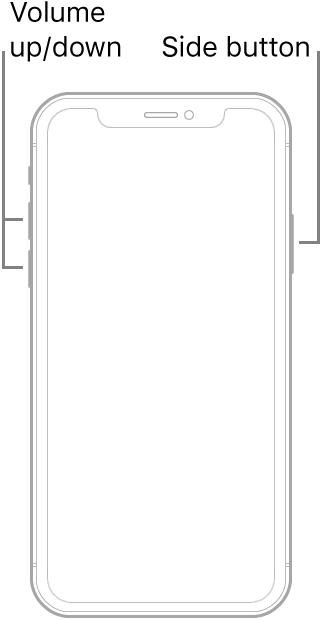
Press and quickly release the volume up button, press and quickly release the volume down button, then press and hold the side button. When the Apple logo appears, release the button.

Similar questions

3 replies
Question marked as Top-ranking reply

Jan 28, 2022 10:55 AM in response to aj_244

Try a force restart


Force restart an iPhone with Face ID

To force restart iPhone X, iPhone XS, iPhone XR, iPhone 11, iPhone 12, or iPhone 13, do the following:

Press and quickly release the volume up button, press and quickly release the volume down button, then press and hold the side button. When the Apple logo appears, release the button.

This thread has been closed by the system or the community team. You may vote for any posts you find helpful, or search the Community for additional answers.

iPhone 11 Pro crashed weather app, disconnected airpods and will not restart now

Welcome to Apple Support Community
A forum where Apple customers help each other with their products. Get started with your Apple Account.