iPhone 13 Safari Bookmarks all messed up

I just got the new iPhone 13. When I tried to save a new bookmark on Safari, it goes to the top of the list instead of the bottom. All the other old bookmarks are still from top to bottom (bottom being the newest).


On my iMac, the list is from top to bottom (oldest to newest). When I save a new bookmark on iMac, it goes to the bottom. But it automatically syncs to the iPhone to the top of the list.


How do I fix the issue?

Posted on Mar 23, 2022 11:05 AM

Reply
Question marked as Top-ranking reply

Posted on Mar 24, 2022 11:19 AM

Hey corolle,


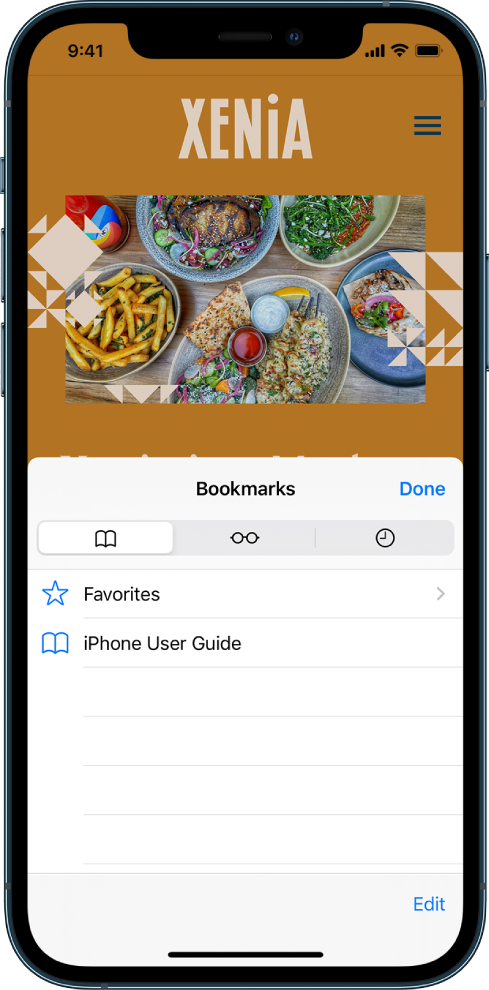
While there is not an option or feature available to adjust how bookmarks are initially saved, you can reorder your bookmarks using the steps from the following article: Bookmark webpages in Safari on iPhone


"View and organize your bookmarks

  1. Tap the Show Bookmarks button.
  2. Tap Edit, then do any of the following:
    • Create a new folder
    • Delete bookmarks
    • Rename bookmarks
    • Reorder bookmarks

The Bookmarks screen, with options to see favorites and browsing history along with bookmarks."


Thanks!

Similar questions

1 reply
Question marked as Top-ranking reply

Mar 24, 2022 11:19 AM in response to corelle

Hey corolle,


While there is not an option or feature available to adjust how bookmarks are initially saved, you can reorder your bookmarks using the steps from the following article: Bookmark webpages in Safari on iPhone


"View and organize your bookmarks

  1. Tap the Show Bookmarks button.
  2. Tap Edit, then do any of the following:
    • Create a new folder
    • Delete bookmarks
    • Rename bookmarks
    • Reorder bookmarks

The Bookmarks screen, with options to see favorites and browsing history along with bookmarks."


Thanks!

This thread has been closed by the system or the community team. You may vote for any posts you find helpful, or search the Community for additional answers.

iPhone 13 Safari Bookmarks all messed up

Welcome to Apple Support Community
A forum where Apple customers help each other with their products. Get started with your Apple Account.