Bluetooth Disconnecting After Waking From Sleep

After waking my Mac from sleep, Bluetooth is turned off. My keyboard and mouse don't work. I tried resetting the Bluetooth module, running sudo pkill bluetoothd in terminal & restarting the computer, and combinations of those 2 things. I also tried disconnecting the devices, resetting the Bluetooth module, and repairing the devices. Nothing has worked. I have to plug in the keyboard and use a different mouse that's connected via USB in order to turn the computer on and turn Bluetooth on again.


The Mac is currently on MacOS Monterey 12.3.

iMac 21.5″, macOS 12.3

Posted on Apr 7, 2022 8:11 AM

Reply
Question marked as Top-ranking reply

Posted on Apr 8, 2022 9:09 AM

Hello juleek,


Does that persist after updating your Mac to the latest macOS 12.3.1 using the steps below?

1. From the Apple menu  in the corner of your screen, choose System Preferences.
2. In the System Preferences window, click Software Update.
If your System Preferences doesn't include Software Update, learn how to upgrade to macOS Monterey or upgrade to an older macOS, and use the Updates tab of the App Store app to get app updates.
3. Click Update Now or Upgrade Now:
• Update Now installs the latest updates for the currently installed version, such as an update from macOS Big Sur 11.5 to macOS Big Sur 11.6. 
• Upgrade Now installs a major new version with a new name, such as macOS Monterey. Software Update shows only upgrades that are compatible with your Mac.
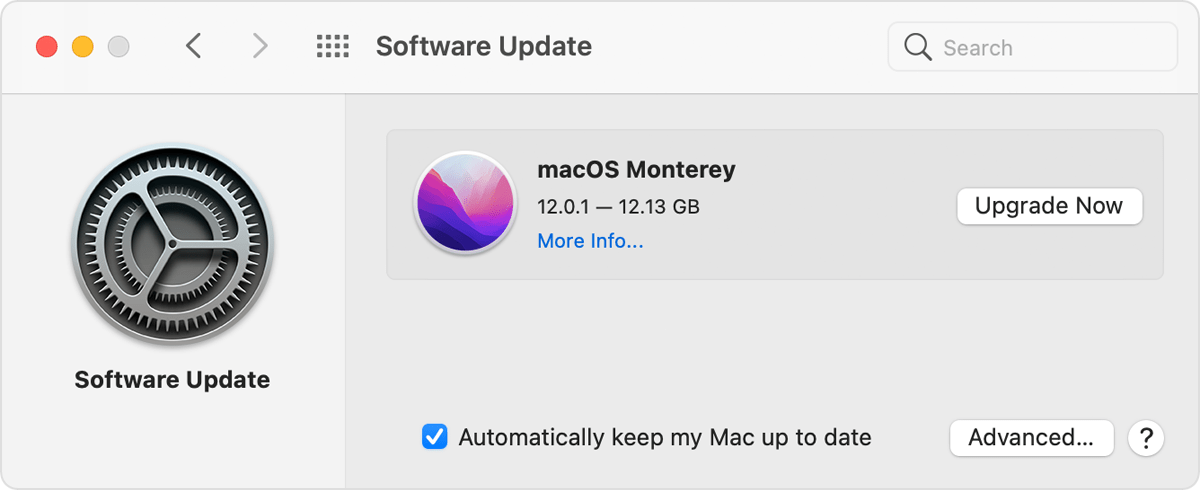
Software Update preferences
When Software Update says that your Mac is up to date, then macOS and all of the apps it installs are up to date, including Safari, Messages, Mail, Music, Photos, FaceTime, and Calendar.

This article also covers that process: Update macOS on Mac


How about after booting your Mac into safe mode using the steps from this article? How to use safe mode on your Mac


It can take a few extra minutes to boot into safe mode. Your screen may flash or flicker while in safe mode. Those behaviors are expected. Testing in safe mode runs a check on your disk, removes some cached files, and can help isolate conflicts with startup items.


Let us know your results, and we'll keep moving forward from there.

Similar questions

5 replies
Question marked as Top-ranking reply

Apr 8, 2022 9:09 AM in response to juleek

Hello juleek,


Does that persist after updating your Mac to the latest macOS 12.3.1 using the steps below?

1. From the Apple menu  in the corner of your screen, choose System Preferences.
2. In the System Preferences window, click Software Update.
If your System Preferences doesn't include Software Update, learn how to upgrade to macOS Monterey or upgrade to an older macOS, and use the Updates tab of the App Store app to get app updates.
3. Click Update Now or Upgrade Now:
• Update Now installs the latest updates for the currently installed version, such as an update from macOS Big Sur 11.5 to macOS Big Sur 11.6. 
• Upgrade Now installs a major new version with a new name, such as macOS Monterey. Software Update shows only upgrades that are compatible with your Mac.
Software Update preferences
When Software Update says that your Mac is up to date, then macOS and all of the apps it installs are up to date, including Safari, Messages, Mail, Music, Photos, FaceTime, and Calendar.

This article also covers that process: Update macOS on Mac


How about after booting your Mac into safe mode using the steps from this article? How to use safe mode on your Mac


It can take a few extra minutes to boot into safe mode. Your screen may flash or flicker while in safe mode. Those behaviors are expected. Testing in safe mode runs a check on your disk, removes some cached files, and can help isolate conflicts with startup items.


Let us know your results, and we'll keep moving forward from there.

Apr 29, 2022 2:33 PM in response to juleek

Hi juleek,


We would recommend that you contact Apple Support, so they can look into this further. As a Bluetooth device, by design, such as your mouse or keyboard, should be able to wake your iMac.

Apple Support

Tell them exactly what's happening, which Bluetooth devices you're using, and the troubleshooting you've done.


In the meantime, to wake your iMac try lightly pressing the power button to wake your iMac.


Thank you!


This thread has been closed by the system or the community team. You may vote for any posts you find helpful, or search the Community for additional answers.

Bluetooth Disconnecting After Waking From Sleep

Welcome to Apple Support Community
A forum where Apple customers help each other with their products. Get started with your Apple Account.
