Powerbeats Pro has no volume despite being connected to my iPhone.

Powerbeats pro has no volume despite being charged to 100% and shows being connected to Iphone. Attempted to reset but no flashing red/white lights so unable to reset.


[Re-Titled by Moderator]

iPhone XR, iOS 15

Posted on Apr 12, 2022 8:32 AM

Reply
Question marked as Top-ranking reply

Posted on Apr 13, 2022 9:18 AM

I ended up deleting the device Powerbeats Pro from my Bluetooth and then reinstalling it. Then it worked! Thank you for taking the time to answer. I was going to see if my IPad worked but couldn’t get my book to open on it. Thanks!

4 replies

Apr 13, 2022 8:26 AM in response to mlp267mp

Hi mlp267mp,


We see you're having some issues with your Powerbeats Pro, and you've tried resetting them. We recommend double-checking the steps here to Reset your Beats earphones and see if that helps:


"Reset Powerbeats Pro

  1. Place both earbuds in the case. Leave the case open.
  2. Press and hold the system button on the case for 15 seconds or until the LED indicator light flashes red and white.
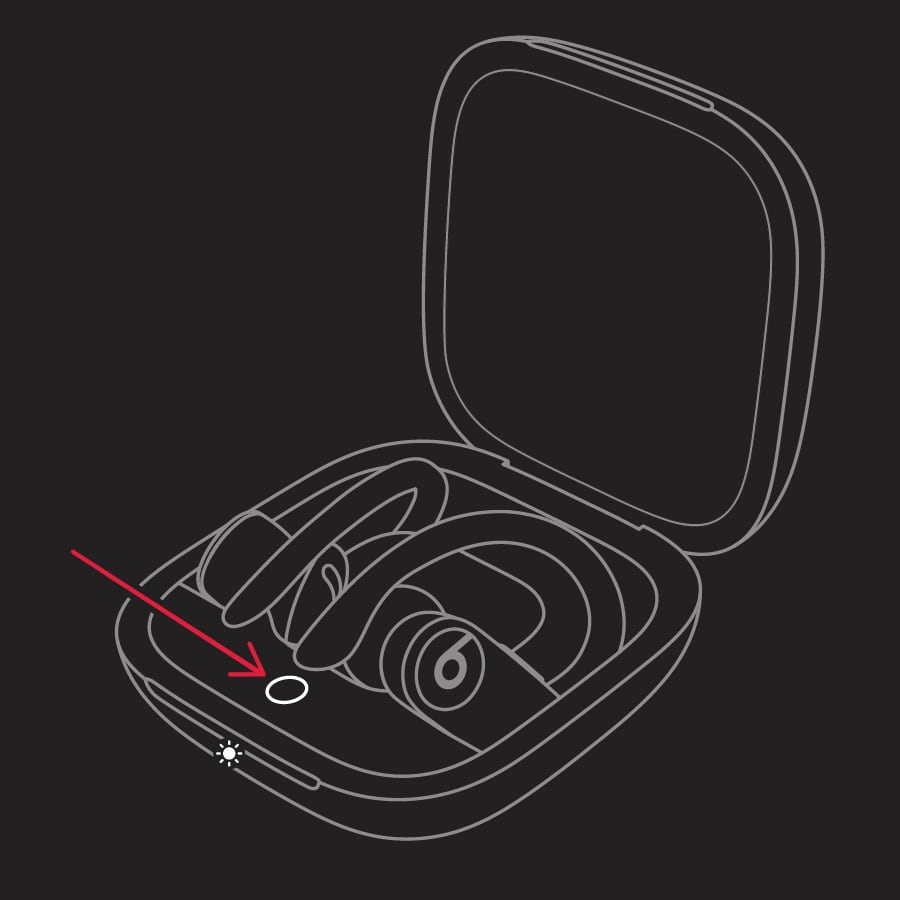
  3. Powerbeats Pro indicator light
  4. Release the system button.

The LED indicator light will continue to flash white, which means that you can pair your Powerbeats Pro with your iPhone, Mac, Android device, or other device again."


As another possibility, do you have another device available that you could test the Powerbeats Pro with? If so, let us know if the same thing happens with another device.


Have a good one.

This thread has been closed by the system or the community team. You may vote for any posts you find helpful, or search the Community for additional answers.

Powerbeats Pro has no volume despite being connected to my iPhone.

Welcome to Apple Support Community
A forum where Apple customers help each other with their products. Get started with your Apple Account.
