Cellular Data on new SE

Hi,


I bought the 3rd Gen SE a few weeks ago and it seems like something funky is up with the dual SIM. My cellular data doesn't work on Primary, only on secondary cellular even though I've only got one phone number. If I'm off WiFi and try to use Primary, it doesn't not work. Furthermore, the phone resets the default to Primary whenever I restart it. I didn't even set it up with two cellular lines; I suppose it came that way as a default.


Anyone else experiencing this?

iPhone SE, iOS 15

Posted on Apr 17, 2022 9:04 AM

Reply
Question marked as Top-ranking reply

Posted on Apr 17, 2022 2:16 PM

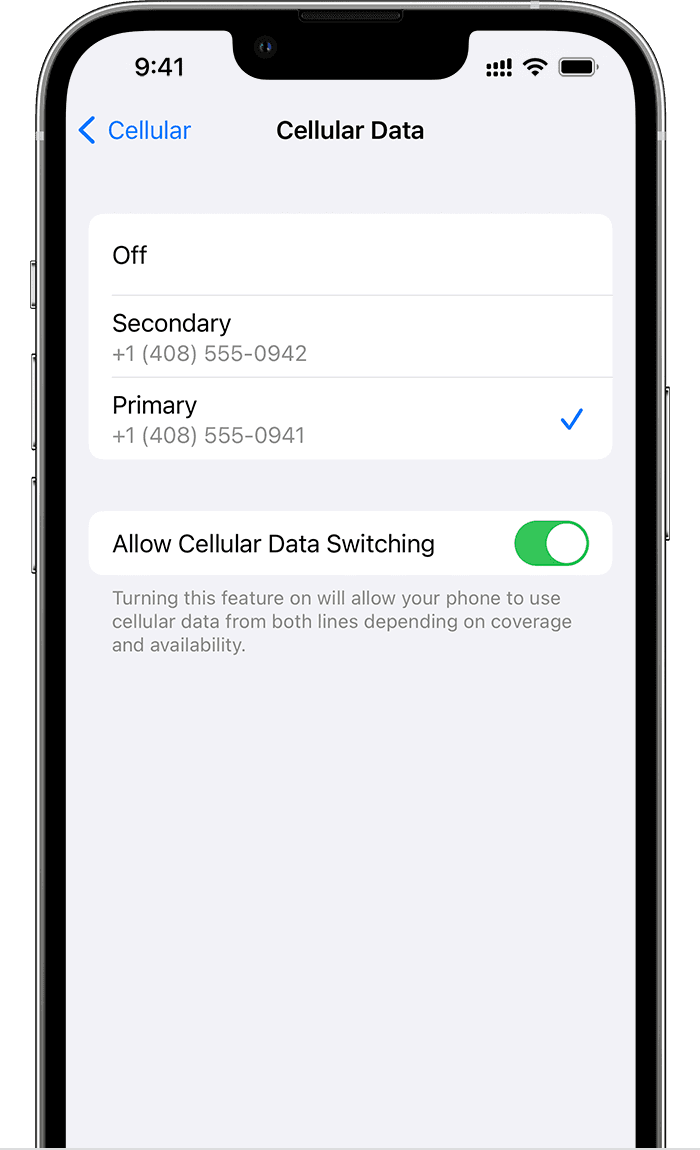
Change your cellular data number

One number at a time can use cellular data. To change which number uses cellular data, follow these steps: 


  1. Go to Settings.
  2. Tap either Cellular or Mobile Data.
  3. Tap Cellular Data. 
  4. Tap the number you want to use cellular data. 

If you turn on Allow Cellular Data Switching, then while you're on a voice call on your voice-only number, that number automatically switches to use voice and data.6This lets you use both voice and data while on the call.

If you turn off Allow Cellular Data Switching and you're active on a voice number that isn't your designated cellular-data number, then cellular data won't work while you're on the call.

To turn on Allow Cellular Data Switching, follow these steps:

  1. Go to Settings.
  2. Tap either Cellular or Mobile Data.
  3. Tap Cellular Data.
  4. Turn on Allow Cellular Data Switching.


2 replies
Question marked as Top-ranking reply

Apr 17, 2022 2:16 PM in response to rckraft

Change your cellular data number

One number at a time can use cellular data. To change which number uses cellular data, follow these steps: 


  1. Go to Settings.
  2. Tap either Cellular or Mobile Data.
  3. Tap Cellular Data. 
  4. Tap the number you want to use cellular data. 

If you turn on Allow Cellular Data Switching, then while you're on a voice call on your voice-only number, that number automatically switches to use voice and data.6This lets you use both voice and data while on the call.

If you turn off Allow Cellular Data Switching and you're active on a voice number that isn't your designated cellular-data number, then cellular data won't work while you're on the call.

To turn on Allow Cellular Data Switching, follow these steps:

  1. Go to Settings.
  2. Tap either Cellular or Mobile Data.
  3. Tap Cellular Data.
  4. Turn on Allow Cellular Data Switching.


Apr 17, 2022 2:15 PM in response to rckraft

To use two different carriers, your iPhone must be unlocked. Otherwise, both plans must be from the same carrier. If a CDMA carrier provides your first SIM, your second SIM won't support CDMA. Contact your carrier for more information. 


If you have an enterprise or corporate cellular service plan, check with your company administrator to see if they support this feature.

This thread has been closed by the system or the community team. You may vote for any posts you find helpful, or search the Community for additional answers.

Cellular Data on new SE

Welcome to Apple Support Community
A forum where Apple customers help each other with their products. Get started with your Apple Account.