Watch 6 placing calls on its own

Here's the deal. Working in the yard--mower, edger, string trimmer--I carry my watch in my pocket. Recently, it has started, for no obvious reason, placing calls. The calls are to my wife, who is the first of the Favorites in that list, which is why I guess that's who it calls. Infograph Modular is my watch face, if that makes a difference. Watch is up to date with 8.5.1.

I'd like to find a way to just prevent the watch from making calls, as it is really handy to be able answer calls from the watch. Oh, the watch only has call service via the iPhone--no direct cell service to the watch. Thank.

Apple Watch Series 6

Posted on May 9, 2022 5:00 PM

Reply
Question marked as Top-ranking reply

Posted on May 10, 2022 11:17 AM

Hey there, bowserb.


If you don't already, you could use a passcode on your Apple Watch to see if that may help. You can see how to do that by following the steps below, from this article: Lock or unlock Apple Watch - Apple Support


"Change your passcode

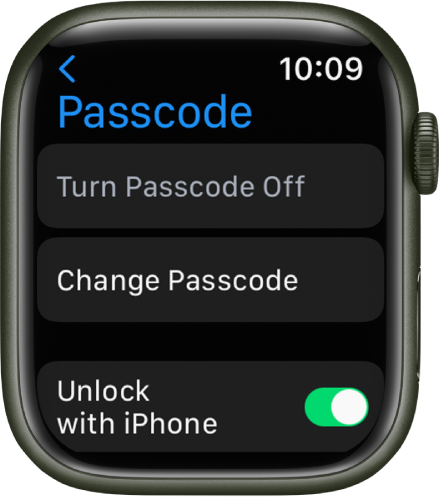
Passcode settings on Apple Watch, with Turn Passcode Off button at top, Change Passcode button below it, and Unlock with iPhone switch at the bottom.

You can change the passcode you created when you first set up your Apple Watch by following these steps:

  1. Open the Settings app  on your Apple Watch.
  2. Tap Passcode, then tap Change Passcode and follow the onscreen prompts.

You can also open the Apple Watch app on your iPhone, tap My Watch, tap Passcode, then tap Change Passcode and follow the onscreen prompts.

Tip: To use a passcode longer than four digits, open the Settings app  on your Apple Watch, tap Passcode, then turn off Simple Passcode."


Also, it could be possible that while in your pocket, it might be getting accidental taps and that is why these calls are happening. To completely stop this from happening, you may need to turn off your Apple Watch before putting it in your pocket. You can do this by pressing and holding the side button until the Power Off slider appears.


Take care.


3 replies
Question marked as Top-ranking reply

May 10, 2022 11:17 AM in response to bowserb

Hey there, bowserb.


If you don't already, you could use a passcode on your Apple Watch to see if that may help. You can see how to do that by following the steps below, from this article: Lock or unlock Apple Watch - Apple Support


"Change your passcode

Passcode settings on Apple Watch, with Turn Passcode Off button at top, Change Passcode button below it, and Unlock with iPhone switch at the bottom.

You can change the passcode you created when you first set up your Apple Watch by following these steps:

  1. Open the Settings app  on your Apple Watch.
  2. Tap Passcode, then tap Change Passcode and follow the onscreen prompts.

You can also open the Apple Watch app on your iPhone, tap My Watch, tap Passcode, then tap Change Passcode and follow the onscreen prompts.

Tip: To use a passcode longer than four digits, open the Settings app  on your Apple Watch, tap Passcode, then turn off Simple Passcode."


Also, it could be possible that while in your pocket, it might be getting accidental taps and that is why these calls are happening. To completely stop this from happening, you may need to turn off your Apple Watch before putting it in your pocket. You can do this by pressing and holding the side button until the Power Off slider appears.


Take care.


May 10, 2022 3:51 PM in response to claire504

Thanks. That's the answer. Yes something is causing taps. I tried turning the band inside out, and that seems to have helped but not eliminated the problem. I had forgotten about the passcode, which I initially did use but found it got in slowed things down. Maybe a very simple code is worth a try.


Oh, and turning it off would mean I don't get credit for the 12,000 steps or so I get when doing the yard! Otherwise, I'd just leave it in the house when working in the yard. Gotta get that exercise credit!

Thanks again.

This thread has been closed by the system or the community team. You may vote for any posts you find helpful, or search the Community for additional answers.

Watch 6 placing calls on its own

Welcome to Apple Support Community
A forum where Apple customers help each other with their products. Get started with your Apple Account.