Selected paragraph styles not appearing in sidebar when selected

I've specified a paragraph style for each new chapter heading in a novel I'm editing, but when I select this paragraph style to appear in the side bar, to create a table of contents, none appear.

any suggestions about what step I'm missing?

iMac (24-inch, M1, 2021, 2 ports)

Posted on Aug 9, 2022 3:33 AM

Reply
2 replies

Aug 10, 2022 7:32 AM in response to Moolie

Greetings Moolie,


If you are having difficulty with paragraph styles and adding a table of contents, follow the guidance found here:


Apply a paragraph style in Pages on Mac - Apple Support

Apply a paragraph style
1. Select one or more paragraphs, or click anywhere in a paragraph to apply the style to only that paragraph.
Note: You can’t apply a paragraph style to text in a table cell.
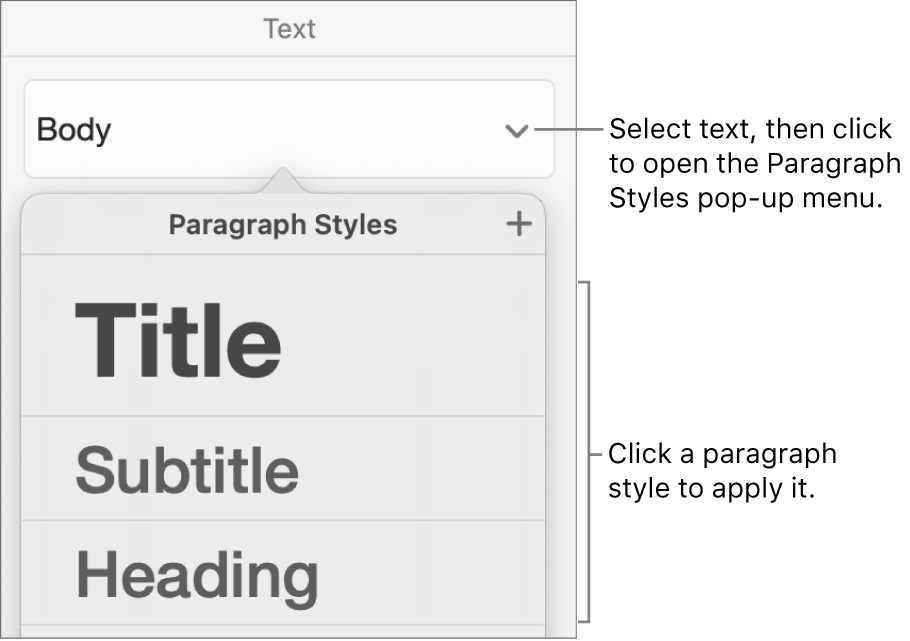
2. In the Format  sidebar, click the Text tab, click the paragraph style name near the top of the sidebar, then choose a style from the Paragraph Styles pop-up menu.
The Paragraph Styles menu.
If you later change the look of text that has a paragraph style applied to it—for example, you make the text bold or change its color—an asterisk, and in some cases an Update button, appears next to the style’s name in the Paragraph Styles pop-up menu, indicating that the style has an override. You can update the paragraph style to incorporate the overrides if you want.
You can also apply character styles and apply list styles to selected text.


Create a table of contents in Pages on Mac - Apple Support


Take care.

This thread has been closed by the system or the community team. You may vote for any posts you find helpful, or search the Community for additional answers.

Selected paragraph styles not appearing in sidebar when selected

Welcome to Apple Support Community
A forum where Apple customers help each other with their products. Get started with your Apple Account.