Stop sharing emergency location after activation

"After an emergency call ends, your iPhone alerts your emergency contacts with a text message, unless you choose to cancel.


When your location is being shared, you'll get a reminder to stop every 4 hours for 24 hours. To stop the updates, tap the status bar and select "Stop Sharing Emergency Location."


What is the “status bar”? Can someone send a screenshot?

Posted on Aug 9, 2022 6:16 AM

Reply
Question marked as Top-ranking reply

Posted on Aug 10, 2022 8:14 AM

Hey there Samster711,


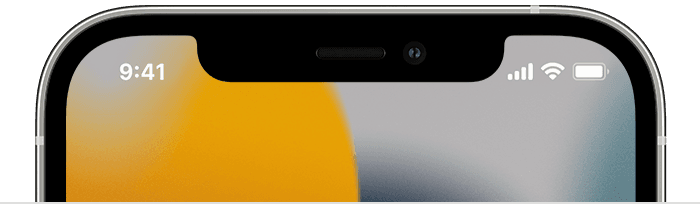
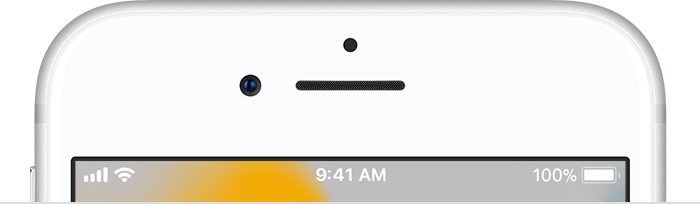
The status bar will be found at the top of your iPhone, where you see cell signal, Wi-Fi, etc.


Check out this link for more details on what's seen in the status bar: Learn the meaning of the iPhone status icons - Apple Support


Status icons appear in the status bar on your iPhone:
iPhone models with Face ID
iPhone models with Touch ID


Status icons and symbols on your iPhone - Apple Support


Take care!


1 reply
Question marked as Top-ranking reply

Aug 10, 2022 8:14 AM in response to Samster711

Hey there Samster711,


The status bar will be found at the top of your iPhone, where you see cell signal, Wi-Fi, etc.


Check out this link for more details on what's seen in the status bar: Learn the meaning of the iPhone status icons - Apple Support


Status icons appear in the status bar on your iPhone:
iPhone models with Face ID
iPhone models with Touch ID


Status icons and symbols on your iPhone - Apple Support


Take care!


This thread has been closed by the system or the community team. You may vote for any posts you find helpful, or search the Community for additional answers.

Stop sharing emergency location after activation

Welcome to Apple Support Community
A forum where Apple customers help each other with their products. Get started with your Apple Account.