iOS 16 Touch Screen Problems

iPhone 11. Updating to iOS16 causes touch screen to fail.

Updated to iOS 15.7 first, then updated to iOS16 straight afterwards. Both updates ran with no issues.

After update to 16, touch screen is operating randomly. (Touch one icon and another is selected, cannot put correct numbers in to make a phone call etc) Everything else appears to work. No problems with touch before the update.


[Re-Titled by Moderator]


iPhone 11, iOS 16

Posted on Sep 12, 2022 3:30 PM

Reply
Question marked as Top-ranking reply

Posted on Sep 13, 2022 2:06 PM

OK - have spent the day with Apple tech trying to diagnose the problem. No software fixes resets or restores worked. I was told the problem is caused by new display features in iOS16 which are incompatible with non-Apple replacement screens.


The phones cannot be restored back to iOS15.7 after upgrading to iOS16. The only solution offered is to replace the display with an Apple display (cost £220 ish). I wish they had warned me of this before doing the upgrade to iOS16!!


By the way, I discovered that fast double taps kind of work sometimes when selecting apps and entering data.

146 replies

Sep 24, 2023 6:46 PM in response to Pipcom

Bad news guys. iOS 17 still not solve this problem.


Reminder Apple trying to fix this since 16.0.2 but they didn't say about 3rd party screen. It is just say after being serviced.
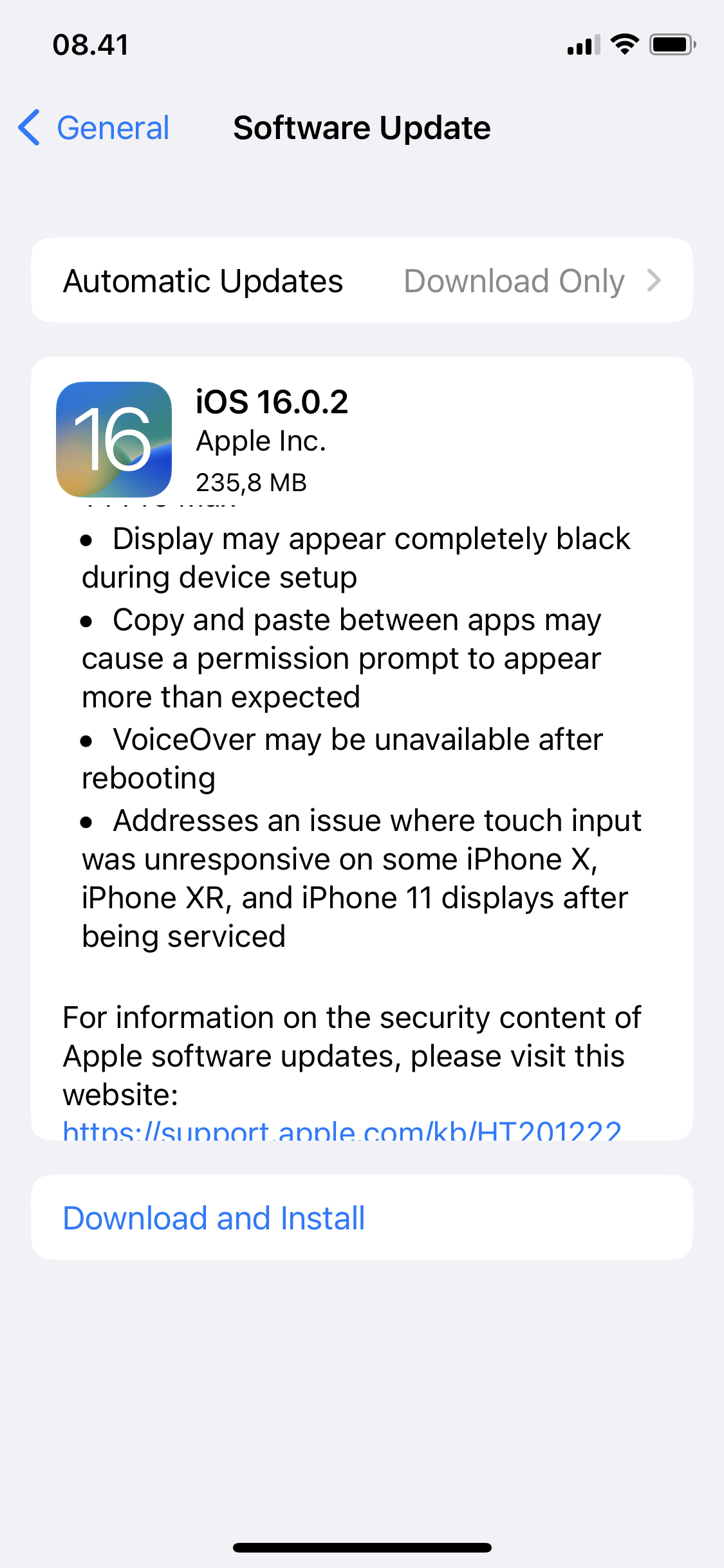


Summary until now.

iOS 15 touch screen working normal.

iOS16 made touch screen wonky.

Some people suspect 3rd party screen is to blame. Which is work great in iOS 15. People buying second hand without knowledge whatever previous owner do to their iPhone is screwed. But then there are also report some iPhone with original parts also affected.

Stop gap measures using Accessbility Touch Accomodation.

iOS 16.4.1 somehow making it less bit annoying when touch screen freeze again.

iOS 16.6.1 making it worse again with random freeze touch screen that must hard reset.

iOS 17.01 still same with 16.6.1. Touch Accomodation barely help anymore.


Previously there are report their iPhone return to normal behaviour after software restore, that mean wipe all and reinstall iOS from fresh. I willl do later if I have time.


[Edited by Moderator]

Sep 14, 2022 7:10 AM in response to foreigner_

foreigner_ wrote:

Hopefully. But I'm not sure if Apple will patch this issue as it only affects non-Apple replacement screens

This could be potential news. "Apple letting iPhone with third party screen replacement become useless with iOS 16 Update. Now this iPhone will goes to the trash bin. What with Apple go green and zero carbon footprint program? Do they care at all?"


Honestly, I'm buying second hand iPhone. I have no idea the seller replace the screen with third party. When I buy it, everything seems normal in iOS 15.x. Like how I know they replace something inside iPhone without additional software running on PC or Mac.


If Apple really don't want any third party spare part, they should build app that letting user show every part in iPhone still genuine from factory.

Sep 22, 2022 7:38 PM in response to omega8719

iOS 16.0.2 somehow didn't fix the problem. On this list say X, XR, and 11 but actually from what I read XS, 12 and more is afffected. Now I'm on XS, this update 16.0.2 making a little bit worse. Home gesture not instant anymore with Touch Accomodation On. Work around explained in previous page. Any gesture in Home screen need tap and wait half second to respond. You just can't swiped your finger left to right (vice versa) really fast. Sometimes it work but most of the you must wait a mili second longer. THIS IS NOT TAP AND HOLD. I think this is related with Swipe Gesture On. Scrolling inside app feel normal.


If I try disable Touch Accomodation, it still not responsive just as vanilla iOS 16.


Oct 15, 2022 7:37 AM in response to Ste55

I have a 3rd party screen too on my iPhone XS. I have been using the above workaround and it works most of the time. If I make a call or receive a call of more than 3-4 minutes, the touchscreen stops working and I have to force restart the phone to make it usable. Imagine if I have to switch the app during a call, it can’t be done as the touchscreen is unresponsive unless I force reboot the phone. I have heard iOS 16.1 will be released this month in October 2022. If it fixes the issue well and good otherwise I’ll have to go down to 15.7 and no more updates further.

Nov 27, 2022 4:45 AM in response to Stez65

Omg!! I thought that I was going crazy!!! Ever since I updated my iPhone 8 to the 16. IOS update I have been having problems with my keyboard when I try typing a text or email, I am pressing letters that I think are right only they are coming up wrong, and because I type fast I would just hit send thinking that my text or email was correct without looking at it. I sent a couple of texts to my son and he actually asked if I was drinking or something because my text looked as though I was drunk and couldn't text right!! I don't drink!!

I also have problems swiping, and my screen just won't respond when I try to do something in apps where it feels like the screen is frozen, I also can't scroll up or down at times!! I really thought that I was going nuts with the texting with the wrong letters coming up!! Is there anything that we can do to fix this?

This thread has been closed by the system or the community team. You may vote for any posts you find helpful, or search the Community for additional answers.

iOS 16 Touch Screen Problems

Welcome to Apple Support Community
A forum where Apple customers help each other with their products. Get started with your Apple Account.
