How to limit background music from Spotify?

Hi,


I found Time limit on Spotify - Apple Community, but none of the amswers is helping. The screen time is only counted if the Spotify app is in foreground. But after locking the phone the music is still playing, but the time isn't counted as screen time anymore. This way my kid can hear music all day long and the whole idea if limiting the time doesn't work. To be precise, the screen time limitation is working, but not for the background or locked mode.


Is this a known issue for iPhone 7 an iOS 15.6.1 or should this be different?

iPhone 7

Posted on Oct 31, 2022 5:48 AM

Reply

Similar questions

1 reply

Nov 2, 2022 11:58 AM in response to twohead_apple

Greetings twohead_apple,


Since this issue is isolated to only the Spotify app, you'll need to contact Spotify directly for assistance.


How to contact an app developer - Apple Support


"Contact the developer of an iOS, iPadOS, or watchOS app

  1. Open the App Store on your iPhone, iPad, or iPod touch.
  2. Search for the app, then tap it. If you can't find it, tap the account button  or your photo at the top of the screen, tap Purchased, tap "Not on this [device]," then tap the app.
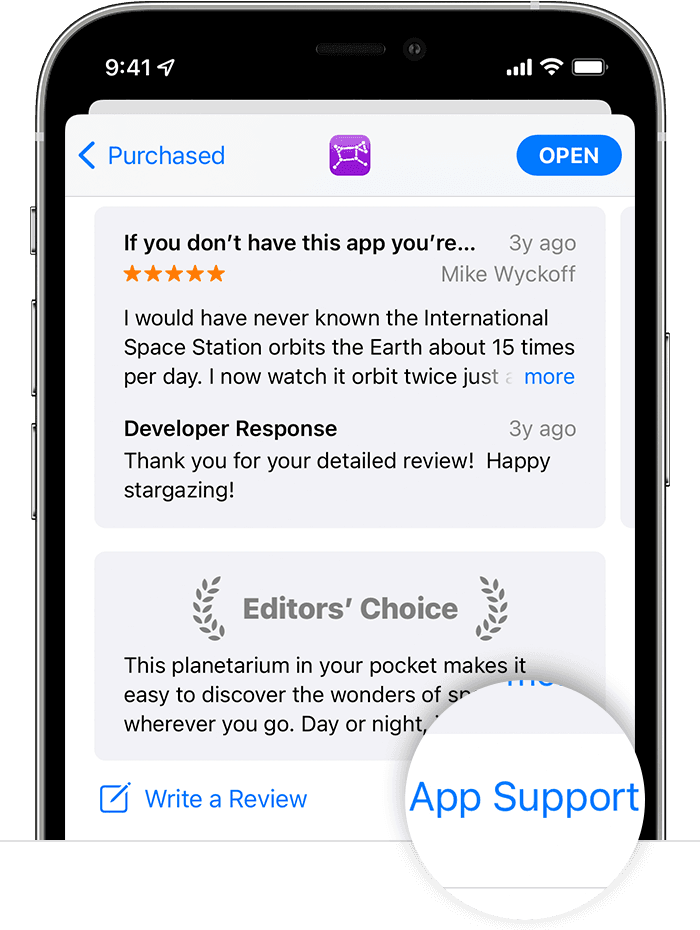
  3. The app's product page appears. Scroll to the Ratings & Reviews section, then tap App Support. If you don't see App Support, make sure that you're signed in with the correct Apple ID.

In the App Store on iPhone, the App Support button is at the bottom of the app's page."


Take care.

This thread has been closed by the system or the community team. You may vote for any posts you find helpful, or search the Community for additional answers.

How to limit background music from Spotify?

Welcome to Apple Support Community
A forum where Apple customers help each other with their products. Get started with your Apple Account.