Poor quality of photos in shared albums?

Hello - I created shared album with MacBook Pro. When I saw they were ok but the pictures were not as good as the original. Original pictures were added to Photos App and transferred to shared album. Originals were taken by professional photographer.


When I sent the the link via Apple Message and WhatsApp, the quality of the album is further lowered.


Is there a way or suggestions to send pictures so that others can see them better? Is Google photos better for sending pictures?


Thanks


Posted on Dec 4, 2022 10:13 AM

Reply
Question marked as Top-ranking reply

Posted on Dec 7, 2022 11:34 PM

It is even worse - not only are the shared photos downsized, most of the metadata we are adding diligently may be stripped. All advanced sharing methods will require to use iCloud Photos, where you need to subscribe to a paid cloud storage plan, while the Shared albums are using free cloud storage.


When sharing from iCloud Photos, you have two options:


Which system version do you have installed?


8 replies
Question marked as Top-ranking reply

Dec 7, 2022 11:34 PM in response to AppatEagles

It is even worse - not only are the shared photos downsized, most of the metadata we are adding diligently may be stripped. All advanced sharing methods will require to use iCloud Photos, where you need to subscribe to a paid cloud storage plan, while the Shared albums are using free cloud storage.


When sharing from iCloud Photos, you have two options:


Which system version do you have installed?


Dec 7, 2022 8:56 AM in response to AppatEagles

Photos in a shared album have a max resolution of 2048 pixel for the long side.


File types that you can use in Shared Albums

Shared Albums support these image formats:

  • HEIF
  • JPEG
  • RAW*
  • PNG
  • GIF
  • TIFF

Shared Albums also support special formats that you capture with your iPhone, like slo-mo, time-lapse, Live Photos, and Memory videos. When shared, photos are reduced to 2048 pixels on the long edge, except panoramic photos, which can be up to 5400 pixels wide. You can share GIFs that are 100MB or smaller.


How to use Shared Albums in Photos on your iPhone, iPad, and Mac - Apple Support


You could use DropBox, but you would have to pay for an account.


Ralf

Dec 6, 2022 2:22 PM in response to AppatEagles

Hello AppatEagles,


Are you using Ventura, by chance? We ask because if you are, you may be able to test this further by using the iCloud Shared Library instead. Learn more here: What is iCloud Shared Photo Library in Photos on Mac? - Apple Support


What is iCloud Shared Photo Library in Photos on Mac?

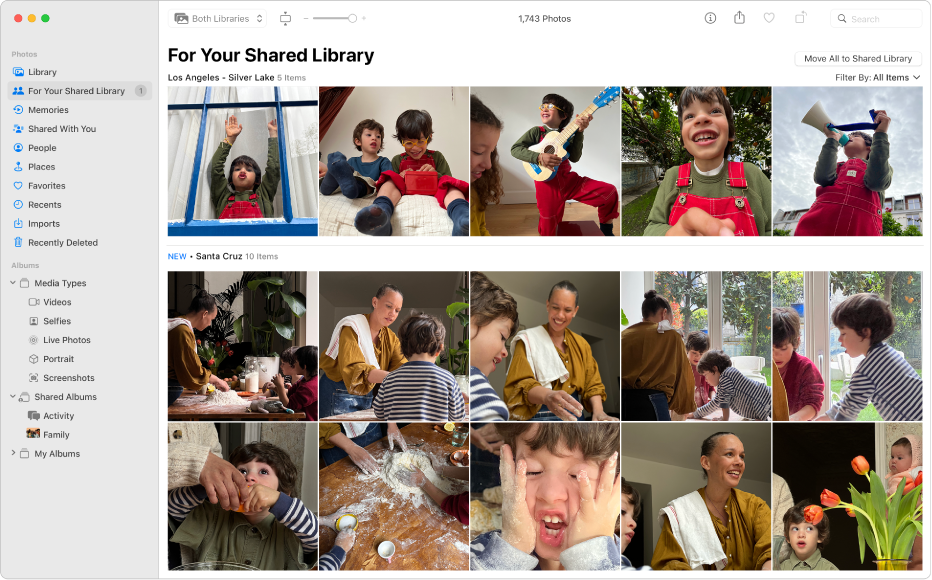
iCloud Shared Photo Library lets you and up to five other people share photos and videos in a separate iCloud Photos library, so everyone can collaborate on the collection and enjoy more complete memories. You can create or participate in one Shared Library at a time.

The Photos window showing For Your Shared Library selected in the sidebar and suggested photos to add to the Shared Library on the right.

All participants can view, add, edit, favorite, and caption photos and videos from the Shared Library as if the items were located in their own libraries, and the changes sync to everyone’s devices. Participants can add existing photos from their Personal Library and capture or import new items directly into the Shared Library. iPhone or iPad users can also send photos and videos to the Shared Library automatically when other participants are nearby.


In case you're not, how are you importing these photos in the Photos app exactly? Are you taking them from the camera or files you've downloaded? That might tell us more about their quality.


Hoping to hear back, take care.

Dec 7, 2022 7:30 AM in response to destiny241

Hi - Thank you very much. No, I am not using Ventura. I may consider it in future.


The pictures are from a professional photographer stored online. I downloaded them and saved in photo App and iCloud folder. For shared album I transferred photos from Photo App so that we can see slideshow with music, and shared it with others. My photo App says "Optimized". I understand it means it saves in Photo App approximately 3 times less resolution. Alternatively, I also created a shared folder in iCloud, and it works - but no slide show, no music. Thanks

This thread has been closed by the system or the community team. You may vote for any posts you find helpful, or search the Community for additional answers.

Poor quality of photos in shared albums?

Welcome to Apple Support Community
A forum where Apple customers help each other with their products. Get started with your Apple Account.