
iphone 11 max pro won't crop photos anymore
The iphone 11 max pro won't crop photos anymore
iPhone 11 Pro Max
The iphone 11 max pro won't crop photos anymore
iPhone 11 Pro Max
Hi lorna_love,
The option to crop photos on an iPhone is still available. For help with cropping photos test the steps below found in the article here: Edit photos and videos on iPhone
"Crop, rotate, or flip a photo or video
 , then do any of the following :
 , then choose an option such as square, 16:9, or 5:4.
 to rotate the photo 90 degrees.
 to flip the image horizontally.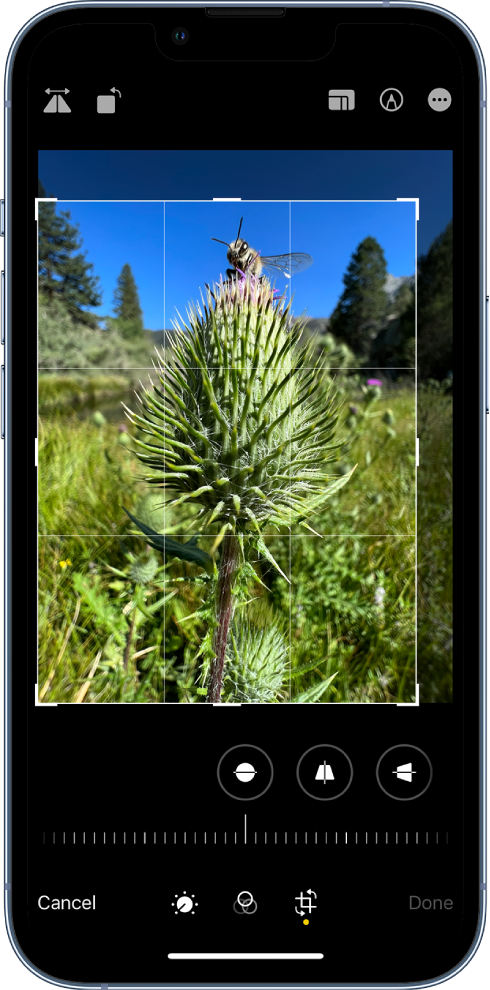
3.Tap Done to save your edits, or if you don’t like your changes, tap Cancel, then tap Discard Changes."
If there's an issue test with a different photo. Also, ensure your iOS is fully updated with the steps here: Update your iPhone or iPad
Cheers.
Hi lorna_love,
The option to crop photos on an iPhone is still available. For help with cropping photos test the steps below found in the article here: Edit photos and videos on iPhone
"Crop, rotate, or flip a photo or video
, then do any of the following :, then choose an option such as square, 16:9, or 5:4. to rotate the photo 90 degrees. to flip the image horizontally.
3.Tap Done to save your edits, or if you don’t like your changes, tap Cancel, then tap Discard Changes."
If there's an issue test with a different photo. Also, ensure your iOS is fully updated with the steps here: Update your iPhone or iPad
Cheers.
iphone 11 max pro won't crop photos anymore

