Iphone X runs out of battery and then gets stuck in and “endless” bootloop

Alright, so i was just using my phone as usual and then it turns off. No big deal i say and plug it in. Its stuck on the dead battery screen for a while so i plug it in again. Suddenly the apple logo immediately appears and it turns on, shortly after it enters a bootloop. This loop only lasts 3-5 boot attempts and if you try again the same thing happens. When it rarely turns on randomly for a short time, i saw that it had 1% which could mean this has to do with the battery. Normally after charging your phone from zero, when it turns on it has 2% and its never changed. If anyone could help me i would really appreciate it since im about to go crazy since i have so much stuff on this phone. Thank you

iPhone X, iOS 16

Posted on Dec 13, 2022 6:01 AM

Reply
Question marked as Top-ranking reply

Posted on Dec 15, 2022 9:45 AM

Hello Amogussussyimpasta,


We'd recommend trying a forced restart using these steps: Force restart iPhone


Force restart iPhone

If iPhone isn’t responding, and you can’t turn it off then on, try forcing it to restart.

1. Press and quickly release the volume up button.

2. Press and quickly release the volume down button.

3. Press and hold the side button.

4. When the Apple logo appears, release the side button.

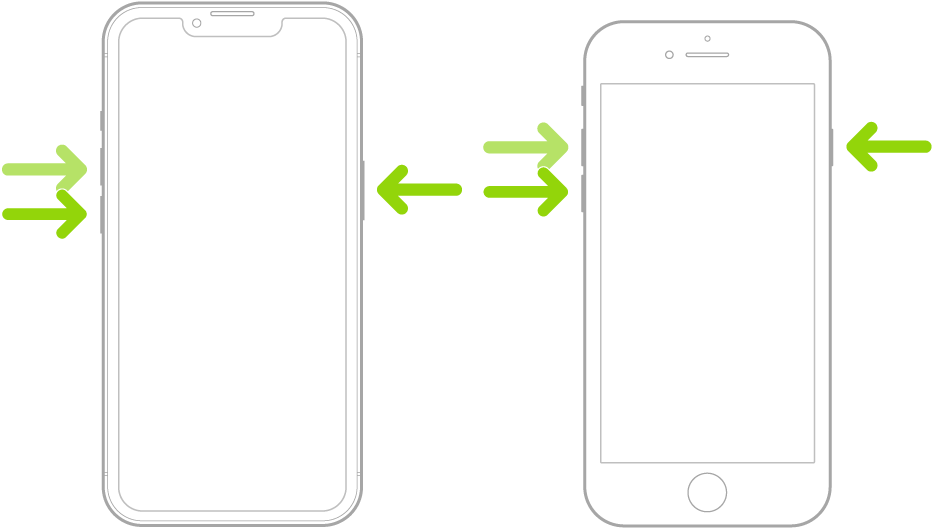
An illustration of two iPhone models, one with a Home button and one without, with the screens facing up. The volume buttons for each model are on the left side of iPhone, and the side button is on the right.


Test multiple charging cables, power adapters, and power outlets in your location.


Make sure nothing is blocking the charging port, sometimes lint and debris can get inside.


If it continues to occur, then we'd try to use these specific steps, since they may be related to your issue: If your iOS or iPadOS device restarts or displays the Apple logo or a spinning gear unexpectedly 


Let us know how it goes and we'll take it from there.


Have a lovely day, take care.


Similar questions

1 reply
Question marked as Top-ranking reply

Dec 15, 2022 9:45 AM in response to Amogussussyimpasta

Hello Amogussussyimpasta,


We'd recommend trying a forced restart using these steps: Force restart iPhone


Force restart iPhone

If iPhone isn’t responding, and you can’t turn it off then on, try forcing it to restart.

1. Press and quickly release the volume up button.

2. Press and quickly release the volume down button.

3. Press and hold the side button.

4. When the Apple logo appears, release the side button.

An illustration of two iPhone models, one with a Home button and one without, with the screens facing up. The volume buttons for each model are on the left side of iPhone, and the side button is on the right.


Test multiple charging cables, power adapters, and power outlets in your location.


Make sure nothing is blocking the charging port, sometimes lint and debris can get inside.


If it continues to occur, then we'd try to use these specific steps, since they may be related to your issue: If your iOS or iPadOS device restarts or displays the Apple logo or a spinning gear unexpectedly 


Let us know how it goes and we'll take it from there.


Have a lovely day, take care.


This thread has been closed by the system or the community team. You may vote for any posts you find helpful, or search the Community for additional answers.

Iphone X runs out of battery and then gets stuck in and “endless” bootloop

Welcome to Apple Support Community
A forum where Apple customers help each other with their products. Get started with your Apple Account.