after upgrading to Ventura 13.1 external display resolution menu has only default resolution (too small) and low resolution options

Hi,


after upgrading to Ventura 13.1 my external display (Dell U49) has only default resolution with retina support (HiDPI). Everything looks small. It also doesn't have any scaling options.


how can I fix it?


P.S. before upgrade it has 3360:944 (HiDPI) option.


MacBook Pro 13″, macOS 13.1

Posted on Dec 14, 2022 12:09 AM

Reply
Question marked as Top-ranking reply

Posted on Jan 26, 2023 12:44 PM

As far as I'm aware they do know about the problem. I talked to german support via phone (in december) and he said that he already knows about this and that they are already working on a fix. But who knows when and if they will ever fix this.


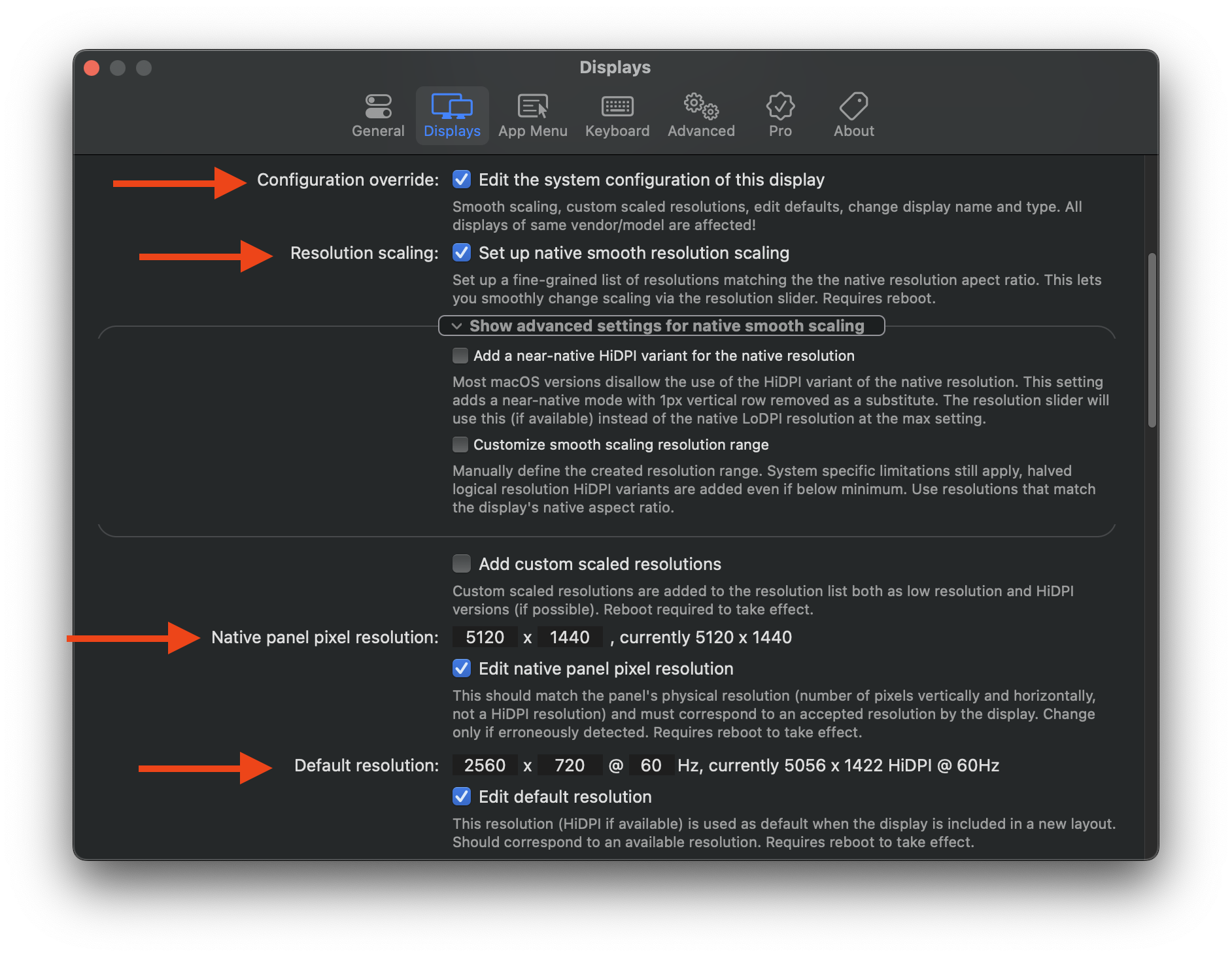
I was able to fix this issue for my 5120x1440 monitor with Better Display (https://github.com/waydabber/BetterDisplay): I had to hit these buttons under settings and after a reboot I had all the HiDPI resolutions I ever wanted... not in system settings though but in the Better Display menu. But once set you don't need to run Better Display in the background and it looks like it doesn't have any overhead like Better Dummy. Currently working on 4096x1152 which is the equivalent to Windows 125% scaling. Even on a 110dpi screen this looks great and from a performance standpoint runs perfectly well on my 2019 MacBook Pro with two external monitors attached. I really don't get it why apple doesn't enable these options by default.

68 replies

This thread has been closed by the system or the community team. You may vote for any posts you find helpful, or search the Community for additional answers.

after upgrading to Ventura 13.1 external display resolution menu has only default resolution (too small) and low resolution options

Welcome to Apple Support Community
A forum where Apple customers help each other with their products. Get started with your Apple Account.