First of all, I want to sincerely thank you for posting an EtreCheck report. There have been many people complaining about this new feature in Ventura. But I think you are the very first person to provide an EtreCheck report to help us try to figure out what is causing this problem.
Unfortunately, that's a lot of bad news there. I will address issues one by one.
1) I think you must have changed the default notification display style. Normally, these notifications should look like this:
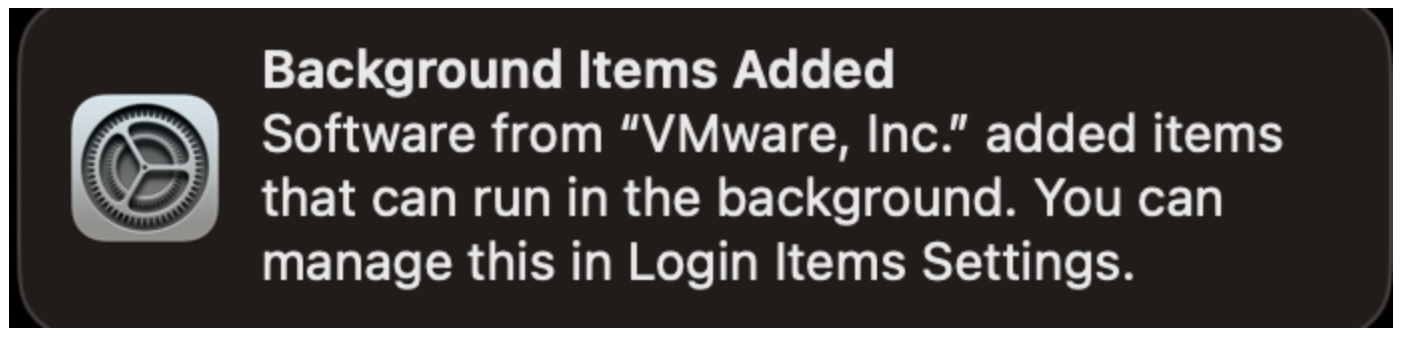
So go to System Settings > Notifications and see if you have turned off the "Preview" setting. I'm just guessing that this might be what is causing your notifications to be so content-free.
2) Those notifications listed in your EtreCheck report are unrelated to the notifications you are asking about. EtreCheck lists notifications from 3rd party apps in an attempt to identify notifications from scam ware apps. These notifications are from the operating system.
3) I went through your EtreCheck report and cross-referenced all of Apple's "background items" with EtreCheck's list. I think that it is that VirtualBox file that is responsible for the mysterious "osascripts". This file is also missing an install date in the EtreCheck report. Did you delete that file perhaps?
4) By far, the most interesting thing about your EtreCheck report is that this new "background items" interface in Ventura appears to be completely non-functional, at least on your computer. You have turned off everything except Hazel, but Hazel is not loaded. Many of the items that you have disabled are still loaded and/or running.
5) This complete failure of the the Ventura "background items" interface is probably what is causing all these notifications. It's totally lost it's mind.
And now for the bad part, which may have a silver lining.
Your Avira antivirus is still partially installed. You have a System Extension from Avira antivirus installed and running. I know you mentioned that you tried to remove it, but I think the damage was done before. Did you try to manually uninstall this app? Did you use one of those vile "app zapper" tools? Or did you try to use the official uninstaller or uninstallation instructions from the developer. Unfortunately, for System Extensions, all options may be wrong. These things are just a total disaster.
I'm not sure, but this could be causing this entire problem with your "background items". It is definitely something that needs to be fixed. There is no way to tell what this antivirus is doing while it is running out of control like this.
The only way to correct this problem is to erase your hard drive and reinstall the operating system. Then, when you restore, you have to make sure to restore only your user files and user accounts. Do NOT restore any apps, software, or "other files". That will only restore the problem and put you back at square one. You will have to manually reinstall any 3rd party software, like Hazel, you want to use. I recommend you take this opportunity to avoid installing anything that isn't absolutely necessary.
A side effect is that this should completely correct the problem with the notifications. This new "background items" user interface in Ventura is still poorly understood and apparently pretty buggy. I strongly urge you to avoid making any change of any kind in this interface. Do not attempt to turn anything on or off. In my opinion, this is one of the worst ideas Apple has had in a long time.