Cannot receive texts from my sister

I just switched carriers, ported my old number, and got a new iPhone 12. Now I cannot receive texts from my sister. (She does NOT have an iPhone)


At first she was only receiving the messages I was sending from my iPhone on her iPad as iMessages (The only apple product she has is an iPad). We were both able to send and receive messages. I turned off iMessages on my iPhone and removed the email associated with her Apple account from her profile in my contacts.


This allowed my texts to her being received on her phone. That solved half the problem. The remaining issue is that now I’m not getting the replies she is sending.


I have tried numerous fixes on my end including multiple reboots, latest software update, entirely cleared my blocked contacts list, deleted her from contacts and re-added her (without her email address), deleted our old conversation, turned off iMessages on my iMac…


I’m at a loss. She said when she tries calling my number it goes directly to voicemail. She is the only person I’m having this issue with. I’ve recommended some fixes for her to try on her end. Can anymore make any other suggestions to fix this issue? Thanks kindly in advance

iPhone 12, iOS 16

Posted on Jan 7, 2023 10:29 AM

Reply
Question marked as Top-ranking reply

Posted on Jan 9, 2023 2:51 PM


I would recommend your sister delete your contact from her phone as well as any text message threads. She should then restart her phone. She should then try to call you by typing in your number on the phone keypad. If that works, she should then be able to save our contact information.


If that doesn't work, she should contact her carrier.

Similar questions

2 replies
Question marked as Top-ranking reply

Jan 9, 2023 2:51 PM in response to Hintzkm


I would recommend your sister delete your contact from her phone as well as any text message threads. She should then restart her phone. She should then try to call you by typing in your number on the phone keypad. If that works, she should then be able to save our contact information.


If that doesn't work, she should contact her carrier.

Jan 9, 2023 2:47 PM in response to Hintzkm

Hey there, and welcome to Apple Support Communities Hintzkm,


We can certainly understand your concern and can help provide some insight.


We recommend checking out these steps for more information on what to do if you are having issues sending and receiving messages.


" If you have issues with Messages after you set up a new device

If you experience issues like conversations in Messages showing up as separate threads or sent messages appearing as green message bubbles instead of blue message bubbles when you set up a new device, update your settings using the following steps:

  1. Update your device to the latest version of iOS or iPadOS if needed.
  2. In the Settings app, tap Cellular. Make sure that your phone line is turned on. If you use multiple SIMs, make sure that the phone number you want to use is selected and turned on.
  3. In the Settings app, tap Messages. Turn iMessage off and then back on.
  4. Tap Send & Receive.
  5. Tap the phone number that you want to use with Messages.

If you have issues when you try to receive a FaceTime call after you set up a new device, you can also update your FaceTime settings.


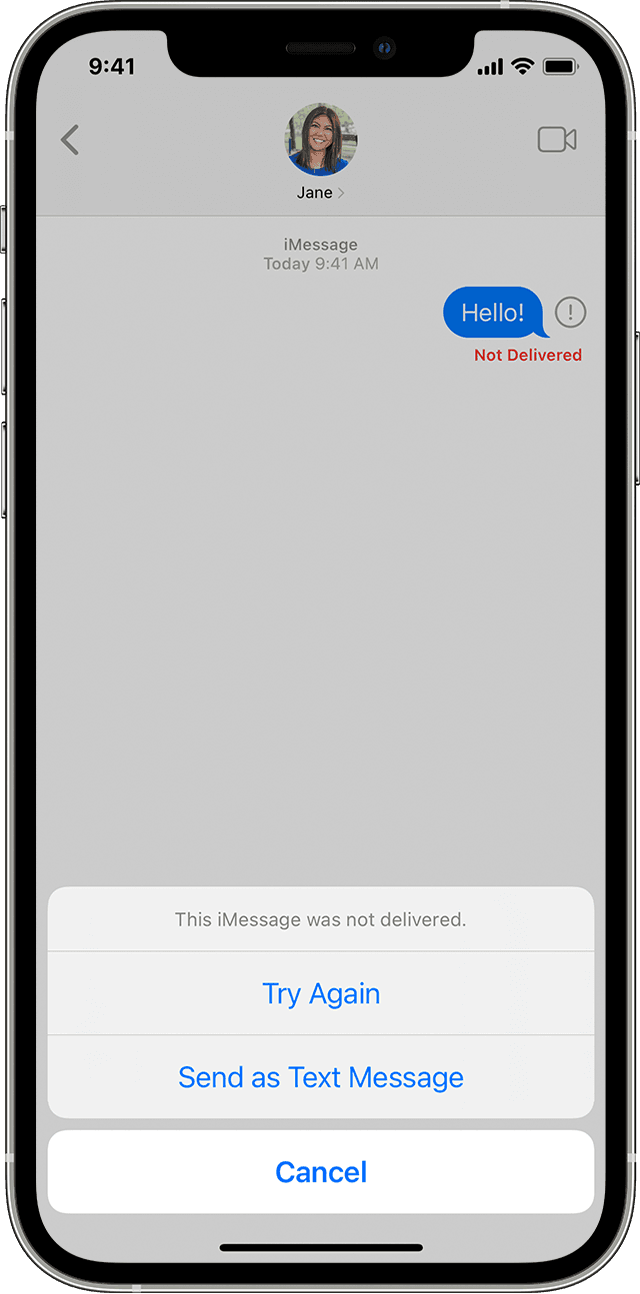
An iPhone showing a message that wasn't delivered in Messages 

If you see a red exclamation point

If you try to send a message and you see  Exclamation mark icon with an alert that says Not Delivered, follow these steps:

  1. Check your network connection.
  2. Tap  Exclamation mark icon, then tap Try Again.
  3. If you still can’t send the message, tap  Exclamation mark icon, then tap Send as Text Message. Messaging rates may apply. Contact your carrier for more information.

You can set up Messages so that it automatically tries to send messages as an SMS when iMessage isn't available. Go to Settings > Messages, and turn on Send as SMS. "


For additional information, check out this link: If you can't send or receive messages on your iPhone or iPad - Apple Support


These steps will help ensure your device is working with ease and can fix common issues like the ones you’re experiencing.


Kindest regards!

This thread has been closed by the system or the community team. You may vote for any posts you find helpful, or search the Community for additional answers.

Cannot receive texts from my sister

Welcome to Apple Support Community
A forum where Apple customers help each other with their products. Get started with your Apple Account.