Hello Kkkkkmac,
It sounds like you are seeing an error regarding disk repair failing after updating your Mac, right? You mentioned that you've attempted to repair the disk, did you do it in macOS recovery?
If you haven't, you can follow the steps here:
How to repair a Mac disk with Disk Utility
"Repair volumes, then containers, then disks
For each disk that you're repairing, start by selecting the last volume on that disk, then click the First Aid button  or tab.
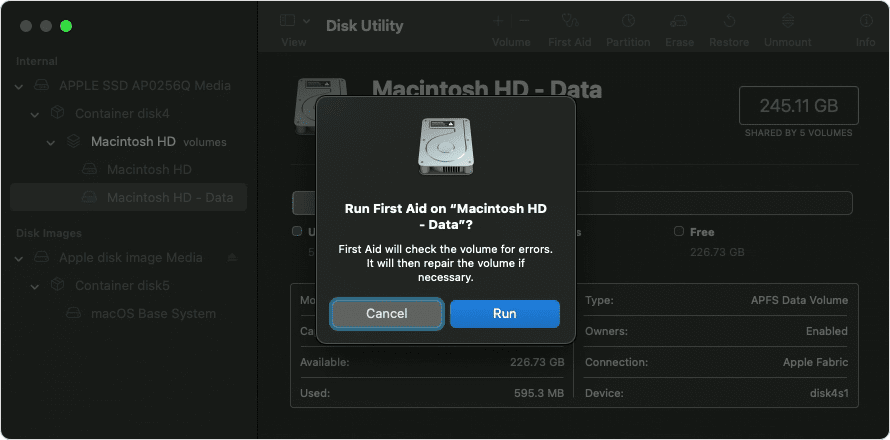
In this example, the last volume on the disk is Macintosh HD - Data.
Click Run to begin checking the selected volume for errors.
- If there is no Run button, click the Repair Disk button instead.
- If the button is dimmed and you can't click it, skip this step for the disk, container, or volume you selected.
- If you're asked for a password to unlock the disk, enter your administrator password.
After Disk Utility is done checking the volume, select the next item above it in the sidebar, then run First Aid again. Keep moving up the list, running First Aid for each volume on the disk, then each container on the disk, then finally the disk itself.
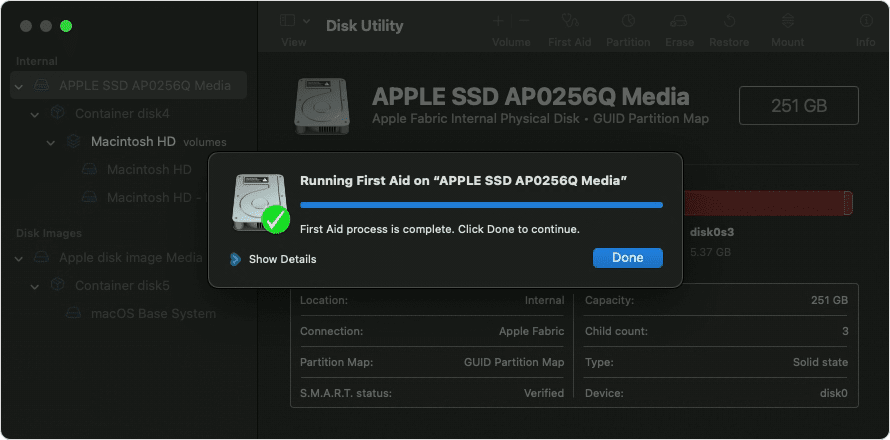
The order of repair in this example was Macintosh HD - Data, then Macintosh HD, then Container disk4, then APPLE SSD.
When done, quit Disk Utility. If you used Disk Utility from macOS Recovery, you can now restart your Mac: choose Apple menu > Restart."
Regards.


