Hello VermontQuest,
Thank you for reaching out to Apple Support Communities.
You can use Spotlight to search for specific files:
"Search for something
- On your Mac, do one of the following:
- Click the Spotlight icon
 (if shown) in the menu bar.
 - Press Command-Space bar.
- Press (if available) in the row of function keys on the keyboard.
You can drag the Spotlight window anywhere on the desktop.
Tip: If the Spotlight icon isn’t in the menu bar, add it using Control Center settings.
2. In the search field, type what you’re looking for—results appear as you type.
Spotlight lists top hits first; click a top hit to preview or open it. Spotlight also suggests variations of your search; you can view those results in Spotlight or on the web.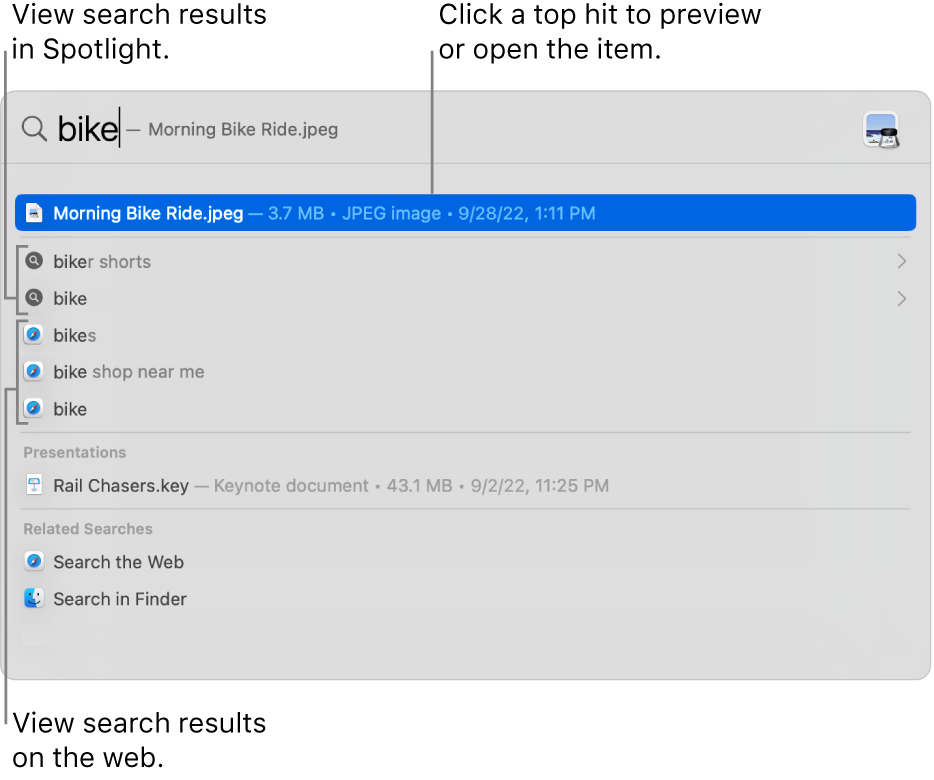
3.In the results, do any of the following:
- See results of a suggested search in Spotlight: Click an item preceded by the Spotlight icon
 .
. - See results of a suggested search on the web: Click an item preceded by the Safari icon
 .
. - Open an item: Double-click it. Or select the item, then press the Return key.
- Show the location of a file on your Mac: Select the file, then press and hold the Command key. The file’s location appears at the bottom of the preview.
- Copy an item: Drag a file to the desktop or a Finder window.
- See all results from your Mac in the Finder: Scroll to the bottom of the results, then click Search in Finder. To refine the results in the Finder, see Narrow your search results.
During downtime, or if you reach the time limit set for apps in Screen Time settings, app icons in results are dimmed and an hourglass icon  is shown. See Manage downtime."
More details can be found here: Search with Spotlight on Mac
If the issue persists, can you provide additional details? Can you also verify your exact macOS version?
Cheers!


