WebCrypto Master Key

The app Friendly Streaming is asking me to share with that app my WebCrypto Master Key. I have no idea what that is. Where can I find the Master Key if it exists, and if it doesn't exist, how do I set it up? Is it safe to share with an app? Meanwhile, I cannot use the app on my Mac. Any help would be greatly appreciated.

MacBook Air (M1, 2020)

Posted on Apr 24, 2023 3:23 PM

Reply
Question marked as Top-ranking reply

Posted on Apr 25, 2023 12:08 PM

I'm one of developers of Friendly Streaming.

The webcrypto key is automatically created by Apple's Webkit framework (supporting safari as well as Friendly Streaming).

An update is on its way that fix this issue (submitted today to the AppStore Review team).


In the meantime the best and most secure solution is to:

1- quit friendly

2- open the "Keychain access" app (in applications/Utilities) or look for "keychain access" in spotlight.

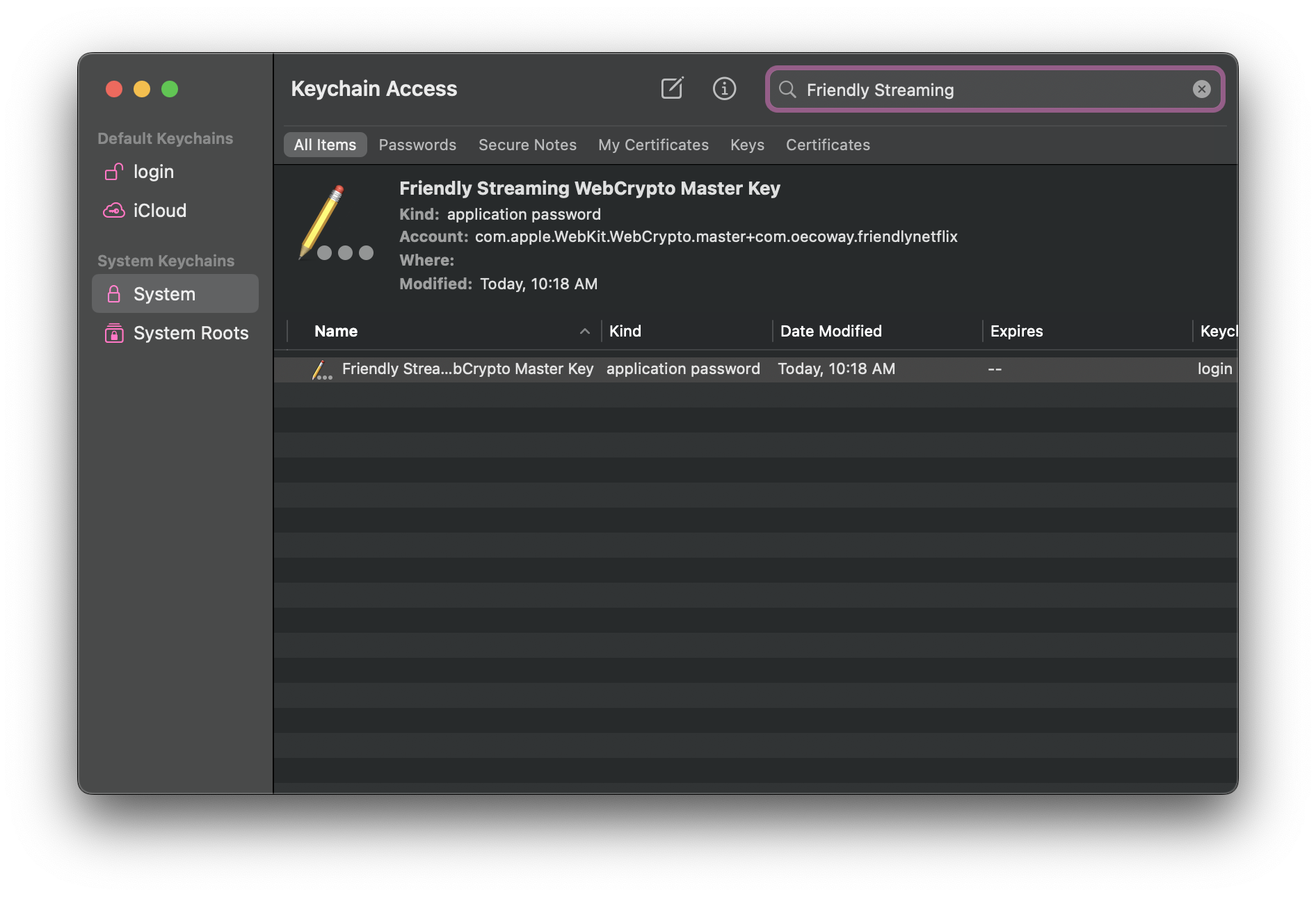
3- in Keychain Access, look for this key (enter "Friendly Streaming" in the search box)

4- delete the key,

5- Launch friendly streaming again. When navigating to any website that uses webcrypto, a new "friendly streaming webcrypto master key" will be created.


I'm attaching screenshots:


Hope this helps,

Don't hesitate to contact us via our support email if you need more information.


29 replies
Question marked as Top-ranking reply

Apr 25, 2023 12:08 PM in response to lridolfi

I'm one of developers of Friendly Streaming.

The webcrypto key is automatically created by Apple's Webkit framework (supporting safari as well as Friendly Streaming).

An update is on its way that fix this issue (submitted today to the AppStore Review team).


In the meantime the best and most secure solution is to:

1- quit friendly

2- open the "Keychain access" app (in applications/Utilities) or look for "keychain access" in spotlight.

3- in Keychain Access, look for this key (enter "Friendly Streaming" in the search box)

4- delete the key,

5- Launch friendly streaming again. When navigating to any website that uses webcrypto, a new "friendly streaming webcrypto master key" will be created.


I'm attaching screenshots:


Hope this helps,

Don't hesitate to contact us via our support email if you need more information.


Apr 25, 2023 10:49 PM in response to lridolfi

I couldn't delete either and ended up going down a very long Terminal rabbit hole. In my case, I discovered that the delete was not in the System Roots folder but was in the Default Keychains/login folder. I searched for "WebCrypto", found the Friendly Streaming one and deleted. It doesn't really matter which option you click, though, I'm pretty sure search will search for all of the keychains no matter where they ar.


I ran this command in a terminal window prior to it working:

sudo security delete-certificate -c "Friendly Streaming WebCrypto Master Key" login.keychain-db


To be fair, this might be the wrong command. Anyway, I messed around with it for awhile running searches using security, tried that command, went back into the GUI and was able to delete and relaunch it again. May be a coincidence but it could be worth trying.

Apr 25, 2023 6:43 PM in response to joi-joikeith

  1. Make sure the Friendly Streaming app is closed.
  2. Open your Applications folder. Inside it, find the folder Utilities and in it, find the app Keychain Access.
  3. On the left sidebar of Keychain Access, find System Roots. Click on it.
  4. At the top of the window, use the search box to search for Friendly Streaming.
  5. This should bring you to the key for Friendly Streaming.
  6. Press the Control key and click on Friendly Streaming Web Crypto Master Key.

Then you should be able to select Delete.


This is my best shot at describing how to delete the Crypto Master Key.


This thread has been closed by the system or the community team. You may vote for any posts you find helpful, or search the Community for additional answers.

WebCrypto Master Key

Welcome to Apple Support Community
A forum where Apple customers help each other with their products. Get started with your Apple Account.

