Difficulties deleting GameCenter data on an app.

I am trying to delete my account on a game that is connected to my iCloud and Game Center, however there is no way to delete the data. Any tutorials that originally solved the problems are outdated and unable to replicate due to recent updates. How can I delete the data of the game so that account is gone and I can create a new one?


If it helps, the game Ime trying to delete data is “Sim City: Build It”

iPhone XR

Posted on Jun 10, 2023 9:19 AM

Reply
Question marked as Top-ranking reply

Posted on Jun 11, 2023 2:54 PM

Hello ExcisionOfficial,


Thanks for posting in the Apple Support Communities.


Presently there is no option available to remove information from Game Center. You can, however, reach out to the app developer to see if there are any options, they provide through the game itself or from their end. The article below will help you locate the developers support details.


How to contact an app developer - Apple Support


Contact the developer of an iOS, iPadOS, or watchOS app

1. Open the App Store on your iPhone or iPad.

2. Search for the app, then tap it. If you can't find it, tap the account button  or your photo at the top of the screen, tap Purchased, tap "Not on this [device]," then tap the app.
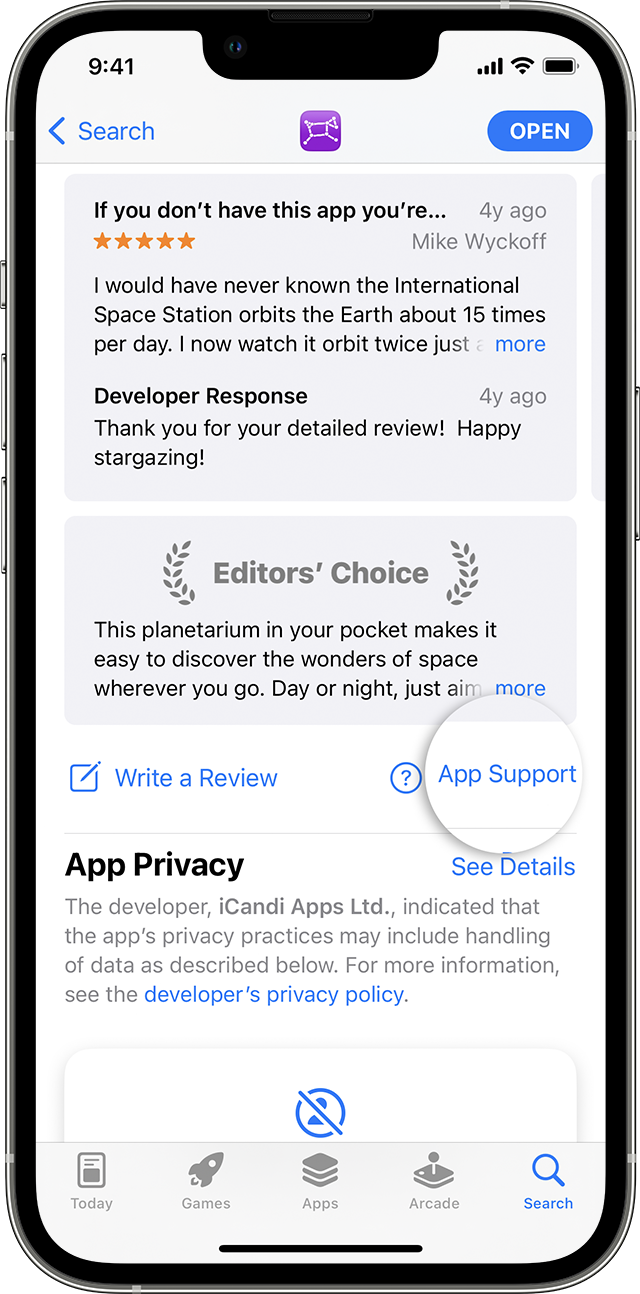
3. The app's product page appears. Scroll to the Ratings & Reviews section, then tap App Support. If you don't see App Support, make sure that you're signed in with the correct Apple ID.

In the App Store on iPhone, you can find the App Support button below the reviews.


Best regards.


1 reply
Question marked as Top-ranking reply

Jun 11, 2023 2:54 PM in response to ExcisionOfficial

Hello ExcisionOfficial,


Thanks for posting in the Apple Support Communities.


Presently there is no option available to remove information from Game Center. You can, however, reach out to the app developer to see if there are any options, they provide through the game itself or from their end. The article below will help you locate the developers support details.


How to contact an app developer - Apple Support


Contact the developer of an iOS, iPadOS, or watchOS app

1. Open the App Store on your iPhone or iPad.

2. Search for the app, then tap it. If you can't find it, tap the account button  or your photo at the top of the screen, tap Purchased, tap "Not on this [device]," then tap the app.

3. The app's product page appears. Scroll to the Ratings & Reviews section, then tap App Support. If you don't see App Support, make sure that you're signed in with the correct Apple ID.

In the App Store on iPhone, you can find the App Support button below the reviews.


Best regards.


This thread has been closed by the system or the community team. You may vote for any posts you find helpful, or search the Community for additional answers.

Difficulties deleting GameCenter data on an app.

Welcome to Apple Support Community
A forum where Apple customers help each other with their products. Get started with your Apple Account.