One side loses charge really fast
One side of my power beats pro
loses charge really fast
One side of my power beats pro
loses charge really fast
Hello Lonemadman,
If one side of your PowerBeats aren't holding a charge as expected, try resetting them to see if that helps. You can reset them with these steps:
Reset Powerbeats Pro
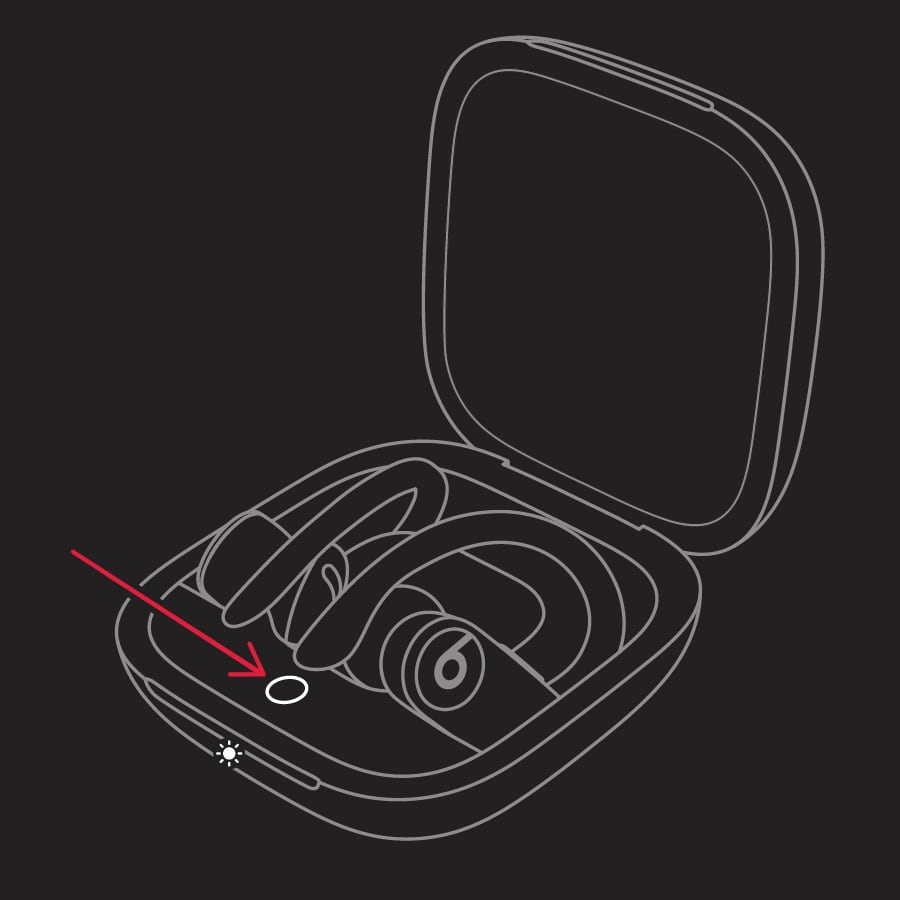
1. Place both earbuds in the case. Leave the case open.
2. Press and hold the system button on the case for 15 seconds or until the LED indicator light flashes red and white.
3.
4. Release the system button.
The LED indicator light will continue to flash white, which means that you can pair your Powerbeats Pro with your iPhone, Mac, Android device, or other device again.
You'll find those steps here: Reset your Beats earphones - Apple Support
Next, check to see what the microphone settings are for your PowerBeats Pro. If it's set to the side that isn't holding the charge, try switching to Automatic or the opposite side to see if that makes a difference. You can follow these steps to check:
Set the microphone to left, right, or automatic
There's a microphone in each Powerbeats Pro earbud, so you can make phone calls and use Siri. By default, Microphone is set to Automatic, so that either of your earbuds can act as the microphone. If you're using only one earbud, that earbud will be the microphone.
You can also set Microphone to Always Left or Always Right. These set the microphone to either the left or right earbud. That earbud will be the microphone even if you remove it from your ear or put it in the case. Here's how to change the microphone settings:
1. Go to Settings > Bluetooth on your iOS device.
2. In the list of devices, tap the blue information iconnext to your Powerbeats Pro.
3. Tap Microphone.
4. Tap the microphone option that you want.
This information can be found in the support article: Change the settings for your Powerbeats Pro - Apple Support
Let us know how it goes.
Cheers!
Hello Lonemadman,
If one side of your PowerBeats aren't holding a charge as expected, try resetting them to see if that helps. You can reset them with these steps:
Reset Powerbeats Pro
1. Place both earbuds in the case. Leave the case open.
2. Press and hold the system button on the case for 15 seconds or until the LED indicator light flashes red and white.
3.
4. Release the system button.
The LED indicator light will continue to flash white, which means that you can pair your Powerbeats Pro with your iPhone, Mac, Android device, or other device again.
You'll find those steps here: Reset your Beats earphones - Apple Support
Next, check to see what the microphone settings are for your PowerBeats Pro. If it's set to the side that isn't holding the charge, try switching to Automatic or the opposite side to see if that makes a difference. You can follow these steps to check:
Set the microphone to left, right, or automatic
There's a microphone in each Powerbeats Pro earbud, so you can make phone calls and use Siri. By default, Microphone is set to Automatic, so that either of your earbuds can act as the microphone. If you're using only one earbud, that earbud will be the microphone.
You can also set Microphone to Always Left or Always Right. These set the microphone to either the left or right earbud. That earbud will be the microphone even if you remove it from your ear or put it in the case. Here's how to change the microphone settings:
1. Go to Settings > Bluetooth on your iOS device.
2. In the list of devices, tap the blue information icon
3. Tap Microphone.
4. Tap the microphone option that you want.
This information can be found in the support article: Change the settings for your Powerbeats Pro - Apple Support
Let us know how it goes.
Cheers!
One side loses charge really fast