Try a forced-restart of your iPad - as this will often clear an isolated software issue:
Force restart iPad (models with Face ID or with Touch ID in the top button)
If your iPad doesn’t have the Home button, do the following:
- Press and quickly release the volume button nearest to the top button.
- Press and quickly release the volume button farthest from the top button.
- Press and hold the top button.
- When the Apple logo appears, release the top button.

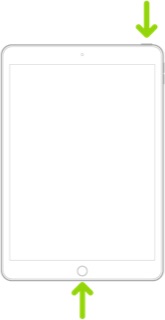
Force restart iPad (models with the Home button)
Press and hold the top button and the Home button at the same time. When the Apple logo appears, release both buttons.
If the restart doesn’t clear the issue, if you can, try testing your iPad with another compatible iPad. Many retailers have display-model devices with which you may be able to test your keyboard.
Otherwise, you would be best advised to have your Magic Keyboard assessed by Apple’s technicians at the Genius Bar of your local Apple Store or Apple Authorised Service Provider (AASP):
Genius Bar Reservation and Apple Support Options - Apple

