No sound notifications when iPhone is locked

With the exception of the phone ringing, I no longer get sound notifications when the phone is locked. I get the banner slide in but no noise.

Not sure if this is relevant but I've also noticed that if I start "now playing" from the Lock Screen it looks as if it is playing but there is no sound. I have to unlock the phone to get sound. Once playing, the phone can lock and all is OK.

I have checked all notification, schedules, focus etc. and all are as you would expect to receive sound notifications.

This has been happening since I moved from 13 Pro Max to 14 Pro Max.

KW iPhone

Posted on Aug 2, 2023 1:22 AM

Reply
Question marked as Top-ranking reply

Posted on Aug 2, 2023 12:22 PM

Having spent an inordinate amount of time with Apple Support chat this afternoon - they diagnosed a hardware fault.

Luckily I didn't quite believe them, did some comparative testing on another phone and discovered that this issue is actually linked to my Apple Watch. If I am wearing my watch, any notifications play sound and show on my watch, with just the banner notification on the phone. If I'm not wearing my watch, for example it is charging, then the phone does indeed show the banner notification AND plays the sound.

So - if it is a problem, it is a software issue, possibly related to a recent update.

For the record iOS 16.6 and watchOS 9.6.


17 replies
Question marked as Top-ranking reply

Aug 2, 2023 12:22 PM in response to SravanKrA

Having spent an inordinate amount of time with Apple Support chat this afternoon - they diagnosed a hardware fault.

Luckily I didn't quite believe them, did some comparative testing on another phone and discovered that this issue is actually linked to my Apple Watch. If I am wearing my watch, any notifications play sound and show on my watch, with just the banner notification on the phone. If I'm not wearing my watch, for example it is charging, then the phone does indeed show the banner notification AND plays the sound.

So - if it is a problem, it is a software issue, possibly related to a recent update.

For the record iOS 16.6 and watchOS 9.6.


Feb 24, 2024 8:33 AM in response to SteveC4321

SteveC4321 wrote:

I have the same issue, turned my Apple Watch off and all notifications are now coming through loud and clear. What is the resolution for this?

There is no resolution required, because your iPhone and watch and doing EXACTLY what they were designed to do. When your iPhone screen is locked, notifications come to your Apple Watch. When your iPhone screen is on, notifications come to your iPhone. Notifications come to one or the other but NOT both and this is how Apple engineered it to work.


Read this link from Apple about this --> About notifications - Apple Support


See the first statement about where notifications appear.

Apr 1, 2024 12:56 PM in response to kizzi65

kizzi65 wrote:

I’ve been dealing with this for over a year. After hours on the phone to Apple they told me not to wear my watch. That was it.

I don't know why anyone from Apple would tell to not wear your watch. What they SHOULD have told you is that BY DESIGN, when your iPhone screen is locked, notifications will be delivered to your Apple Watch. It's the way Apple designed it to work and it can't be changed. If the iPhone screen is open, notifications will be delivered to your iPhone. But when you wear Apple Watch, notifications will be delivered to one or the other, but NOT BOTH.


Read this to better understand --> About notifications - Apple Support


See the statement at the top which says:


Where notifications appear

Notifications appear on your Apple Watch or iPhone, but not both.

Aug 2, 2023 1:42 AM in response to Kaz_GL6

Turn off all focus (DND, Driving, Work, Sleep, Personal, Any other). Open the Control center and see if this helps.

And then turn back the only Focus that you need.


If your family is still receiving texts with the message "notification silenced" when messaging you, it could be due to a few different settings or configurations on your iPhone or iPad. Here are some troubleshooting steps you can follow to resolve the issue:


Check Individual Contact Settings:

  • Open the Messages app on your iPhone.
  • Find a conversation with one of your family members.
  • Tap the contact name at the top of the conversation to open the contact details.
  • Check if "Hide Alerts" or "Emergency Bypass" is enabled for that contact. If so, toggle it off.


Check Mute Conversation:

  • In the Messages app, swipe left on the conversation with your family member.
  • If "Hide Alerts" or "Mute" is enabled, tap on it to unmute the conversation.
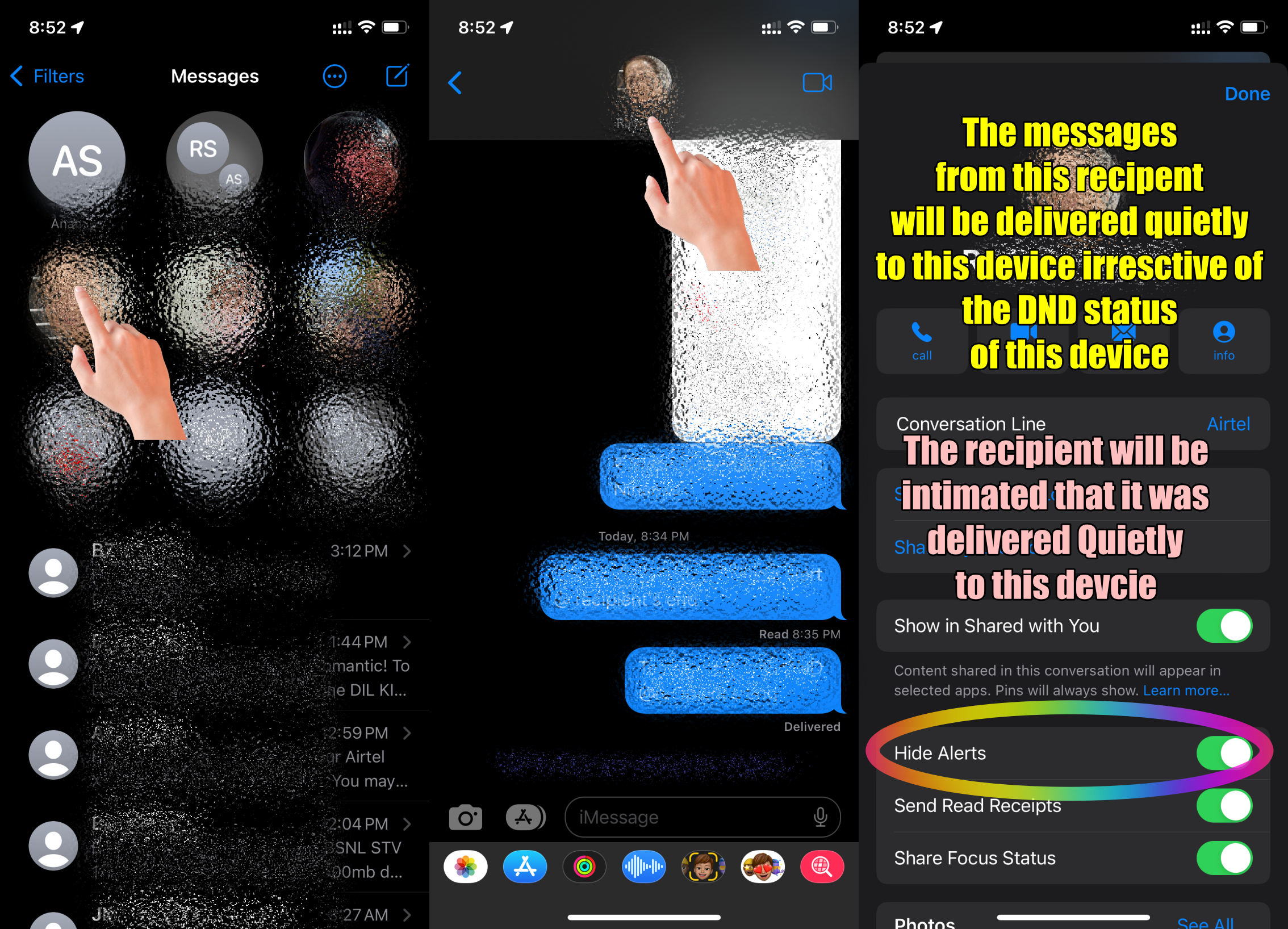
  • Hide Alerts watch the GIF below


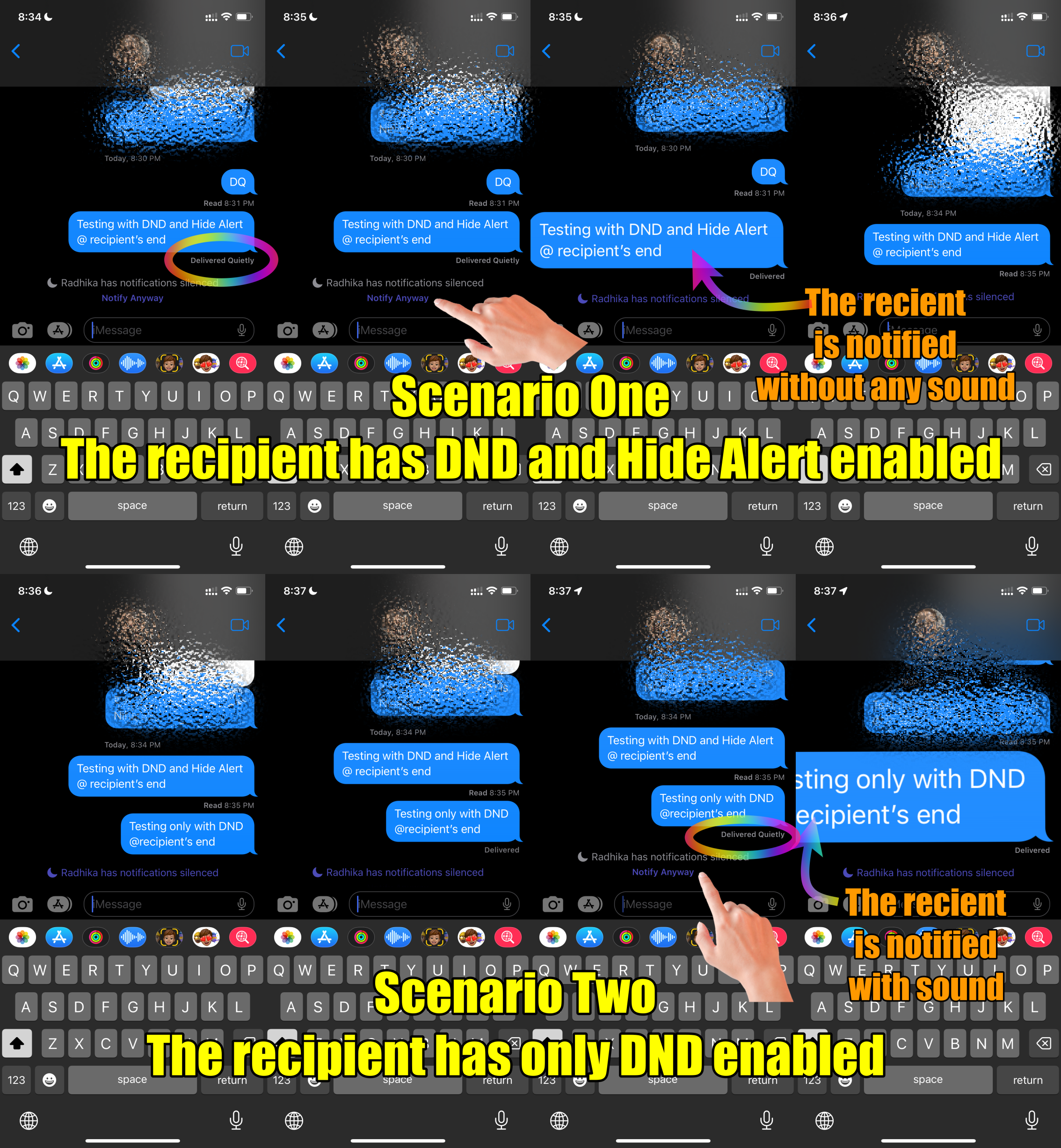
SMS and iMessage notifications settings are not different. However, if the recipient has enabled Hide Alerts for a specific message thread then there won't be any sound irrespective of DND


For Hide Alerts please see the pic 1 below. Follow Pic 2 for two scenarios; DND+Hide Alert and Only DND


Pic 1 (Hide Alerts)

Pic 2 (Two Scenarios) 1. DND + Hide Alert, 2. Only DND


Jul 29, 2024 12:38 PM in response to lobsterghost1

This is absolutely BS! I’ve had both an Apple Watch and an iPhone for approximately 7-10 years and I’ve ALWAYS received notifications simultaneously on BOTH the watch and the phone!

I have had family members and friends test their phones and they are able to get notifications and BOTH their phones and watches when the iPhone BOTH locked and unlocked!

Apple support is giving misinformation, they don’t know what they are talking about and or it’s a software problem/glitch and they won’t admit that the issue exists!

There are toooooooo many iPhone and Apple Watch users making the same complaint for it there to be no validity to our complaints/issues!

Jul 29, 2024 12:40 PM in response to lobsterghost1

This is absolutely BS! I’ve had both an Apple Watch and an iPhone for approximately 7-10 years and I’ve ALWAYS received notifications simultaneously on BOTH the watch and the phone!

I have had family members and friends test their phones and they are able to get notifications and BOTH their phones and watches when the iPhone BOTH locked and unlocked!

Apple support is giving misinformation, they don’t know what they are talking about and or it’s a software problem/glitch and they won’t admit that the issue exists!

There are toooooooo many iPhone and Apple Watch users making the same complaint for it there to be no validity to our complaints/issues!

This thread has been closed by the system or the community team. You may vote for any posts you find helpful, or search the Community for additional answers.

No sound notifications when iPhone is locked

Welcome to Apple Support Community
A forum where Apple customers help each other with their products. Get started with your Apple Account.



