How to turn off App Library on iPhone?

I’ve seen several posts from other users, why isn’t Apple listening. Not everyone wants App Library. I had my apps organized in folders the way I wanted them. Now I only have one Home Screen and a jumble in the App Library. I don’t want to have to reorganize everything again.


[Re-Titled by Moderator]

iPhone 12 mini, iOS 16

Posted on Aug 3, 2023 3:53 AM

Reply
Question marked as Top-ranking reply

Posted on Aug 3, 2023 8:11 AM

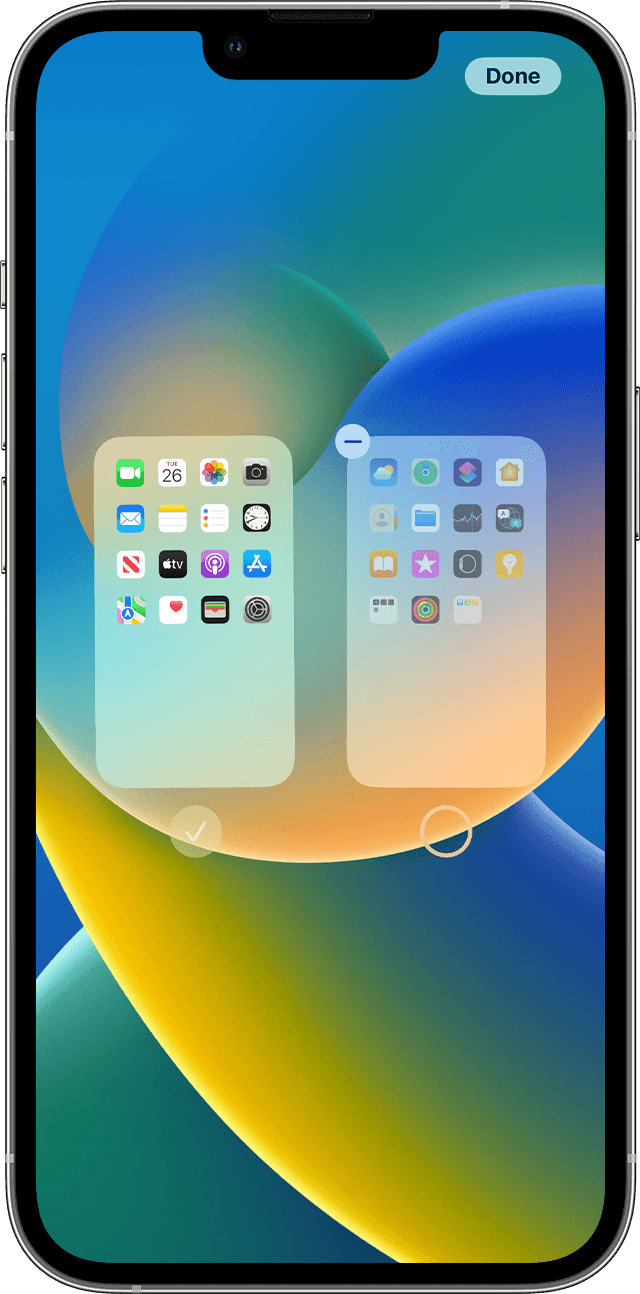
Any chance that you have inadvertently hidden your other Home Screens? See the following from Organize the Home Screen and App Library on your iPhone - Apple Support


With iOS 14 and later, you can hide pages to streamline how your Home Screen looks and add them back whenever you want. Here's how to hide a page:


  1. Touch and hold an empty area on your Home Screen.
  2. Tap the dots near the bottom of your screen.
  3. Tap the circle under the page that you want to hide.
  4. Tap Done. 

To unhide a page, repeat the steps above. 

49 replies
Question marked as Top-ranking reply

Aug 3, 2023 8:11 AM in response to katybetx

Any chance that you have inadvertently hidden your other Home Screens? See the following from Organize the Home Screen and App Library on your iPhone - Apple Support


With iOS 14 and later, you can hide pages to streamline how your Home Screen looks and add them back whenever you want. Here's how to hide a page:


  1. Touch and hold an empty area on your Home Screen.
  2. Tap the dots near the bottom of your screen.
  3. Tap the circle under the page that you want to hide.
  4. Tap Done. 

To unhide a page, repeat the steps above. 

Sep 23, 2024 2:53 PM in response to azjp35

azjp35 wrote:

Could we have the option to disable or remove the App Library from the Home Screen?

Currently, that is not an option. You can let Apple know what you'd like to see here:


Product Feedback - Apple

I’m trying to remove addictive apps like social media from my Home Screen, but they still appear in the App Library, making it harder to avoid them.

Your issue isn't with the App Library. It's with how to delete apps.


Having the App Library doesn't mean you can't delete apps. Either when you are deleting apps from the Home Screen, you're not choosing the correct option (Chose "Delete App", not "Remove from Home Screen) or you have deleting apps restricted in Settings>Screen Time>Content & Privacy Restrictions>iTunes & App Store Purchases>Deleting Apps.


If you chose the wrong option but deletion isn't restricted, you can delet the apps from the App Library (and the phone) by pressing and holding on the icon in App Library.

Sep 30, 2024 12:36 PM in response to Keepitsimplealready

Keepitsimplealready wrote:

iPhone users have taken great lengths of time to organize their phones the way that works best for them. The organization on peoples phones is probably as different as every fingerprint on the planet because no one is the same. Get rid of this the front door, Apple library because it’s a pain in the butt when restarting voiceover it’s in my face and it’s really ticking me off. It’s one of the stupider things Apple‘s done lately. Thanks a bunch.

You clearly didn't read past the first post of this thread. If you had, you'd have seen you are NOT writing anyone from Apple on this user to user only forum and NO, you can't turn off the App Library. It is baked into iOS and there is simply no way to turn it off. Telling only other users to make such a change will get you nothing.

Sep 8, 2024 6:27 AM in response to Rob Lux

Rob Lux wrote:

I have all apps organised on one home screen. Main apps in top rows. Less frequent into folders labelled with names like "Maps", "files", Bookmarks", "Audio", "Photo" and "Never".
It is one screen. For all my apps.
No typing.
No searching
All accessible by one thumb tapping. Nothing moves. It feels like MY home screen.

I have Zero interest in the app library and its conceptual framework for categorising what it thinks I do with the tools on my phone. I do not agree and frankly hate its pointlessness. I want it gone.
Some say "oh just don’t swipe there" I say remove pointless redundancies.

I have no use for widgets, I open the app. I have emptied them out so that useless screen is blank. Less confusion. The App Library is its own confusing jumble that intrudes by accidental gesture adding nothing to the user experience, just let us turn it off.

I'm not sure what you're hoping anyone here can do to change this? This is a user to user only forum, NOT Apple Support.


I just don't get what the issue is. I don't use the App Library as I too have all of my apps organized in folders as I want. It doesn't bother me in the least that the App Library exists as again, I don't have a need to use it. Just don't swipe to it and if you do, swipe back. How hard is that?


Again, we aren't Apple Support and we can't do anything about the App Library. Use this link to tell Apple your thoughts --> Feedback - iPhone - Apple


Apr 9, 2024 6:34 AM in response to _Afgunwarrior_

_Afgunwarrior_ wrote:

No offence my rude friend this is not the matter of swiping to it or not this is the matter of what we want and what we pay for.
EXAMPLE: You want an Ice cream at I cream shop and the ice cream guy will bring for you coffee and say lick it if you like if not don’t then how you will be feeling with that?

That analogy is .... so very wrong. It's more like if I go to an ice cream shop, and they bring me ice cream and a cup of coffee I didn't order. They tell me it's free with the ice cream, but if I don't want it, I don't have to drink it.


If you don't like the App Library, don't use it. And tell Apple you don't like it here:


Product Feedback - Apple


Jul 15, 2024 4:56 PM in response to Community User

Os56 wrote:

+1 let people disable the cards they don’t use ffs. Let people disable „today view” and „app library”. Why we have to swipe into them all the time. Never used it anyway.

You don't have to swipe to them if you don't use them. And posting a "+1" here accomplishes nothing. Apple doesn't read here for feedback or suggestions. You can, however, let them know your preferences here:


Product Feedback - Apple

Oct 12, 2024 1:19 PM in response to IdrisSeabright

Well, you have a point, but every time I would inadvertently swipe to the dreaded App Library page I would shake my head in disgust. The AI that organizes the apps into disorganized chaos should be fired. I would be fine with the app library page if it was a simple alphabetical listing, which you can change to by swiping down, but it defaults to the chaos page. My solution was to create a blank page and add a widget I find useful. That's my warning not to swipe further and raise my BP.

Oct 14, 2024 7:45 AM in response to DaddyBDG

DaddyBDG wrote:

Well, you have a point, but every time I would inadvertently swipe to the dreaded App Library page I would shake my head in disgust. The AI that organizes the apps into disorganized chaos should be fired. I would be fine with the app library page if it was a simple alphabetical listing, which you can change to by swiping down, but it defaults to the chaos page. My solution was to create a blank page and add a widget I find useful. That's my warning not to swipe further and raise my BP.

I find there are so many larger problems in the world to worry about than swiping to a page I don't use on my iPhone. I try not to let my technology control me.

Jun 17, 2024 7:37 AM in response to Erasmix

Erasmix wrote:

They do not care about us, except for how much revenue they can extract.

How are "they" extracting revenue from you using App Library?

Thus they’re not listening when we say we don’t want the App Library.

I suspect most people either like App Library or don't care. And Apple doesn't read here in this user-to-user forum for feedback or suggestions. You can, however, let Apple know your thoughts here:


Product Feedback - Apple


If enough people do, perhaps they will make a change.

They could at least take it off the recently used list of apps


What list are you talking about? App Library is not an app.

This thread has been closed by the system or the community team. You may vote for any posts you find helpful, or search the Community for additional answers.

How to turn off App Library on iPhone?

Welcome to Apple Support Community
A forum where Apple customers help each other with their products. Get started with your Apple Account.