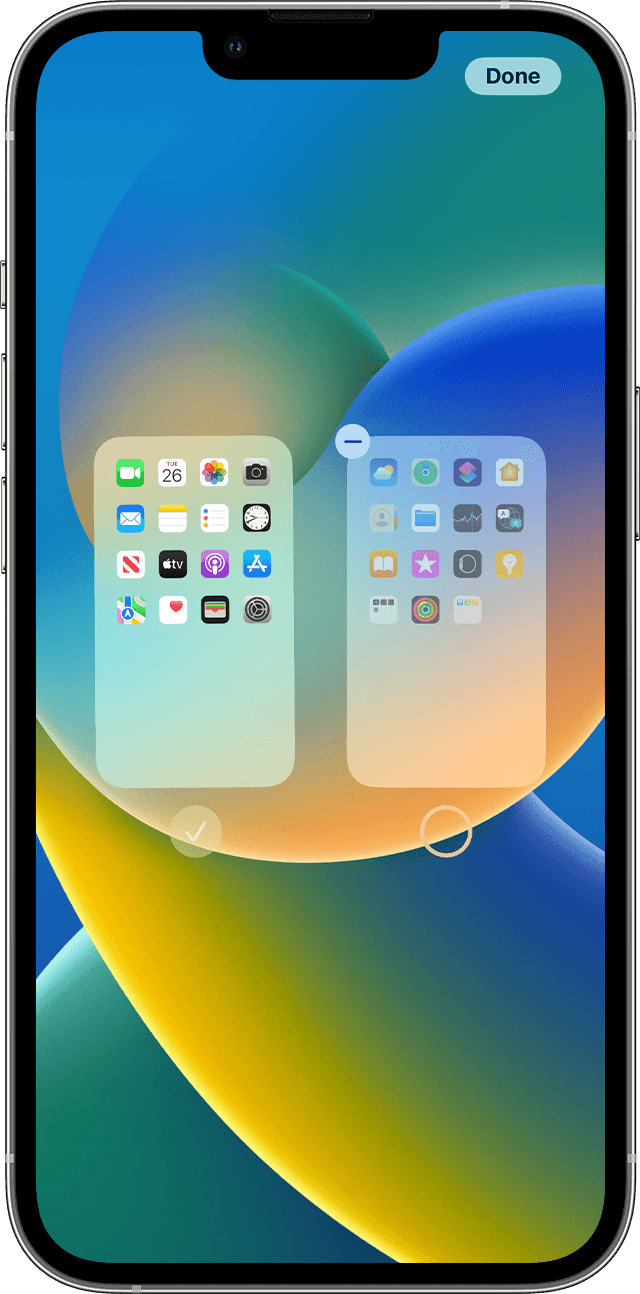
How to turn off App Library on iPhone?

I’ve seen several posts from other users, why isn’t Apple listening. Not everyone wants App Library. I had my apps organized in folders the way I wanted them. Now I only have one Home Screen and a jumble in the App Library. I don’t want to have to reorganize everything again.


[Re-Titled by Moderator]

iPhone 12 mini, iOS 16

Posted on Aug 3, 2023 3:53 AM

Reply
49 replies

Sep 8, 2024 5:33 AM in response to katybetx

I have all apps organised on one home screen. Main apps in top rows. Less frequent into folders labelled with names like "Maps", "files", Bookmarks", "Audio", "Photo" and "Never".

It is one screen. For all my apps.

No typing.

No searching

All accessible by one thumb tapping. Nothing moves. It feels like MY home screen.


I have Zero interest in the app library and its conceptual framework for categorising what it thinks I do with the tools on my phone. I do not agree and frankly hate its pointlessness. I want it gone.

Some say "oh just don’t swipe there" I say remove pointless redundancies.


I have no use for widgets, I open the app. I have emptied them out so that useless screen is blank. Less confusion. The App Library is its own confusing jumble that intrudes by accidental gesture adding nothing to the user experience, just let us turn it off.

Sep 10, 2024 7:28 AM in response to Lana1000

Lana1000 wrote:

This! I’m trying to create a focus Home Screen where my kids can only access the app I allow them to but all that work diminishes because they can still access the other apps via the bloody App Library!!! Get rid of it! I’ve never used it!!!

If you only want them to be able to use one app, use Guided Access:


Use Guided Access with iPhone, iPad, and iPod touch - Apple Support


If you want to restrict apps generall, use the parental controls Apple proivdes. They take a bit of learning but they can be very effective. You can delete all the apps you don't want child to use then restrict their ability to download apps.


Use Screen Time on your iPhone or iPad - Apple Support


Sep 30, 2024 12:25 PM in response to katybetx

iPhone users have taken great lengths of time to organize their phones the way that works best for them. The organization on peoples phones is probably as different as every fingerprint on the planet because no one is the same. Get rid of this the front door, Apple library because it’s a pain in the butt when restarting voiceover it’s in my face and it’s really ticking me off. It’s one of the stupider things Apple‘s done lately. Thanks a bunch.

Sep 30, 2024 12:46 PM in response to Keepitsimplealready

Keepitsimplealready wrote:

iPhone users have taken great lengths of time to organize their phones the way that works best for them.

What does that have to do with the App Library? Please explain.


The App Library has zero effect on your preferred method of organizing apps. The only thing it does is add a screen a the end of all your screens, one that you never have to look at or interact with if you choose not to.

Sep 30, 2024 12:55 PM in response to IdrisSeabright

IdrisSeabright wrote:


Keepitsimplealready wrote:

iPhone users have taken great lengths of time to organize their phones the way that works best for them.
What does that have to do with the App Library? Please explain.

The App Library has zero effect on your preferred method of organizing apps. The only thing it does is add a screen a the end of all your screens, one that you never have to look at or interact with if you choose not to.

I don't get it either. I have a few hundred apps, all organized in folders, exactly as I want them. And I never ever ever seem to bump into the App Library, but if I do, all I have to do is swipe back one page to get to my apps as I organized them. I don't get this irrational opposition to something no one ever has to use, if they don't want to use it?

Sep 30, 2024 1:21 PM in response to lobsterghost1

lobsterghost1 wrote:

I don't get it either. I have a few hundred apps, all organized in folders, exactly as I want them. And I never ever ever seem to bump into the App Library, but if I do, all I have to do is swipe back one page to get to my apps as I organized them. I don't get this irrational opposition to something no one ever has to use, if they don't want to use it?

I, on the other hand, like it a lot. I'm way too lazy to put a couple of hundred apps in folders (too lazy, apparently, to delete them, too). I have two screens with widgets and apps I use all the time. For everything else, I either look in the App Library or just search for it.

Oct 1, 2024 4:16 PM in response to Etual88

Etual88 wrote:

One day all of my app folders disappeared and now I am presented with a “smart” App Library which ruined everything. I cannot find any single app! Users remember where everything is located, I don’t need you to rearrange things based on what you think is best. Please add a way to turn off this feature.

This has nothing to do with the App Library. The App Library is 100% NOT capable of removing your app folders. If they disappeared, something else happened. And just like so many other posters, you clearly didn't read past the first post. Had you done so, you'd know you aren't speaking with anyone from Apple and this is a user to user ONLY forum. We have ability to turn anything off.

This thread has been closed by the system or the community team. You may vote for any posts you find helpful, or search the Community for additional answers.

How to turn off App Library on iPhone?

Welcome to Apple Support Community
A forum where Apple customers help each other with their products. Get started with your Apple Account.