Powerbeats Pro sound in left ear intermittently does not work. Will connect and is recognized when in use, just not sound.

It was happening every so often, but now more than previously. Other than sound, you can increase and decrease volume, stop and play music from the button, and when you take it off it turns off like normal. There is just no sound coming from it. If I place it back into the charging case it charges fine, and if I take it out sometimes it seems to work without any issue.

Beats

Posted on Aug 20, 2023 3:53 PM

Reply
Question marked as Top-ranking reply

Posted on Aug 21, 2023 4:29 PM

Hello Missmae104,


It looks like you joined the Apple Support Communities from an excellent starting point; Sound troubleshooting – Beats headphones and earphones - Apple Support. Did you get a chance to review the information and complete the steps offered on that page? If not, please start there.


If you have and you still experience the issue, you may want to try to reset the Beats to see if this helps to correct the issue. Here are some steps to help: Reset your Beats earphones - Apple Support.


Reset Powerbeats Pro

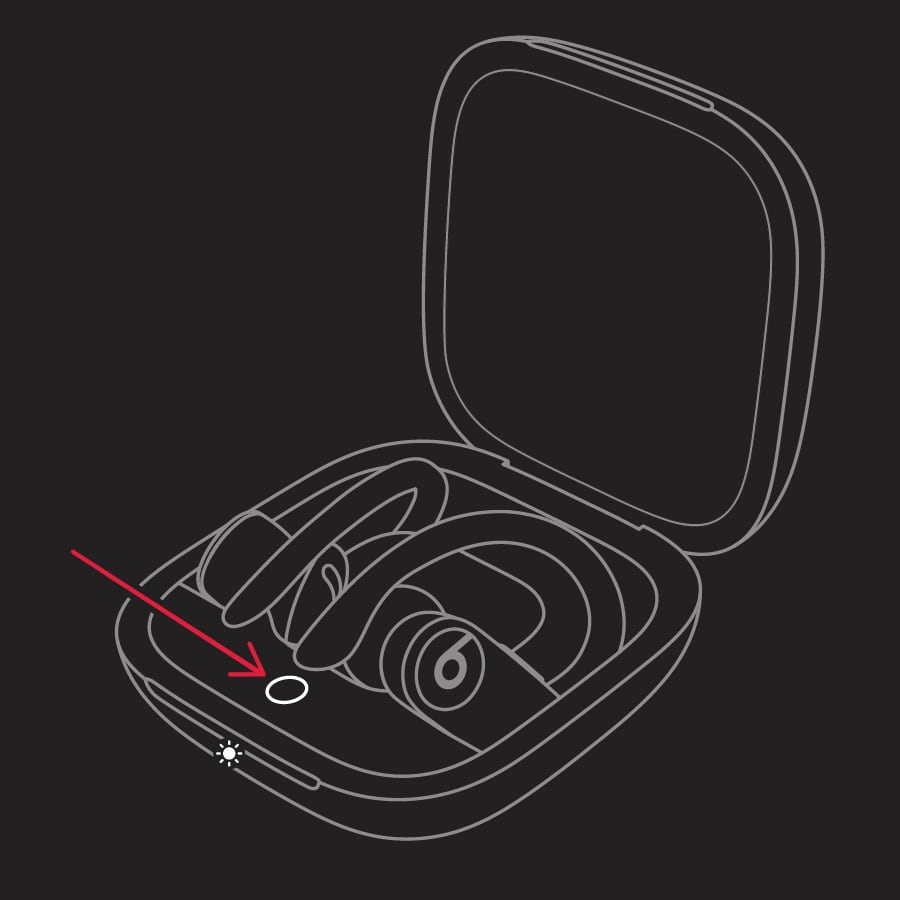
1. Place both earbuds in the case. Leave the case open.
2. Press and hold the system button on the case for 15 seconds or until the LED indicator light flashes red and white.
3. Powerbeats Pro indicator light
4. Release the system button.

The LED indicator light will continue to flash white, which means that you can pair your Powerbeats Pro with your iPhone, Mac, Android device, or other device again.


We hope this information helps you out.


Cheers!

3 replies
Question marked as Top-ranking reply

Aug 21, 2023 4:29 PM in response to Missmae104

Hello Missmae104,


It looks like you joined the Apple Support Communities from an excellent starting point; Sound troubleshooting – Beats headphones and earphones - Apple Support. Did you get a chance to review the information and complete the steps offered on that page? If not, please start there.


If you have and you still experience the issue, you may want to try to reset the Beats to see if this helps to correct the issue. Here are some steps to help: Reset your Beats earphones - Apple Support.


Reset Powerbeats Pro

1. Place both earbuds in the case. Leave the case open.
2. Press and hold the system button on the case for 15 seconds or until the LED indicator light flashes red and white.
3. Powerbeats Pro indicator light
4. Release the system button.

The LED indicator light will continue to flash white, which means that you can pair your Powerbeats Pro with your iPhone, Mac, Android device, or other device again.


We hope this information helps you out.


Cheers!

This thread has been closed by the system or the community team. You may vote for any posts you find helpful, or search the Community for additional answers.

Powerbeats Pro sound in left ear intermittently does not work. Will connect and is recognized when in use, just not sound.

Welcome to Apple Support Community
A forum where Apple customers help each other with their products. Get started with your Apple Account.