Changing iMessage from Australia to Ireland

I have recently moved to Ireland from Australia and can't seem to get my phone to send iMessages on Irish numbers. I have changed the region to Ireland and turned imessage on and off. I have tried to remove the Australian number but it's still not working. I still have the Australian number as I still need access to it.


Does anyone know how to make the iMessages work on my Irish number?

iPhone 14 Pro Max

Posted on Sep 3, 2023 2:23 PM

Reply
Question marked as Top-ranking reply

Posted on Sep 4, 2023 10:43 AM

Hi BettyD33,


It seems like you need to remove your old phone number from iMessage and set up your correct number, is that right? If so, please check out the information outlined in the following link, which will guide you through that process: Add or remove your phone number in Messages or FaceTime


Set up your phone number

On your iPhone:

1. Go to Settings > Messages and make sure that iMessage is on. You might need to wait a moment for it to activate.
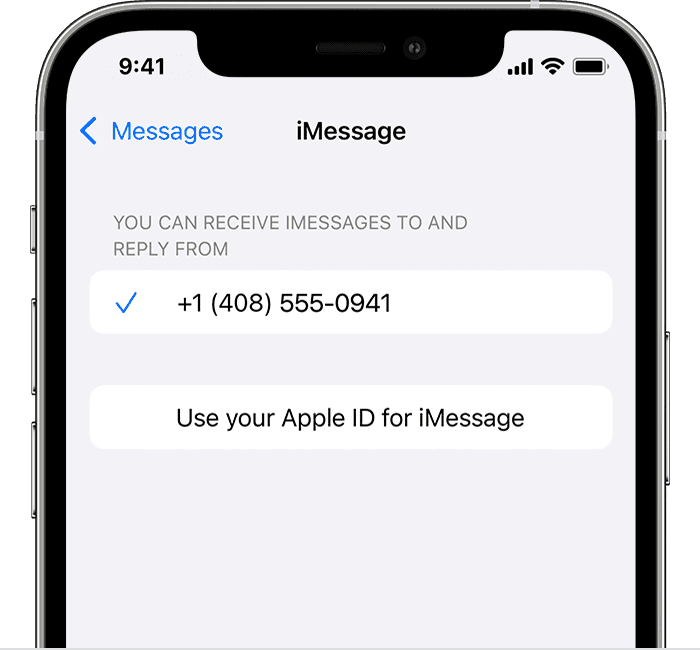
2. Tap Send & Receive. If you see “Use your Apple ID for iMessage,” tap it and sign in with the same Apple ID that you use on your Mac, iPad, and iPod touch.

iPhone showing how to select iMessage settings

3. In the "You can receive iMessages to and Reply From" section, make sure that your phone number and Apple ID are selected.
4. Go to Settings > FaceTime and make sure that your phone number and Apple ID are selected in the "You can be reached by FaceTime at" section.

On your other devices, you can now turn on the phone number that you just set up:
* Turn on your phone number for your Mac
* Turn on your phone number for your iPad or iPod touch

If you use this feature and share your Apple ID with someone, you can't prevent them from seeing your conversations. Instead of using the same Apple ID as someone else, set up Family Sharing.

Remove your phone number

If you don't want calls or messages for your iPhone on your iPad, iPod touch, or Mac, you can remove your phone number. There are two ways to do this:

* On your iPhone, go to Settings > Messages > Send & Receive. Select your Apple ID at the bottom of the screen and tap Sign Out. Then go to Settings > FaceTime, select your Apple ID and tap Sign Out.
* If the phone number that you want to remove belongs to an iPhone that you can't access, change your Apple ID password. This removes all phone numbers from your iPad, iPod touch, and Mac. Calls or messages for the removed numbers won't appear on those devices anymore.

If you have questions, contact Apple Support.


Thanks!


1 reply
Question marked as Top-ranking reply

Sep 4, 2023 10:43 AM in response to BettyD33

Hi BettyD33,


It seems like you need to remove your old phone number from iMessage and set up your correct number, is that right? If so, please check out the information outlined in the following link, which will guide you through that process: Add or remove your phone number in Messages or FaceTime


Set up your phone number

On your iPhone:

1. Go to Settings > Messages and make sure that iMessage is on. You might need to wait a moment for it to activate.
2. Tap Send & Receive. If you see “Use your Apple ID for iMessage,” tap it and sign in with the same Apple ID that you use on your Mac, iPad, and iPod touch.

iPhone showing how to select iMessage settings

3. In the "You can receive iMessages to and Reply From" section, make sure that your phone number and Apple ID are selected.
4. Go to Settings > FaceTime and make sure that your phone number and Apple ID are selected in the "You can be reached by FaceTime at" section.

On your other devices, you can now turn on the phone number that you just set up:
* Turn on your phone number for your Mac
* Turn on your phone number for your iPad or iPod touch

If you use this feature and share your Apple ID with someone, you can't prevent them from seeing your conversations. Instead of using the same Apple ID as someone else, set up Family Sharing.

Remove your phone number

If you don't want calls or messages for your iPhone on your iPad, iPod touch, or Mac, you can remove your phone number. There are two ways to do this:

* On your iPhone, go to Settings > Messages > Send & Receive. Select your Apple ID at the bottom of the screen and tap Sign Out. Then go to Settings > FaceTime, select your Apple ID and tap Sign Out.
* If the phone number that you want to remove belongs to an iPhone that you can't access, change your Apple ID password. This removes all phone numbers from your iPad, iPod touch, and Mac. Calls or messages for the removed numbers won't appear on those devices anymore.

If you have questions, contact Apple Support.


Thanks!


This thread has been closed by the system or the community team. You may vote for any posts you find helpful, or search the Community for additional answers.

Changing iMessage from Australia to Ireland

Welcome to Apple Support Community
A forum where Apple customers help each other with their products. Get started with your Apple Account.