I got an error that says my imessage is not signed in after i restored my new phone with old back up

I got a replacement device and when restoring from a backup my software had to be updated. After the update was complete and my phone was restored its saying im not signed in to my imessage. When I go into my imessage in settings my number isn't linked. I'm not sure if it will just take time for this to happen or if something is wrong.

iPhone 12 Pro Max

Posted on Sep 12, 2023 11:48 AM

Reply
Question marked as Top-ranking reply

Posted on Sep 13, 2023 10:41 AM

Hi there albertina81,


If you are having issues using iMessage with your phone number after restoring your replacement device from backup, follow these steps from Add or remove your phone number in Messages or FaceTime since they can resolve issues like this:

If you can't see or select your number in Messages or FaceTime
1. Make sure that you're using the latest software for your Mac or iOS device
2. Make sure that you correctly followed the iPhone steps to set up your phone number. You should be using the same Apple ID on all of your devices.
3. In the “You can be reached” section of Messages and FaceTime settings, make sure that there are checkmarks beside your phone number and Apple ID:
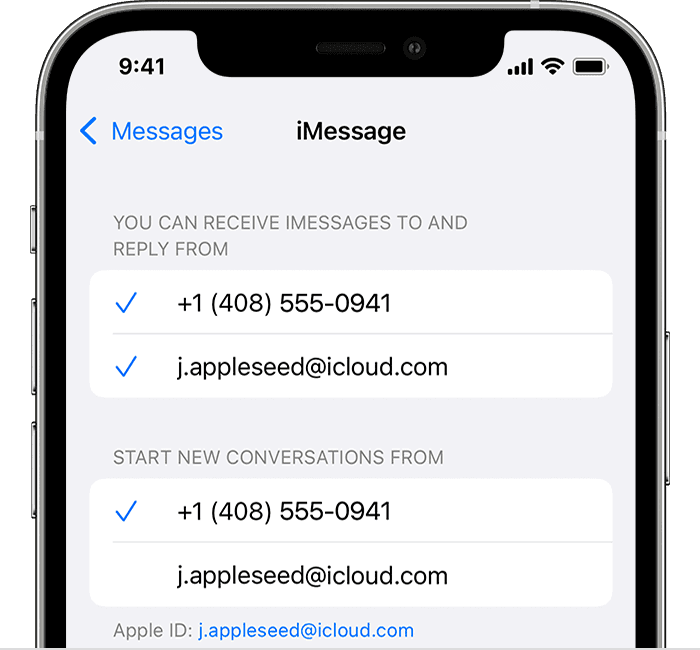
iPhone showing how to choose where you can be reached
If your phone number is unchecked and you can't select it, or you have some other issue, follow these steps:
1. On your Mac:
* In Messages, choose Messages > Settings, then click iMessage. Click Sign Out.
* In FaceTime, choose FaceTime > Settings, then click General. Click Sign Out.
2. On your iPhone, iPad, and iPod touch:
* Go to Settings > Messages > Send & Receive. Tap your Apple ID, then tap Sign Out.
* Go to Settings > FaceTime. Tap your Apple ID, then tap Sign Out.
3. On your iPhone:
* Go back to Settings > Messages and make sure that iMessage is turned on.
* Tap Send & Receive, then choose “Use your Apple ID for iMessage” and sign in with your Apple ID.
4. Using the same Apple ID, sign back in to Messages and FaceTime on your other devices. 

If you still need help, change your Apple ID password and repeat the setup steps. If that doesn't work, contact Apple Support.


If something else is occurring or you are getting an error message of some kind, please provide more details so that we can continue to assist.


Cheers!

Similar questions

1 reply
Question marked as Top-ranking reply

Sep 13, 2023 10:41 AM in response to albertina81

Hi there albertina81,


If you are having issues using iMessage with your phone number after restoring your replacement device from backup, follow these steps from Add or remove your phone number in Messages or FaceTime since they can resolve issues like this:

If you can't see or select your number in Messages or FaceTime
1. Make sure that you're using the latest software for your Mac or iOS device
2. Make sure that you correctly followed the iPhone steps to set up your phone number. You should be using the same Apple ID on all of your devices.
3. In the “You can be reached” section of Messages and FaceTime settings, make sure that there are checkmarks beside your phone number and Apple ID:
iPhone showing how to choose where you can be reached
If your phone number is unchecked and you can't select it, or you have some other issue, follow these steps:
1. On your Mac:
* In Messages, choose Messages > Settings, then click iMessage. Click Sign Out.
* In FaceTime, choose FaceTime > Settings, then click General. Click Sign Out.
2. On your iPhone, iPad, and iPod touch:
* Go to Settings > Messages > Send & Receive. Tap your Apple ID, then tap Sign Out.
* Go to Settings > FaceTime. Tap your Apple ID, then tap Sign Out.
3. On your iPhone:
* Go back to Settings > Messages and make sure that iMessage is turned on.
* Tap Send & Receive, then choose “Use your Apple ID for iMessage” and sign in with your Apple ID.
4. Using the same Apple ID, sign back in to Messages and FaceTime on your other devices. 

If you still need help, change your Apple ID password and repeat the setup steps. If that doesn't work, contact Apple Support.


If something else is occurring or you are getting an error message of some kind, please provide more details so that we can continue to assist.


Cheers!

This thread has been closed by the system or the community team. You may vote for any posts you find helpful, or search the Community for additional answers.

I got an error that says my imessage is not signed in after i restored my new phone with old back up

Welcome to Apple Support Community
A forum where Apple customers help each other with their products. Get started with your Apple Account.